Section 22
Sales Comparison Approach
Appendix F-1, page 214
The Sales Comparison Approach section captures a market analysis of the subject property via a grid of comparable transactions (comps) and their characteristics. The "sales grid" (or "sales comparison grid") displays a summary of the evidence in support of the appraiser's opinion of value in the form of market-driven adjustments for differences in characteristics. The section provides space for commentary and exhibits.
Due to the expandable nature of the sales comparison grid:
- Do not represent the same information more than once in the sales grid.
- Do not duplicate line items and/or their adjustments.
The Sales Comparison Approach displays when the field Sales Comparison Approach Developed by Appraiser is Yes, and the "When to Include" column in this chapter reflects this.
Sales Comparison Approach Developed by Appraiser
| Report Field ID | Report Label | When to Include | Allowable Answers / Format | Definition / Additional Guidance |
|---|---|---|---|---|
| Not on Report | This is an appraiser input that does not display | Always required | Yes | No | Sales Comparison Approach Developed by Appraiser - Yes (The Sales Comparison Approach section is included) - No (The Sales Comparison Approach section is not included) Note: Sales Comparison Approach Developed by Appraiser does not display. |
The Sales Comparison Approach section may include some or all of the following subsections ("gray bars"):
- General Information (always displays)
- Project Information (if applicable, or if relevant)
- Site (always displays)
- Water Frontage with Private Access (if applicable)
- Dwelling(s) (always displays)
- Energy Efficient and Green Features (if relevant)
- Unit(s) (always displays)
- Quality and Condition (always displays)
- Property Amenities (if relevant)
- Vehicle Storage (always displays)
- Outbuilding (if applicable)
- Summary (always displays)
- Reconciliation of Sales Comparison Approach (always displays)
- Sales Comparison Map (always displays)
- Additional Properties Analyzed Not Used (if relevant)
- Sales Comparison Approach Exhibits (always displays)
Key Concepts#
Subject and Comparable Information#
Subject Property Information in the Sales Comparison Grid#
Information previously entered for the subject property populates from the applicable section to the sales comparison grid and does not have to be re-entered.
- The "Origin of Subject Property Information" column in this chapter shows the original location of the information.
- Reference the original section for detailed definitions of the allowable answers.
There is other information that the appraiser must input directly into the sales comparison grid.
Fields that are Not Applicable in the Sales Comparison Grid#
If a specific field in the sales grid is not applicable for the subject or a given comparable, the cell is either grayed out or displays a dash (--).
Grayed Out Cells#
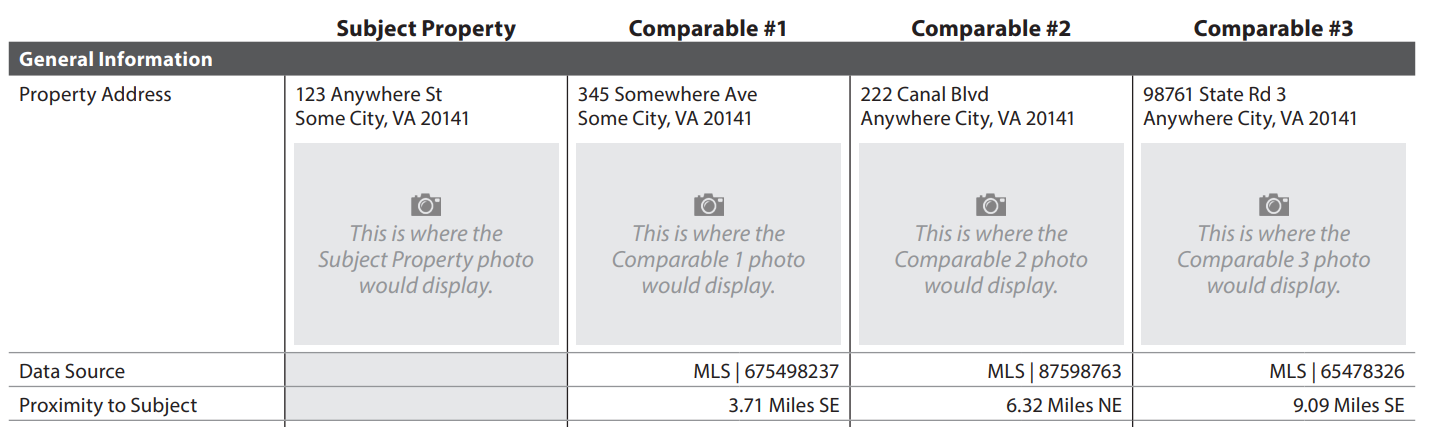
Information that is never applicable for the subject property or comparables is grayed out in the sales comparison grid.
Examples:
- Proximity to Subject, Same Builder as Subject, and Sale Date are not applicable for the subject property and are always grayed out.
- Same Builder as Subject is not adjustable, so the adjustment cell is always grayed out.

Cells Displaying a Dash#
Information that is not applicable for the appraisal displays a dash (--) in the sales comparison grid.
Examples:
- If there is no sales contract, or Sales Contract Analyzed is No, the following cells display a dash for the subject property to show that the information is not applicable.
- Contract Price (if the row is included in the sales comparison grid)
- Sales Concessions
- Contract Date

- If the subject is in a project and the comparable is not, the cell(s) display a dash to show that project information is not applicable for the comparable.
How Rows Display in the Sales Comparison Grid#
There are three ways that rows display in the sales comparison grid depending on characteristics of the subject and / or comparables.
- Rows that always display (e.g., Property Address, Year Built, and Attached/Detached), or
- Rows that conditionally display if applicable based on property characteristics (e.g., Project Information, Water Frontage, and ADU), or
- Rows that may display if relevant to support adjustments, analysis, and conclusions
Examples:
| Report Label | Row Always Displays | Row Displays if Applicable (Conditionally Displays) |
Row Displays if Relevant (May Display) |
|---|---|---|---|
| Year Built | √ | ||
| Quality (Interior) | √ | ||
| Condition (Interior) | √ | ||
| Hazard Zone | When the subject or any comparable is in a Hazard Zone | ||
| Project Name | Same Project as Subject | When the subject or any comparable is in a condo, co-op, or condop | ||
| Townhouse End Unit | √ | ||
| Cooling | √ |
For a full list, including whether the row is adjustable, see Appendix F-1: URAR Reference Guide Supplement - Summary of Rows in Comparable Grids.
General Guidance on Rows that May Display#
Some rows display on the sales comparison grid if relevant:
- To make an adjustment on a specific characteristic, or
- In support of an overall or rollup adjustment, or
- To report meaningful attributes, or
- To support conclusions, scope of work, or policy.
Notes:
- These rows must be brought into the sales comparison grid when there is relevant and meaningful information for the subject and all comparables, and adding the row leads to credible results. Not reporting a meaningful attribute can be misleading by omission.
- These rows are indicated in this chapter with the Report Label in blue italics, and "If relevant" in the "When Row Displays" column.
Additional Rows#
One or more additional rows may be added to the following relevant subsections to provide context and impactful details. These rows must only be used when atypical characteristics are observed. Do not add rows for information that is already available as a predefined row. Choose the applicable subsection for the characteristic.
- General Information
- Site
- Dwelling(s)
- Unit(s)
- Vehicle Storage
- Outbuilding
Adjustments#
Adjustments in the sales comparison grid fall into one of two categories:
- An overall or rollup adjustment that is supported by non-adjustable rows. Example:

- A line-item adjustment. Example:

For a full list of rows in the sales grid and whether each is adjustable, see Appendix F-1: URAR Reference Guide Supplement - Summary of Rows in Comparable Grids.
If a feature or characteristic of the subject property differs from a feature or characteristic of a comparable property and there is no market support for an adjustment, enter a $0 in the adjustment line. The zero indicates that the appraiser has considered the difference and determined that there is no measurable impact. This includes information that is not applicable ("grayed out") for the subject, such as Financing Type and Sale Date.

When the features for the subject and comparable sale(s) are the same and no adjustment is warranted, leave the field blank - do not enter or default to zero.

General Information#
The General Information subsection always displays on the sales comparison grid.
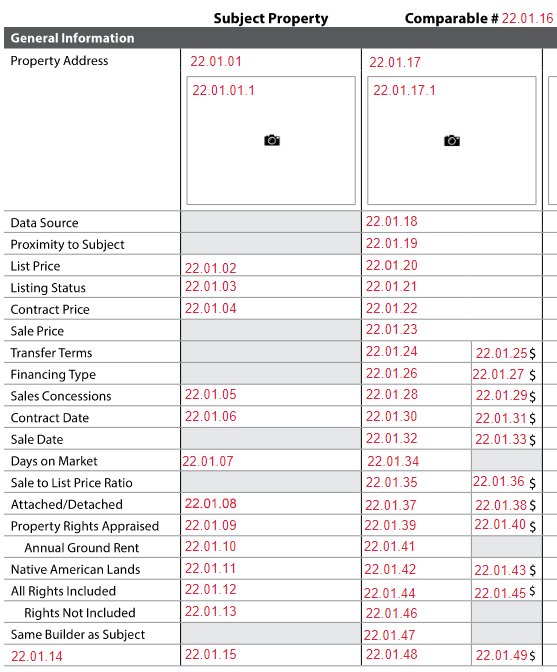
Sales Comparison Approach: General Information
| Report Field ID | Report Label | When Row Displays | When to Include for each Comparable | Allowable Answers / Format | Origin of Subject Property Information | Adjustable Row |
Definition / Additional Guidance |
|---|---|---|---|---|---|---|---|
| 22.01.16 | Comparable # | Always | Always required | 1, 2, 3 … | Sales Comparable # is only applicable to comparables | No | Sales Comparable # |
| 22.01.01 22.01.17 |
Property Address | Always | Always required | Free-form, in format that conforms to address standards in USPS Publication 28, Postal Addressing Standards | Subject Property - Property Address 3.000 |
No | |
| See IGuide | Property Address | Always | Always required | Photo | No | Property Photo Photo of the property, typically the front. Note: Sales comparable photos are required and redisplay in Sales Comparison Approach Exhibits with the Comparable #. |
|
| Not on Report | This is an appraiser input that does not display in the sales grid | N/A | Always required | Number | Subject Property - Number of ADUs on Subject Property |
No | Number of ADUs on Property Notes: - Enter zero (0) if there are no ADUs on the property. - ADUs may be in the dwelling, attached to the dwelling, or associated with a separate building (outbuilding). |
| 22.01.18 | Data Source | Always | Always required | Choose one or more allowable answers from the Definition / Additional Guidance column | Sales Comparable Data Source is only applicable to comparables | No | Sales Comparable Data Source - Assessor Record - Builder or Developer - Condominium Questionnaire - Cooperative Board - Cooperative Questionnaire - Data Aggregator - Exterior Inspection - HOA - Interior Inspection - Land Survey - MLS - Previous Appraisal File - Property Management Company - Property Owner - Real Estate Agent - Other (Describe) |
| 22.01.18 | Data Source | Always | Required when Sales Comparable Data Source is MLS, or if applicable for other data sources | Free-form | Data Source Identifier is only applicable to comparables | No | Data Source Identifier: A unique number or identifier assigned to the sales comparable by the data source. Notes: - If Sales Comparable Data Source is MLS, the MLS number is required. - If a data source has an identifier, it must be reported on the URAR. |
| 22.01.19 | Proximity to Subject | Always | Always required | Number of miles or kilometers | Proximity to Subject is only applicable to comparables | No | Proximity to Subject Note: Can be 0, such as when the comparable is in the same building as the subject property or an adjacent property. |
| 22.01.19 | Proximity to Subject | Always | Required if Proximity to Subject is not 0 | Choose an allowable answer from the Definition / Additional Guidance column | Direction from Subject to Comparable is only applicable to comparables | No | Direction from Subject to Comparable - E - N - NE - NW - S - SE - SW - W |
| 22.01.02 22.01.20 |
List Price | Always | If available | Dollar amount | Subject Listing Information - List Price 19.009 for most recent listing |
No | List Price: The last known list price for the transaction. |
| 22.01.03 22.01.21 |
Listing Status | Always | Always required | Choose an allowable answer from the Definition / Additional Guidance column | Subject Listing Information - Listing Status 19.002 for most recent listing |
No | - Active - Off Market (previously in MLS) - Pending - Settled Sale (applicable to comparables only) |
| 22.01.22 | Contract Price | When the Assignment Reason = "Purchase" or "Construction" or "Short Sale" for the Subject, or if relevant | Required when Listing Status is Pending, and the row is included in the sales comparison grid | Yes | No | Contract Price Unknown is only applicable to comparables | No | Contract Price Unknown - Yes (the comparable has been included in the sales grid, but the contract price is unknown. In this case, "Unknown" displays) - No (Contract Price is known and must be provided) |
| 22.01.04 22.01.22 |
Contract Price | When the Assignment Reason = "Purchase" or "Construction" or "Short Sale" for the Subject, or if relevant | Required if Contract Price Unknown is No | Dollar amount | Sales Contract - Contract Price 20.004 |
No | |
| 22.01.23 | Sale Price | Always | Required if Listing Status is Settled Sale | Dollar amount | Sale Price is only applicable to comparables | No | |
| 22.01.24 | Transfer Terms | Always | Required if Listing Status is Settled Sale | Choose an allowable answer from the Definition / Additional Guidance column | Transfer Terms is only applicable to comparables | Yes 22.01.25 |
- Court Ordered Non-Foreclosure Sale - Estate Sale - Foreclosure Sale - Land Sale - Pre-Subdivision Sale - Relocation Sale - REO Sale - Sale Between Related Parties - Short Sale - Typically Motivated (e.g., Arm's Length sale) - Other (Describe) Note: If more than one Transfer Term applies, select the most applicable one and provide details in Reconciliation of Sales Comparison Approach (22.16.01). |
| 22.01.26 | Financing Type | If relevant | Required if Listing Status is Settled Sale, and the row is included in the sales comparison grid | Yes | No | Transaction Executed Without Financing is only applicable to comparables |
Yes 22.01.27 |
Transaction Executed Without Financing - If Yes, "Cash" displays for Financing Type |
| 22.01.26 | Financing Type | If relevant | Required when Transaction Executed Without Financing is No, and the row is included in the sales comparison grid | Choose an allowable answer from Definition / Additional Guidance column | Primary Financing Type is only applicable to comparables | Yes 22.01.27 |
Primary Financing Type - Conventional (includes Jumbo and portfolio lending) - FHA - Private - USDA - VA - Other (Describe) |
| 22.01.05 22.01.28 |
Sales Concessions | Always | Required if Listing Status is Settled Sale | Yes | No | Sales Contract - Known Sales Concessions 20.008 |
Yes 22.01.29 |
Known Sales Concessions: Indicates whether there are sales concessions. - Yes (indicate whether the amount is known) - No (the appraiser is not aware of any sales concessions, and "No" displays) |
| 22.01.05 22.01.28 |
Sales Concessions | Always | Required if Known Sales Concessions is Yes | Yes | No | Sales Contract - Sales Concession Amount Known 20.009 |
Yes 22.01.29 |
Sales Concession Amount Known: Indicates whether the appraiser is aware of the specific sales concession amount. - Yes (provide the amount) - No ("Unknown" displays) |
| 22.01.05 22.01.28 |
Sales Concessions | Always | Required if Sales Concessions Amount Known is Yes | Dollar amount | Sales Contract - Total Sales Concessions 20.009 |
Yes 22.01.29 |
Total Sales Concessions: The sales concession amount known to the appraiser. |
| 22.01.30 | Contract Date | Always | Required if Listing Status is Pending or Settled Sale | Yes | No | Contract Date Unknown is only applicable to comparables | Yes 22.01.31 |
Contract Date Unknown - Yes (the comp has been included in the sales grid, but the contract date is unknown. In this case, "Unknown" displays) - No (Contract Date must be provided) |
| 22.01.06 22.01.30 |
Contract Date | Always | Required if Contract Date Unknown is No | mm/dd/yyyy | Sales Contract - Contract Date 20.005 |
Yes 22.01.31 |
Contract Date: The date that a fully executed contract was signed by all parties. Note: If Contract Date is known, use this row to make time adjustments based on changes in the market. |
| 22.01.32 | Sale Date | Always | Required if Listing Status is Settled Sale | mm/dd/yyyy | Sale Date is only applicable to comparables | Yes 22.01.33 |
Note: If Contract Date is unknown, use this row to make time adjustments based on changes in the market. |
| 22.01.07 22.01.34 |
Days on Market | Always | Always required | Number | Subject Listing Information - Days on Market 19.007 for the most recent listing |
No | Days on Market for the most recent listing. Notes: - Enter zero (0) for properties that were not listed on the open market through a publicly available source (e.g., Listing Type is FSBO (For Sale by Owner)). - Enter 1 for properties that were listed on the market and placed under contract on the same day. - For all other scenarios, enter the actual days on market that apply to the listing. |
| 22.01.35 | Sale to List Price Ratio | If relevant | Required if Listing Status is not Settled Sale, and the row is included in the sales comparison grid | Percent | Sale to List Price Ratio is only applicable to comparables | Yes 22.01.36 |
A ratio applied to a comparable listing that represents the difference between the list price and an anticipated sale price for the comparable. Examples: - $100,000 List Price with a sale price of $102,000 results in a Sale to List Price Ratio of 102%. - $100,000 List Price with a sale price of $98,000 results in a Sale to List Price Ratio of 98%. |
| 22.01.08 22.01.37 |
Attached/Detached | Always | Always required | Attached or Detached | Subject Property - Attachment Type 3.004 |
Yes 22.01.38 |
|
| 22.01.09 22.01.39 |
Property Rights Appraised | When the subject or any comparable is not in a cooperative | Required if the comparable is not in a cooperative | Choose an allowable answer from the Definition / Additional Guidance column | Subject Property - Property Rights Appraised 3.019 |
Yes 22.01.40 |
- Fee Simple - Leasehold - Other (Describe) Adjustments, if any, for differences between Fee Simple and Leasehold, or for differences in Ground Rent Annual Amount are done in this row. |
| 22.01.10 22.01.41 |
Annual Ground Rent | If relevant | Required if Property Rights Appraised is Leasehold, Site Owned in Common is No, and the row is included in the sales comparison grid | Dollar amount | Subject Property - Ground Rent Annual Amount 3.022 |
No | This row is included only to report the ground rents for the subject and comparables. Any adjustment for Ground Rent Annual Amount is done in the Property Rights Appraised row (22.01.40). |
| 22.01.11 22.01.42 |
Native American Lands | If relevant | Required when the row is included in the sales comparison grid | Yes | No | Subject Property - Property on Native American Lands 3.014 |
Yes 22.01.43 |
Property on Native American Lands |
| 22.01.11 22.01.42 |
Native American Lands | If relevant | Required if Property on Native American Lands is Yes | Choose an allowable answer from the Definition / Additional Guidance column | Subject Property - Native American Lands Type 3.021 |
Yes 22.01.43 |
- Alaska Native Corporation Land - Hawaiian Home Lands - Tribal Trust Land - Other (Describe) |
| 22.01.12 22.01.44 |
All Rights Included | If relevant | Required if Site Owned in Common is No, and the row is included in the sales comparison grid | Yes | No | Subject Property - All Rights Included in Appraisal 3.027 |
Yes 22.01.45 |
This row displays on the sales comparison grid when an adjustment is made for the bundle of rights, or to support conclusions. |
| 22.01.13 22.01.46 |
Rights Not Included | If relevant | Required if All Rights Included in Appraisal is No, and the row is included in the sales comparison grid | Choose one or more allowable answers from the Definition / Additional Guidance column | Subject Property - Rights Not Included 3.028 |
No | - Air Rights - Mineral Rights - Timber Rights - Water Rights - Other (Describe) This row is included only to report the rights that are not included as part of the bundle of rights for the subject and comparables. Any adjustment for Rights Not Included is done in the All Rights Included row (22.01.45). |
| 22.01.47 | Same Builder as Subject | When New Construction for the subject property is Yes | Required if New Construction for the subject property is Yes | Yes | No | Same Builder as Subject is only applicable to comparables | No | |
| 22.01.15 22.01.48 |
Additional data element displays as the Report Label 22.01.14 |
If relevant | Required when the row is included in the sales comparison grid | Free-form | Additional Row does not populate from other sections; the appraiser must enter information for the subject property | Yes 22.01.49 |
Additional Row This row displays on the sales comparison grid when an additional data element relevant to the General Information subsection is needed that is not predefined. Note: Only put one data element in each row and add additional rows as needed for other data elements. |
Project Information#
The Project Information subsection displays on the sales comparison grid when the subject property or any comparable is in a condominium, cooperative, or condop. The subsection should also display if relevant for PUDs, such as when there are differences in monthly fees, common amenities and services, and / or special assessments.
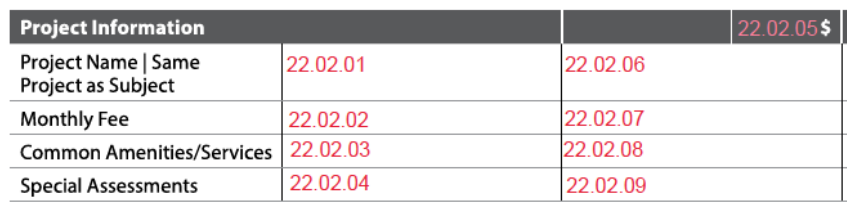
Sales Comparison Approach: Project Information
| Report Field ID | Report Label | When Row Displays | When to Include for each Comparable | Allowable Answers / Format | Origin of Subject Property Information | Adjustable Row | Definition / Additional Guidance |
|---|---|---|---|---|---|---|---|
| 22.02.05 | Project Information (subsection heading) | When subject or any comparable is in a condo, co-op, or condop, or if relevant | Yes 22.02.05 |
Any adjustment for the Project Information subsection is made in this row. | |||
| Not on Report | This is an appraiser input that does not display in the sales grid | N/A | Always required | Yes | No | Subject Property - Property in a PUD 3.010 |
No | Property in a PUD: Indicates whether the property is in a PUD. |
| Not on Report | This is an appraiser input that does not display in the sales grid | N/A | Always required | Yes | No | Subject Property - Property in a Project 3.011-3.012-3.013 |
No | Property in a Project - Yes (the property is in a condominium, cooperative, or condop) - No (the property is not in a condominium, cooperative, or condop) |
| Not on Report | This is an appraiser input that does not display in the sales grid | N/A | Required if the comparable is in a condo, co-op, or condop | Choose an allowable answer from the Definition / Additional Guidance column | Subject Property - Project Legal Structure 3.011 3.012 3.013 |
No | Project Legal Structure - Condominium - Cooperative - Condop |
| 22.02.01 22.02.06 |
Project Name | Same Project as Subject | When the subject or any comparable is in a condo, co-op, or condop | Required if the comparable is in a condo, co-op, or condop | Free-form | Project Information - Project Name 18.004 |
No | Project Name Provides support for the Project Information adjustment (22.02.05). |
| 22.02.06 | Project Name | Same Project as Subject | When the subject or any comparable is in a condo, co-op, or condop | Required if the subject and comparable are in a condo, co-op, or condop | Yes | No | Same Project as Subject is only applicable to comparables | No | Same Project as Subject Provides support for the Project Information adjustment (22.02.05). |
| 22.02.02 22.02.07 |
Monthly Fee | If relevant | Required if the comparable is in a condo, co-op, condop, or PUD, and the row is included in the sales comparison grid | Dollar amount | Project Information - Mandatory Monthly Fees 18.011 |
No | Mandatory Monthly Fees: The combined dollar amount of all the mandatory fees, expressed as a monthly amount. When included, provides support for the Project Information adjustment (22.02.05). |
| 22.02.03 22.02.08 |
Common Amenities/Services | If relevant | Required if the comparable is in a condo, co-op, condop, or PUD, and the row is included in the sales comparison grid | Choose one or more allowable answers from 18.012 | Project Information - Common Amenities / Services 18.012 |
No | When included, provides support for the Project Information adjustment (22.02.05). |
| 22.02.04 22.02.09 |
Special Assessments | When Special Assessment Amount Type for the subject property is Existing or Proposed, or if relevant (special assessments for any comparable are known to the appraiser) | Required when the comparable is in a condo, co-op, condop, or PUD and: - Special Assessment Amount Type for subject property is Existing or Proposed, or - The row is included in the sales comparison grid |
None, Existing, or Proposed | Project Information - Special Assessment Amount Type 18.072 |
No | - None - Existing - Proposed Notes: - The appraiser must analyze and report project special assessments for the subject and comparables. - If the subject unit's special assessment has been paid in full, this must be addressed in Reconciliation of Sales Comparison Approach (22.16.01). - When included, provides support for the Project Information adjustment (22.02.05). |
Site#
The Site subsection always displays on the sales comparison grid.
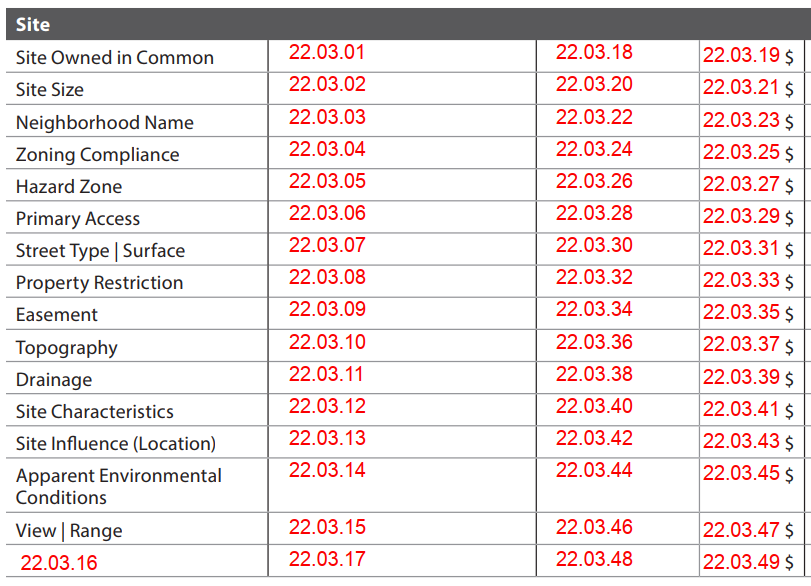
Sales Comparison Approach: Site
| Report Field ID | Report Label | When Row Displays | When to Include for each Comparable | Allowable Answers / Format | Origin of Subject Property Information | Adjustable Row | Definition / Additional Guidance |
|---|---|---|---|---|---|---|---|
| 22.03.01 22.03.18 |
Site Owned in Common | If relevant | Always required | Yes | No | Subject Property - Site Owned in Common 3.015 |
Yes 22.03.19 |
|
| 22.03.02 22.03.20 |
Site Size | When Site Owned in Common is No for the subject or any comparable | Required if Site Owned in Common is No | Number of acres, square feet, hectares, or square meters | Site - Total Site Size 4.000 |
Yes 22.03.21 |
This row must be included when Site Owned in Common is No for the subject or any comparable. |
| 22.03.03 22.03.22 |
Neighborhood Name | If relevant | Required when the row is included in the sales comparison grid | Free-form | Subject Property - Neighborhood Name 3.003 |
Yes 22.03.23 |
Note: Neighborhood name may not apply in some areas, such as rural areas. In this case, enter None when the row is included in the sales comparison grid. |
| 22.03.04 22.03.24 |
Zoning Compliance | If relevant | Required when the row is included in the sales comparison grid | Choose an allowable answer from the Definition / Additional Guidance column | Site - Zoning Compliance 4.008 |
Yes 22.03.25 |
- Illegal - Legal - Legal Nonconforming - No Zoning Note: If the subject is Legal Nonconforming, including this row can demonstrate marketability. |
| 22.03.05 22.03.26 |
Hazard Zone | When the subject or any comparable is in a Hazard Zone | Always required | Choose an allowable answer from the Definition / Additional Guidance column | Site - Hazard Zone 4.047 |
Yes 22.03.27 |
- FEMA Special Flood Hazard Area - USGS Lava Flow Zone - None (No Hazard Zone Noted) - Other (Describe) |
| 22.03.05 22.03.26 |
Hazard Zone | When the subject or any comparable is in a Hazard Zone | Required if Hazard Zone is USGS Lava Flow Zone | USGS Lava Flow Zone 1 - 9 | Site - Lava Flow Zone 4.047 |
Yes 22.03.27 |
|
| 22.03.06 22.03.28 |
Primary Access | If relevant | Required if Site Owned in Common is No, and the row is included in the sales comparison grid | Choose an allowable answer from the Definition / Additional Guidance column | Site - Primary Access to Property 4.020 |
Yes 22.03.29 |
- Pedestrian Only Access - Private Airstrip - Private Street - Public Street - Waterway - Other (Describe) |
| 22.03.07 22.03.30 |
Street Type | Surface | If relevant | Required when the row is included in the sales comparison grid | Choose one or more allowable answers from the Definition / Additional Guidance column | Site - Street(s) Used to Access Property 4.021 |
Yes 22.03.31 |
- Alley - Arterial Street - Collector Street - Cul-de-sac - Dead End - Local Road - Rural Road - Other (Describe) |
| 22.03.07 22.03.30 |
Street Type | Surface | If relevant | Required for each street when the row is included in the sales comparison grid | Choose an allowable answer from the Definition / Additional Guidance column | Site - Street Surface Material 4.021 |
Yes 22.03.31 |
- Asphalt - Brick - Concrete - Cobblestone - Dirt - Gravel - Other (Describe) |
| 22.03.08 22.03.32 |
Property Restriction | If relevant | If applicable when the row is included in the sales comparison grid | Choose one or more allowable answers from the Definition / Additional Guidance column | Site - Property Restriction 4.051 |
Yes 22.03.33 |
- Age - Historic Preservation - Income - Land Use - Rental - Sale Price - Other (Describe) |
| 22.03.09 22.03.34 |
Easement | If relevant | If applicable when the row is included in the sales comparison grid | Choose one or more allowable answers from the Definition / Additional Guidance column | Site - Easement 4.055 |
Yes 22.03.35 |
- Conservation - Drainage - Ingress/Egress - Utility (other than typical property utility easements) - Other (Describe) Note: Do not report easements that are typical or common to the market. |
| 22.03.10 22.03.36 |
Topography | If relevant | Required when Site Characteristic is Topography, and the row is included in the sales comparison grid | Choose one or more allowable answers from the Definition / Additional Guidance column | Site - Site Characteristic (4.062) is Topography - Topography Type 4.063 |
Yes 22.03.37 |
- Flat - Rocky - Rolling - Sloping - Other (Describe) Note: If this row is included in the sales comparison grid, and the comparable(s) have a topography impact, Topography Type (e.g., Flat) must also be populated for the subject (4.063). |
| 22.03.11 22.03.38 |
Drainage | If relevant | Required when Site Characteristic is Drainage, and the row is included in the sales comparison grid | Choose one or more allowable answers from the Definition / Additional Guidance column | Site - Site Characteristic (4.062) is Drainage - Site Drainage Reason 4.063 |
Yes 22.03.39 |
- Evidence of Erosion - Improper Grading - Standing Water - Other (Describe) |
| 22.03.12 22.03.40 |
Site Characteristics | If relevant | Required when the row is included in the sales comparison grid | Choose one or more allowable answers from the Definition / Additional Guidance column | Site - Site Characteristic 4.063 |
Yes 22.03.41 |
- None - Coastal Barrier Resources System - Excess Land - Landlocked - Landscaping - Road Frontage - Shape - Soil Suitability - Surplus Land - Wetlands - Zero Lot Line - Other (Describe) Any adjustments for Site Characteristics (other than Drainage or Topography) are made in this row. Additional context specific to the adjustment may be provided in Reconciliation of Sales Comparison Approach (22.16.01). |
| 22.03.13 22.03.42 |
Site Influence (Location) | Always | Always required | Choose one or more allowable answers from the Definition / Additional Guidance column | Site - Site Influence 4.025 |
Yes 22.03.43 |
- Agricultural - Airport - Body of Water (Body of Water Type displays) - Busy Roadway - Commercial Area - Golf Course - Green Space - High Density Residential - High Pressure Gas Line - Historic District - Industrial Area - Local Distribution Line - Oil or Gas Well - Overhead Electric Power Transmission Line - Park - Public Transportation Hub - Rail Line - Residential - School - Stormwater Retention - Other (Describe) Additional context specific to the adjustment may be provided in Reconciliation of Sales Comparison Approach (22.16.01). |
| 22.03.13 22.03.42 |
Site Influence (Location) | Always | Required when Site Influence is Body of Water | Choose one or more allowable answers from the Definition / Additional Guidance column | Site - Body of Water Type 4.027 |
Yes 22.03.43 |
- Bay - Canal - Cove - Creek - Gulf - Lake - Marsh - Ocean - Pond - Reservoir - River - Sound - Other (Describe) |
| 22.03.14 22.03.44 |
Apparent Environmental Conditions | If relevant | Required when the row is included in the sales comparison grid | Choose one or more allowable answers from the Definition / Additional Guidance column | Site - Apparent Environmental Condition 4.027 |
Yes 22.03.45 |
- None - Hazardous Above Ground Storage Tank - Hazardous Substances - Landfill - Radon - Slush Pit - Soil Contamination - Superfund Site - Underground Storage Tank - Water Contamination - Other (Describe) Additional context specific to the adjustment may be provided in Reconciliation of Sales Comparison Approach (22.16.01). |
| 22.03.15 22.03.46 |
View | Range | Always | Always required | Choose one or more allowable answers from the Definition / Additional Guidance column | Site - View 4.039 |
Yes 22.03.47 |
- Bay - Canal - City Street - Commercial - Cove - Creek - Golf Course - Gulf - High Density Residential - Highway - Industrial - Lake - Marsh - Mountain - Ocean - Park - Parking Lot - Pastoral - Pond - Reservoir - Residential - River - School - Skyline - Sound - Traffic Wall Barriers - Valley - Woods - Other (Describe) Any adjustments for View and / or Range of View are made in this row. Additional context specific to the adjustment may be provided in Reconciliation of Sales Comparison Approach (22.16.01). |
| 22.03.15 22.03.46 |
View | Range | Always | If available and applicable for each View | Choose an allowable answer from the Definition / Additional Guidance column | Site - Range of View 4.040 |
Yes 22.03.47 |
- Full - Partial - Seasonal - Other (Describe) |
| 22.03.17 22.03.48 |
Additional data element displays as the Report Label 22.03.16 |
If relevant | Required when the row is included in the sales comparison grid | Free-form | Additional Row does not populate from other sections; the appraiser must enter information for the subject property | Yes 22.03.49 |
Additional Row This row displays on the sales comparison grid when an additional data element relevant to the Site subsection is needed that is not predefined. Note: Only put one data element in each row and add additional rows as needed for other data elements. |
Water Frontage with Private Access#
The Water Frontage with Private Access subsection displays when the subject or any comparable has private access rights to at least one body of water. Private access is intended to mean that the access is either owned by the property or exclusively granted to the property through easement or right.
The appraiser must indicate whether each comparable has private access to each Body of Water Type that was indicated in the Site Influences row for the comparable.
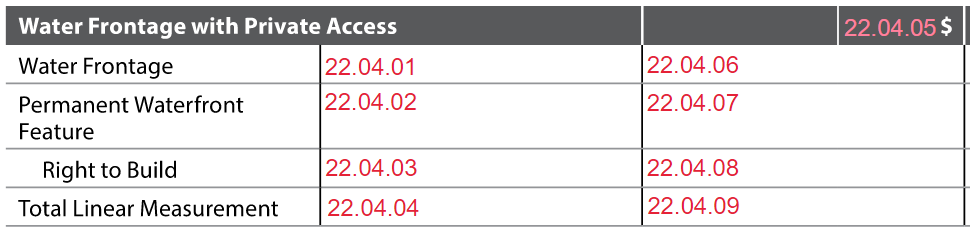
Sales Comparison Approach: Water Frontage with Private Access
| Report Field ID | Report Label | When Row Displays | When to Include for each Comparable | Allowable Answers / Format | Origin of Subject Property Information | Adjustable Row | Definition / Additional Guidance |
|---|---|---|---|---|---|---|---|
| Not on Report | This is an appraiser input that does not display | N/A | Required if Site Influence (22.03.42) is Body of Water | Yes | No | Site - Property Has Private Access Rights to the Body of Water Not on Report |
No | Property Has Private Access Rights to the Body of Water: Indicates whether the property has private access to the associated body of water. This represents private access from the property only, either through a community buffer or exclusive to the property. Do not select Yes to report on public, community, or project waterfront access and amenities. |
| 22.04.05 | Water Frontage with Private Access (subsection heading) | When the subject or any comparable has private access to one or more bodies of water | Yes 22.04.05 |
Any adjustment for the Water Frontage with Private Access subsection is made in this row. |
For Each Body of Water with Private Access#
The appraiser must indicate which bodies of water have private access from the property and may also provide additional information about each one.
Sales Comparison Approach: Water Frontage (For Each Body of Water With Private Access)
| Report Field ID | Report Label | When Row Displays | When to Include for each Comparable | Allowable Answers / Format | Origin of Subject Property Information | Adjustable Row | Definition / Additional Guidance |
|---|---|---|---|---|---|---|---|
| 22.04.01 22.04.06 |
Water Frontage | When the subject or any comparable has private access to one or more bodies of water | Required for each body of water with private access | Choose an allowable answer from the Definition / Additional Guidance column | Site - Body of Water Type 4.034 |
No | - Bay - Canal - Cove - Creek - Gulf - Lake - Marsh - Ocean - Pond - Reservoir - River - Sound - Other (Describe) Notes: - If the property has water frontage on multiple bodies of water, they display in the same cell separated by "|". - When included, provides support for the Water Frontage with Private Access adjustment (22.04.05). |
| 22.04.01 22.04.06 |
Water Frontage | When subject or any comparable has private access to one or more bodies of water | If relevant for each body of water with private access | Free-form | Site - Body of Water Name 4.035 |
No | |
| 22.04.01 22.04.06 |
Water Frontage | When subject or any comparable has private access to one or more bodies of water | Required for each body of water with private access | Choose an allowable answer from the Definition / Additional Guidance column | Site - Access Depth 4.037 |
No | - Deep Water - Non-Navigable - Shallow Water - Other (Describe) |
For All Private Water Frontage on the Property#
These rows represent features for all water frontage on the property.
Sales Comparison Approach: Water Frontage
| Report Field ID | Report Label | When Row Displays | When to Include for each Comparable | Allowable Answers / Format | Origin of Subject Property Information | Adjustable Row | Definition / Additional Guidance |
|---|---|---|---|---|---|---|---|
| 22.04.02 22.04.07 |
Permanent Waterfront Feature | If relevant | Required if the property has private access to one or more bodies of water, and the row is included in the sales comparison grid | Choose one or more allowable answers from the Definition / Additional Guidance column | Site - Permanent Waterfront Feature 4.032 |
No | A natural or man-made feature in or alongside a body of water. - None - Beach - Boat Lift - Boat Ramp - Boat Slip - Dock - Pier - Riprap - Seawall or Bulkhead - Other (Describe) When included, provides support for the Water Frontage with Private Access adjustment (22.04.05). Note: If there are multiple permanent waterfront features and bodies of water for the comparable(s), further details must be provided in Reconciliation of Sales Comparison Approach (22.16.01). |
| 22.04.03 22.04.08 |
Right to Build | If relevant | Required if Permanent Waterfront Features is None, and the row is included in the sales comparison grid | Yes | No | Site - Right to Build Waterfront Features 4.033 |
No | Right to Build Waterfront Features When there are no waterfront features on the property (Permanent Waterfront Feature is None), indicates whether the property has the right to improve the shoreline or build waterfront features. When included, provides support for the Water Frontage with Private Access adjustment (22.04.05). |
| 22.04.04 22.04.09 |
Total Linear Measurement | If relevant | Required if the property has private access to one or more bodies of water, and the row is included in the sales comparison grid | Number of feet or meters | Site - Water Frontage Total Length 4.031 |
No | When included, provides support for the Water Frontage with Private Access adjustment (22.04.05). |
Dwelling(s)#
The Dwelling(s) subsection always displays on the sales comparison grid.
This subsection is limited to structure(s) that are identified as a dwelling. Outbuilding information is captured in the Outbuilding subsection (22.14.01-22.14.26). If there are multiple dwellings, information is either:
- Listed separately for each dwelling in one row. Example: If there are two dwellings, the Year Built and Dwelling Style rows reflect the answers for all dwellings.

- Combined for all dwellings in one row. Example: The Gross Building Finished Area row reflects the total area across all dwellings as a single number.
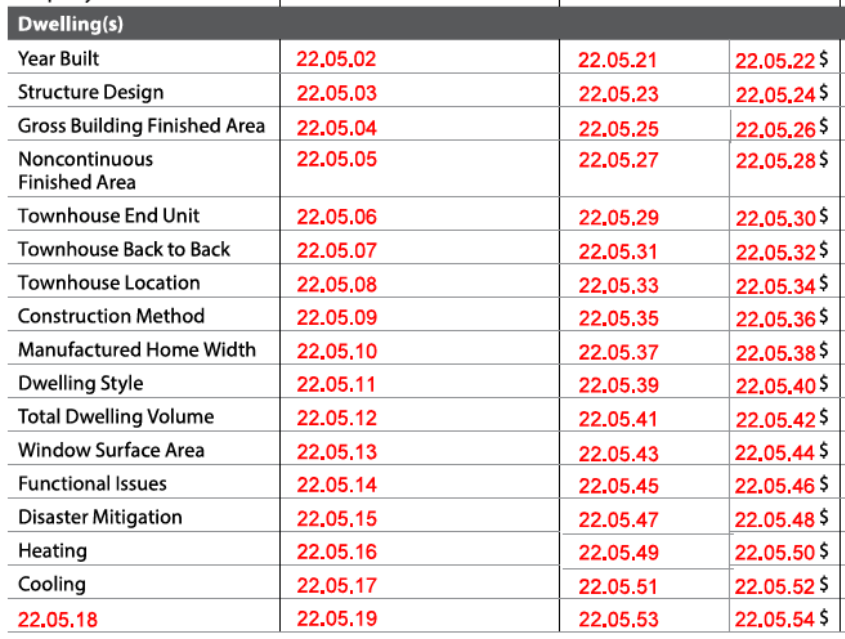
Sales Comparison Approach: Dwelling(s)
| Report Field ID | Report Label | When Row Displays | When to Include for each Comparable | Allowable Answers / Format | Origin of Subject Property Information | Adjustable Row | Definition / Additional Guidance |
|---|---|---|---|---|---|---|---|
| Not on Report | This is an appraiser input that does not display in the sales grid | N/A | Always required | Number | Dwelling Exterior - Units in Structure 8.001 |
No | Units in Structure: The number of separate living units in or attached to the dwelling that are attributable to the property, including any accessory dwelling units. Note: This applies for the subject or comparable property only. - If in a low-rise, mid-rise, or high-rise, this does not represent the total number of units in the building. |
| 22.05.02 22.05.21 |
Year Built | Always | Always required | yyyy | Dwelling Exterior, for each dwelling - Year Built 8.010 |
Yes 22.05.22 |
Note: If there are multiple dwellings, Year Built is displayed for each of them in the same row. |
| 22.05.02 22.05.21 |
Year Built | Always | Always required | Yes | No | Dwelling Exterior, for each dwelling - Year Built Estimated 8.010 |
Yes 22.05.22 |
Note: If Yes, Year Built displays with a tilde (~). |
| 22.05.03 22.05.23 |
Structure Design | When Attachment Type is Attached for the subject or any comparable | Required if Attachment Type is Attached | Choose an allowable answer from the Definition / Additional guidance column | Dwelling Exterior, for each dwelling - Structure Design 8.002 |
Yes 22.05.24 |
The type of structural design when properties are connected. - High-rise - Mid-rise - Low-rise - Rowhouse / Townhouse - Semi-Detached - Other (Describe) Note: If there are multiple dwellings in an attached property, Structure Design is displayed for each of them in the same row. |
| 22.05.04 22.05.25 |
Gross Building Finished Area | When Units Excluding ADUs for the subject is more than 1 | Required when Units Excluding ADUs for the subject is more than 1 | Number of square feet | The appraiser must enter the information for the subject property. Note: Displays in Income Approach, if applicable - Gross Building Finished Area 24.003 |
Yes 22.05.26 |
Total Gross Building Finished Area for Property Gross Building Finished Area (GBFA) for all dwellings regardless of grade level and whether the finished area is standard or nonstandard; includes common finished areas, ADUs (in dwellings), and below grade finished areas. Note: Does not include unfinished area. |
| 22.05.05 22.05.27 |
Noncontinuous Finished Area | If relevant | Required if Units Excluding ADUs for the comp is 1, and the row is included in the sales comparison grid | Number of square feet | Dwelling Exterior - Noncontinuous Finished Area Exists Not on Report - Noncontinuous Finished Area 8.047 |
Yes 22.05.28 |
Notes: - For the subject property, If Noncontinuous Finished Area Exists is No, 0 displays. If there is no noncontinuous finished area for the comparable, report 0. - For properties with more than 1 unit (Units Excluding ADUs is more than 1), report this area as part of GBFA (22.05.04, 22.05.25) and not here. - If the exact area is not known for the comparable, indicate that it is estimated in Reconciliation of Sales Comparison Approach (22.16.01). |
| 22.05.06 22.05.29 |
Townhouse End Unit | If relevant | Required if Structure Design is Rowhouse / Townhouse, and the row is included in the sales comparison grid | Yes | No | Dwelling Exterior, for each dwelling - Townhouse End Unit 8.006 |
Yes 22.05.30 |
Indicates whether the rowhouse / townhouse is located at the end of a row of attached properties. |
| 22.05.07 22.05.31 |
Townhouse Back to Back | If relevant | Required if Structure Design is Rowhouse / Townhouse, and the row is included in the sales comparison grid | Yes | No | Dwelling Exterior, for each dwelling - Townhouse Back to Back 8.007 |
Yes 22.05.32 |
Indicates whether the rowhouse / townhouse shares a rear wall with a rear wall of another property. |
| 22.05.08 22.05.33 |
Townhouse Location | If relevant | Required if Structure Design is Rowhouse / Townhouse, and the row is included in the sales comparison grid | Yes | No | Dwelling Exterior, for each dwelling - Units Above or Below 8.008 |
Yes 22.05.34 |
Indicates whether there are other properties above and / or below the rowhouse / townhouse. - Yes (e.g., piggyback or stacked) - No ("No Units Above/Below" displays for Townhouse Location) |
| 22.05.08 22.05.33 |
Townhouse Location | If relevant | Required when Units Above or Below is Yes, and the row is included in the sales comparison grid | Choose an allowable answer from the Definition / Additional guidance column | Dwelling Exterior, for each dwelling - Townhouse Location 8.009 |
Yes 22.05.34 |
The location of the rowhouse / townhouse when there are other properties above or below. - Top Unit - Middle Unit - Bottom Unit |
| 22.05.09 22.05.35 |
Construction Method | When the Structure Design is not High-rise, Mid-rise, or Low-rise for the subject or any comparable | Required if Structure Design is not High-rise, Mid-rise, or Low-rise | Choose one or more allowable answers from the Definition / Additional guidance column | Dwelling Exterior, for each dwelling - Construction Method 8.011 |
Yes 22.05.36 |
- Container - Manufactured - Modular - On-Frame Modular - Site Built - 3D Technology - Other (Describe) Note: If the subject or any comparables are manufactured homes, this row must be included in the sales comparison grid. If there are multiple dwellings, or multiple Construction Methods for a dwelling, all display in the same row. |
| 22.05.10 22.05.37 |
Manufactured Home Width | When the subject or any comparable is a manufactured home | Required if the comparable is a manufactured home | Single Wide or Multi Wide | Manufactured Home, for each dwelling that is a manufactured home - Manufactured Home Width 9.005 |
Yes 22.05.38 |
If there are multiple dwellings that are manufactured homes, Manufactured Home Width displays for each of them in the same row. |
| 22.05.11 22.05.39 |
Dwelling Style | If relevant | Required for detached properties when the row is included in the sales comparison grid | Choose an allowable answer from the Definition / Additional guidance column | Dwelling Exterior, for each dwelling - Dwelling Style 8.004 |
Yes 22.05.40 |
- A-Frame - Barn - Bi-Level - Bungalow - Cape Cod - Chalet - Colonial - Contemporary - Cottage - Craftsman - Earth / Berm - Farmhouse - Geodesic Dome - Georgian - Log - Mediterranean - Modern - Neo-Eclectic - Raised Ranch - Rambler - Ranch - Southwest - Spanish - Split Foyer or Entry - Split Level - Stilt - Traditional - Tudor - Victorian - Other (Describe) If there are multiple dwellings, Dwelling Style displays for each of them in the same row. |
| 22.05.12 22.05.41 |
Total Dwelling Volume | If relevant | Required when the row is included in the sales comparison grid | Number of cubic feet | Dwelling Exterior, for each dwelling - Structure Volume 8.015 |
Yes 22.05.42 |
Dwelling Volume for All Dwellings - For the subject property, calculated: The sum of the Structure Volume for all dwellings. - For the comparables, report the total volume for all dwellings as a single number. |
| 22.05.13 22.05.43 |
Window Surface Area | If relevant | Required when the row is included in the sales comparison grid | Number of square feet | Dwelling Exterior, for each dwelling - Window Surface Area 8.016 |
Yes 22.05.44 |
Window Surface Area for all Dwellings - For the subject property, calculated: The sum of the Window Surface Area for all dwellings. - For the comparables, report the total window surface area for all dwellings as a single number. |
| 22.05.14 22.05.45 |
Functional Issues | If relevant | Required when the row is included in the sales comparison grid | Choose one or more allowable answers from the Definition / Additional guidance column | Functional Obsolescence - Functional Issue 11.000 |
Yes 22.05.46 |
- None - Ceiling Height - Floor Plan - Nonconformity - Overimprovement - Underimprovement - Other (Describe) |
| 22.05.15 22.05.47 |
Disaster Mitigation | If relevant | Required when the row is included in the sales comparison grid | Choose one or more allowable answers from the Definition / Additional guidance column | Disaster Mitigation - Mitigation Feature 5.000 |
Yes 22.05.48 |
- None - Enclosed Soffits - Fire Resistant Decking - Fire Resistant Exterior Walls - Flood Vents - Fortified Roof - Framing Anchoring or Bracing - Impact Resistant Glass - Impact Resistant Shingles - Noncombustible Perimeter - Storm Shelter - Storm Shutters - Water Heater Strapping - Other (Describe) |
| 22.05.16 22.05.49 |
Heating | Always | Always required | Choose one or more allowable answers from the Definition / Additional guidance column | Dwelling Exterior, for each dwelling - Heating System Type 8.049 |
Yes 22.05.50 |
- None - Baseboard - Fireplace - Forced Warm Air - Gravity Air - Mini Split - Passive Solar - Radiant - Radiators - Stove - Other (Describe) If there are multiple dwellings, Heating System Type (and Heating System Fuel if known) displays for each of them in the same row. |
| 22.05.16 22.05.49 |
Heating | Always | If available for each identified Heating System Type | Choose an allowable answer from the Definition / Additional Guidance column | Dwelling Exterior, for each dwelling - Heating System Fuel 8.050 |
Yes 22.05.50 |
- Coal - Electric - Geothermal - Natural Gas - Oil - Propane - Solar - Wood - Other (Describe) If there are multiple dwellings, Heating System Type (and Heating System Fuel if known) displays for each of them in the same row. |
| 22.05.17 22.05.51 |
Cooling | If relevant | Required when the row is included in the sales comparison grid | Yes | No | Dwelling Exterior, for each dwelling - Cooling System Exists 8.051 |
Yes 22.05.52 |
Cooling System Exists: Indicates whether there is permanent cooling in the structure. - If No, "None" displays. |
| 22.05.17 22.05.51 |
Cooling | If relevant | Required when Cooling System Exists is Yes, and the row is included in the sales comparison grid | Choose one or more allowable answers from the Definition / Additional guidance column | Dwelling Exterior, for each dwelling - Cooling System Type 8.051 |
Yes 22.05.52 |
- Centralized - Individual - Other (Describe) If there are multiple dwellings, Cooling System Type displays for each of them in the same row. |
| 22.05.19 22.05.53 |
Additional data element displays as the Report Label 22.05.18 |
If relevant | Required when the row is included in the sales comparison grid | Free-form | Additional Row does not populate from other sections; the appraiser must enter information for the subject property | Yes 22.05.54 |
Additional Row This row displays on the sales comparison grid when an additional data element relevant to the Dwelling(s) subsection is needed that is not predefined. Note: Only put one data element in each row and add additional rows as needed for other data elements. |
Energy Efficient and Green Features#
The Energy Efficient and Green Features subsection displays on the sales comparison grid if relevant to analysis and conclusions.
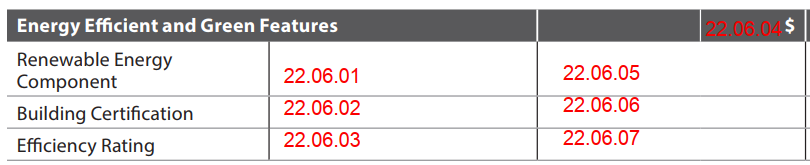
Sales Comparison Approach: Energy Efficient and Green Features
| Report Field ID | Report Label | When Row Displays | When to Include for each Comparable | Allowable Answers / Format | Origin of Subject Property Information | Adjustable Row | Definition / Additional Guidance |
|---|---|---|---|---|---|---|---|
| 22.06.04 | Energy Efficient and Green Features (subsection heading) | If relevant | Yes 22.06.04 |
Any adjustment for the Energy Efficient and Green Features subsection is made in this row. This subsection displays on the sales comparison grid when an adjustment has been made on Energy Efficient and Green Features, or to support conclusions based on market support. |
|||
| 22.06.01 22.06.05 |
Renewable Energy Component | If relevant | Required when the row is included in the sales comparison grid | Yes | No | Energy Efficient and Green Features - Known Renewable Energy Components 6.000 |
No | Known Renewable Energy Components Indicates whether the property has renewable energy components that are known to the appraiser. When included, provides support for the Energy Efficient and Green Features adjustment (22.06.04). |
| 22.06.01 22.06.05 |
Renewable Energy Component | If relevant | Required when Known Renewable Energy Components is Yes, and the row is included in the sales comparison grid | Choose one or more allowable answers from the Definition / Additional guidance column | Energy Efficient and Green Features - Renewable Energy Component Type 6.001 |
No | - Geothermal - Solar - Wind Turbine - Other (Describe) When included, provides support for the Energy Efficient and Green Features adjustment (22.06.04). |
| 22.06.02 22.06.06 |
Building Certification | If relevant | Required when the row is included in the sales comparison grid | Yes | No | Energy Efficient and Green Features - Known Building Certifications 6.004 |
No | Known Building Certifications Indicates whether the property has obtained green, health, or wellness certifications that are known to the appraiser. When included, provides support for the Energy Efficient and Green Features adjustment (22.06.04). |
| 22.06.02 22.06.06 |
Building Certification | If relevant | Required when Known Building Certifications is Yes, and the row is included in the sales comparison grid | Free-form | Energy Efficient and Green Features - Building Certification Name 6.006 |
No | When included, provides support for the Energy Efficient and Green Features adjustment (22.06.04). |
| 22.06.02 22.06.06 |
Building Certification | If relevant | If applicable when Known Building Certifications is Yes, and the row is included in the sales comparison grid | Free-form | Energy Efficient and Green Features - Building Certification Rating 6.009 |
No | When included, provides support for the Energy Efficient and Green Features adjustment (22.06.04). |
| 22.06.03 22.06.07 |
Efficiency Rating | If relevant | Required when the row is included in the sales comparison grid | Yes | No | Energy Efficient and Green Features - Known Efficiency Ratings 6.010 |
No | Known Efficiency Ratings Indicates whether the property has obtained an efficiency rating that is known to the appraiser. When included, provides support for the Energy Efficient and Green Features adjustment (22.06.04). |
| 22.06.03 22.06.07 |
Efficiency Rating | If relevant | Required when Known Efficiency Ratings is Yes, and the row is included in the sales comparison grid | Free-form | Energy Efficient and Green Features - Efficiency Rating Name 6.012 |
No | When included, provides support for the Energy Efficient and Green Features adjustment (22.06.04). |
| 22.06.03 22.06.07 |
Efficiency Rating | If relevant | Required when Known Efficiency Ratings is Yes, and the row is included in the sales comparison grid | Free-form | Energy Efficient and Green Features - Efficiency Rating Score 6.013 |
No | When included, provides support for the Energy Efficient and Green Features adjustment (22.06.04). |
Unit(s)#
The Unit(s) subsection always displays on the sales comparison grid. For properties with more than one unit, or for properties with ADU(s), the subsection repeats for each unit and for each ADU.
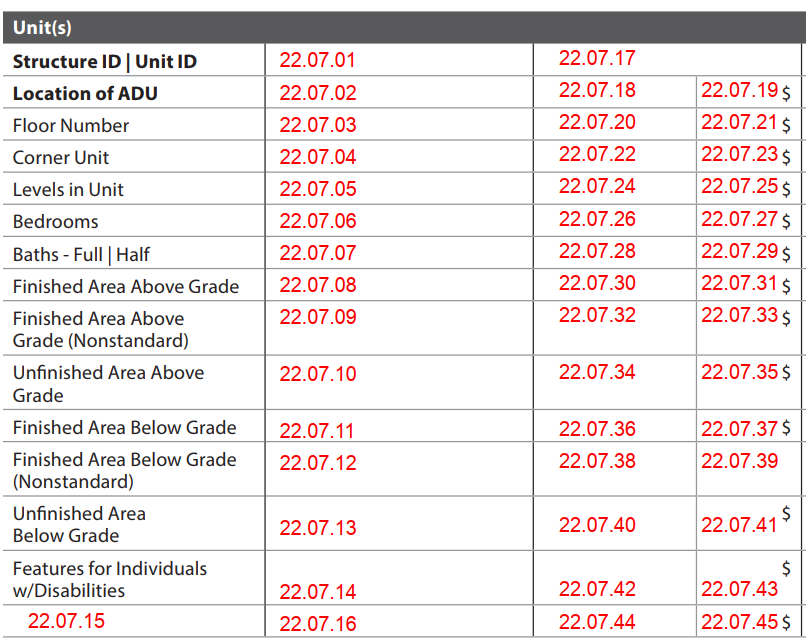
Sales Comparison Approach: Unit(s)
| Report Field ID | Report Label | When Row Displays | When to Include for each Comparable | Allowable Answers / Format | Origin of Subject Property Information | Adjustable Row | Definition / Additional Guidance |
|---|---|---|---|---|---|---|---|
| Not on Report | This is an appraiser input that does not display in the sales grid | N/A | Always required | Number | Subject Property - Units Excluding ADUs 3.005 |
No | Units Excluding ADUs Number of separate living units on the property, not counting any ADUs. Examples: - A single-family property (with or without an ADU) is reported as 1 unit in this field. - A three-unit property (with or without an ADU) is reported as 3 units in this field. Notes: 2- to 4-unit properties are identified using Units Excluding ADUs between 2 and 4. |
| 22.07.01 22.07.17 |
Structure ID | Unit ID | For properties with more than one unit, when the unit is not an ADU for the subject or any comparable | For properties with more than one unit, when the unit is not an ADU | Free-form | Unit Interior - Structure Identifier 10.001 |
No | For the subject property, Structure Identifier 10.001 redisplays from each Unit Interior section if applicable. Examples: Building 1, Building 2 |
| 22.07.01 22.07.17 |
Structure ID | Unit ID | For properties with more than one unit, when the unit is not an ADU for the subject or any comparable | When there are multiple units on the property: - Units Excluding ADUs is more than 1, or - Number of ADUs on Property is 1 or more (Does not display in sales grid) |
Free-form | Unit Interior - Unit Identifier 10.002 |
No | Unit Identifier: An identifier assigned by the appraiser that differentiates between multiple units on the property. Examples: Unit 1, Unit 2, Primary Dwelling, ADU Notes: - If there are multiple units or ADUs, Unit Identifier cannot be repeated. For 2-4 unit properties, units would be identified as Unit 1, Unit 2, etc. - Unit Identifier is required but does not display in the sales grid for comparables with ADUs. |
| Not on Report | This is an appraiser input that does not display in the sales grid | N/A | Always required for each unit in the comparable | Yes | No | Unit Interior - Unit is an ADU 10.011 |
No | Unit is an ADU: Indicates whether the unit is considered an accessory dwelling unit. |
| 22.07.02 22.07.18 |
Location of ADU | If Unit is an ADU is Yes for the subject or any comparable | Required if Unit is an ADU is Yes | Dwelling or Outbuilding | - Structure Type Not on Report | Yes 22.07.19 |
Structure Type: The type of structure that contains the ADU. - If the ADU is in a dwelling, "Dwelling" displays. |
| 22.07.02 22.07.18 |
Location of ADU | If Unit is an ADU is Yes for the subject or any comparable | Required if Unit is an ADU is Yes, and the ADU is in an outbuilding | Choose an allowable answer from 10.000 | Unit Interior - Outbuilding Type 10.000 |
Yes 22.07.19 |
Outbuilding Type: The type of outbuilding that contains the ADU. - If the ADU is in an outbuilding, Outbuilding Type displays. |
| 22.07.03 22.07.20 |
Floor Number | When Structure Design is Low-rise, Mid-rise, or High-rise for the subject or any comparable, or if relevant | Required if Structure Design is Low-rise, Mid-rise, or High-rise, or the row is included in the sales comparison grid | Free-form | Unit Interior - Floor Number 10.018 |
Yes 22.07.21 |
The building floor number where the entrance to the unit is located. Examples: 1, 2, B1, B2 |
| 22.07.04 22.07.22 |
Corner Unit | If relevant | Required when Structure Design is Low-rise, Mid-rise, or High-rise, and the row is included in the sales comparison grid | Yes | No | Unit Interior - Corner Unit 10.019 |
Yes 22.07.23 |
|
| 22.07.05 22.07.24 |
Levels in Unit | If relevant | Required when the row is included in the sales comparison grid | Number | Unit Interior - Levels in Unit 10.017 |
Yes 22.07.25 |
The number of levels in the living unit. Note: This does not represent the number of floors in the building. |
| 22.07.06 22.07.26 |
Bedrooms | Always | Always required | Number | Unit Interior - Total Bedrooms 10.023 |
Yes 22.07.27 |
|
| 22.07.07 22.07.28 |
Baths - Full | Half | Always | Always required | Number | Unit Interior - Total Bathrooms - Full 10.024 |
Yes 22.07.29 |
|
| 22.07.07 22.07.28 |
Baths - Full | Half | Always | Always required | Number | Unit Interior - Total Bathrooms - Half 10.025 |
Yes 22.07.29 |
|
| 22.07.08 22.07.30 |
Finished Area Above Grade | Always | Always required | Number of square feet | Unit Interior - Above Grade Finished Area 10.003 |
Yes 22.07.31 |
Notes: - Can be 0. - Noncontinuous finished area is reported in the Dwelling(s) subsection (22.05.05-22.05.27) and not here. - If the exact area is not known for the comparable, indicate that it is estimated in Reconciliation of Sales Comparison Approach (22.16.01). |
| 22.07.09 22.07.32 |
Finished Area Above Grade (Nonstandard) | When Above Grade Finished Area (Nonstandard) is greater than 0 for the subject, or if relevant | Required when Above Grade Finished Area (Nonstandard) is greater than 0 for the subject, or the row is included in the sales comparison grid | Number of square feet | Unit Interior - Above Grade Finished Area (Nonstandard) 10.004 |
Yes 22.07.33 |
Notes: - Can be 0. - Noncontinuous finished area is reported in the Dwelling(s) subsection (22.05.05-22.05.27) and not here. - If the exact area is not known for the comparable, indicate that it is estimated in Reconciliation of Sales Comparison Approach (22.16.01). |
| 22.07.10 22.07.34 |
Unfinished Area Above Grade | When Above Grade Unfinished Area is greater than 0 for the subject, or if relevant | Required when Above Grade Unfinished Area is greater than 0 for the subject, or the row is included in the sales comparison grid | Number of square feet | Unit Interior - Above Grade Unfinished Area 10.005 |
Yes 22.07.35 |
Notes: - Can be 0. - If the exact area is not known for the comparable, indicate that it is estimated in Reconciliation of Sales Comparison Approach (22.16.01). |
| 22.07.11 22.07.36 |
Finished Area Below Grade | Always | Always required | Number of square feet | Unit Interior - Below Grade Finished Area 10.006 |
Yes 22.07.37 |
Notes: - Can be 0. - If the exact area is not known for the comparable, indicate that it is estimated in Reconciliation of Sales Comparison Approach (22.16.01). |
| 22.07.12 22.07.38 |
Finished Area Below Grade (Nonstandard) | When Below Grade Finished Area (Nonstandard) is greater than 0 for the subject, or if relevant | Required when Below Grade Finished Area (Nonstandard) is greater than 0 for the subject, or the row is included in the sales comparison grid | Number of square feet | Unit Interior - Below Grade Finished Area (Nonstandard) 10.007 |
Yes 22.07.39 |
Notes: - Can be 0. - If the exact area is not known for the comparable, indicate that it is estimated in Reconciliation of Sales Comparison Approach (22.16.01). |
| 22.07.13 22.07.40 |
Unfinished Area Below Grade | Always | Always required | Number of square feet | Unit Interior - Below Grade Unfinished Area 10.008 |
Yes 22.07.41 |
Notes: - Can be 0. - If the exact area is not known for the comparable, indicate that it is estimated in Reconciliation of Sales Comparison Approach (22.16.01). |
| 22.07.14 22.07.42 |
Features for Individuals w/ Disabilities | If relevant | Required when the row is included in the sales comparison grid | Choose one or more allowable answers from the Definition / Additional Guidance column | Unit Interior - Accessibility Feature 10.050 |
Yes 22.07.43 |
Accessibility Feature: A feature designed to provide accessibility and usability for a person with disabilities. - None - Appliances - Auditory - Bathtub - Cabinets - Counters - Doorways - Electrical Switches - Grab Bars - Handrails - Hardware - Lighting - Ramps - Shower - Sink - Toilet - Other (Describe) |
| 22.07.16 22.07.44 |
Additional data element displays as the Report Label 22.07.15 |
If relevant | Required when the row is included in the sales comparison grid | Free-form | Additional Row does not populate from other sections; the appraiser must enter information for the subject property | Yes 22.07.45 |
Additional Row This row displays on the sales comparison grid when an additional data element relevant to the unit is needed that is not predefined. Note: Only put one data element in each row and add additional rows as needed for other data elements. |
Quality and Condition#
The Quality and Condition subsection always displays on the sales comparison grid, and includes:
- Exterior Quality and Condition - repeats for each structure, if the homeowner is responsible for exterior maintenance
- Interior Quality and Condition - repeats for each unit that is not an ADU
- ADU Interior Quality and Condition - repeats for each ADU
- Overall Quality and Condition - always displays
Exterior Quality and Condition#
Exterior Quality and Condition displays in the sales comparison grid if Homeowner Responsible for all Exterior Maintenance of Dwellings (3.016) is Yes for the subject, and the "When Row Displays" column in this chapter reflects this.
Notes:
- When exterior features are included in the Exterior Quality and Condition subsection, it provides context for:
- Exterior Quality Rating for the dwelling, and for the Overall Quality Rating.
- Exterior Condition Rating for the dwelling, and for the Overall Condition Rating.
- Any adjustments are made in the Overall Quality Rating (22.11.04) or Overall Condition Rating row (22.11.06), and not here.
- For properties with multiple dwellings, Exterior Quality and Condition repeats for each dwelling, based on the field Dwellings Containing Units.
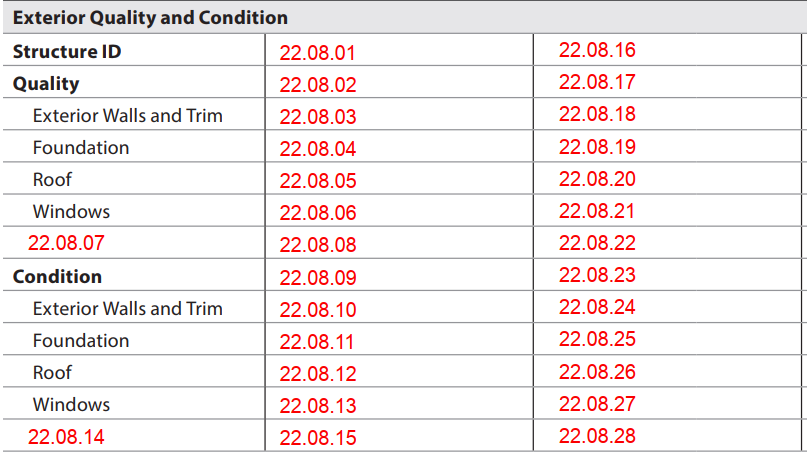
Sales Comparison Approach: Exterior Quality and Condition
| Report Field ID | Report Label | When Row Displays | When to Include for each Comparable | Allowable Answers / Format | Origin of Subject Property Information | Adjustable Row | Definition / Additional Guidance |
|---|---|---|---|---|---|---|---|
| Not on Report | This is an appraiser input that does not display in the sales grid | N/A | Always required | Yes | No | Subject Property - Homeowner Responsible for all Exterior Maintenance of Dwellings 3.016 |
No | Indicates whether the homeowner is responsible for all exterior maintenance of the dwelling(s) on the property. |
| Not on Report | This is an appraiser input that does not display in the sales grid | N/A | Always required | Number | Subject Property - Dwellings Containing Units 3.007 |
No | Number of dwellings on the property. A dwelling is a structure designed to be used as a residence that contains one or more living units. Examples: - Enter 1 for a 2-unit property where both units are in the same building. - Enter 1 for a 3-unit property where all units are in the same building. - Enter 2 for a 2-unit property where each unit is in a separate building. |
| 22.08.01 22.08.16 |
Structure ID | When Units Excluding ADUs is more than 1 for the subject or any comparable | When Units Excluding ADUs is more than 1 | Free-form | Dwelling Exterior, if applicable for each dwelling - Structure Identifier 8.000 |
No | Examples: Building 1, Building 2 |
| 22.08.02 22.08.17 |
Quality | When Homeowner Responsible for Exterior Maintenance of all Dwellings is Yes for the subject | Required when Homeowner Responsible for Exterior Maintenance of all Dwellings is Yes | Q1 to Q6 | Dwelling Exterior - Exterior Quality Rating 8.022 |
No | The Exterior Quality Rating for the dwelling provides support for the Overall Quality Rating. Adjustments are made in the Overall Quality Rating row. Reference Appendix 2: Condition and Quality Rating Definitions for definitions. |
| 22.08.03 22.08.18 |
Exterior Walls and Trim | If relevant | Required when the row is included in the sales comparison grid | Choose one or more allowable answers from the Definition / Additional Guidance column | Dwelling Exterior - Exterior Wall Material 8.025 |
No | - Adobe - Aluminum - Asbestos - Brick - Cement Board - Concrete Block - Engineered Wood - Glass - Log - Poured Concrete - Steel - Stone - Stucco - Synthetic Stone - Synthetic Stucco - Vinyl - Wood - Other (Describe) |
| 22.08.04 22.08.19 |
Foundation | If relevant | Required when the row is included in the sales comparison grid | Choose one or more allowable answers from the Definition / Additional Guidance column | Dwelling Exterior - Foundation Type 8.029 |
No | - Basement - Crawl Space - Post and Pier - Runner - Slab - Other (Describe) |
| 22.08.05 22.08.20 |
Roof | If relevant | Required when the row is included in the sales comparison grid | Choose one or more allowable answers from the Definition / Additional Guidance column | Dwelling Exterior - Roof Material 8.033 |
No | - Asbestos - Asphalt - Ceramic Tile - Clay - Composition - Concrete - Copper - Metal - Rubber - Slate - Solar Shingles - Synthetic - Tar/Gravel - Wood - Other (Describe) |
| 22.08.06 22.08.21 |
Windows | If relevant | Required when the row is included in the sales comparison grid | Free-form | Windows Quality Summary does not populate from Dwelling Exterior; the appraiser must enter information for the subject property | No | Windows Quality Summary: A short description summarizing the quality of the windows in the dwelling. |
| 22.08.08 22.08.22 |
[Other Exterior Feature] 22.08.07 Exterior Feature Other Description 8.041 populates from Dwelling Exterior |
If relevant, for each additional feature | Required when the row is included in the sales comparison grid | Free-form | Dwelling Exterior - Exterior Feature Other Description 8.041 (Report Label) Other Exterior Feature Quality Summary 22.08.08 does not populate from Dwelling Exterior; the appraiser must enter information for the subject property |
No | If needed to support the quality rating, additional rows may be included for any features not predefined that were added to the Exterior Features table in the Dwelling Exterior section (8.041-8.045). Example: Other Exterior Feature Example in Dwelling Exterior and Sales Comparison Approach Other Exterior Feature Quality Summary: A short description summarizing the quality of the other exterior feature. Example: Custom concrete cornices and frieze Notes: - If the feature does not exist for the comparable, enter "None". - If the comparable has an exterior feature that the subject does not have, report as an Additional Row in the Dwelling(s) subsection (22.05.18) and not here. |
| 22.08.09 22.08.23 |
Condition | When Homeowner Responsible for Exterior Maintenance of all Dwellings is Yes for the subject | Required when Homeowner Responsible for Exterior Maintenance of all Dwellings is Yes | C1 to C6 | Dwelling Exterior - Exterior Condition Rating 8.023 |
No | The Exterior Condition Rating for the dwelling provides support for the Overall Condition Rating. Adjustments are made in the Overall Condition Rating row. Reference Appendix 2: Condition and Quality Rating Definitions for definitions. |
| 22.08.10 22.08.24 |
Exterior Walls and Trim | If relevant | Required when the row is included in the sales comparison grid | Choose an allowable answer from the Definition / Additional Guidance column | Dwelling Exterior - Exterior Walls and Trim Condition Status 8.027 |
No | - New or Like New - Typical Wear and Tear - Damaged and Functional - Damaged and Nonfunctional |
| 22.08.11 22.08.25 |
Foundation | If relevant | Required when the row is included in the sales comparison grid | Choose an allowable answer from the Definition / Additional Guidance column | Dwelling Exterior - Foundation Condition Status 8.031 |
No | - New or Like New - Typical Wear and Tear - Damaged and Functional - Damaged and Nonfunctional |
| 22.08.12 22.08.26 |
Roof | If relevant | Required when the row is included in the sales comparison grid | Yes | No | Dwelling Exterior - Roof Observable 8.033 |
No | Roof Observable - Yes (Roof Observable does not display) - No (the person performing the inspection was unable to make an informed determination on the condition status of the roof, and "(Unobservable)" displays) |
| 22.08.12 22.08.26 |
Roof | If relevant | Required when Roof Observable is Yes, the row is included in the sales comparison grid | Choose an allowable answer from the Definition / Additional Guidance column | Dwelling Exterior - Roof Condition Status 8.035 |
No | - New or Like New - Typical Wear and Tear - Damaged and Functional - Damaged and Nonfunctional |
| 22.08.13 22.08.27 |
Windows | If relevant | Required when the row is included in the sales comparison grid | Choose an allowable answer from the Definition / Additional Guidance column | Dwelling Exterior - Windows Condition Status 8.039 |
No | - New or Like New - Typical Wear and Tear - Damaged and Functional - Damaged and Nonfunctional |
| 22.08.15 22.08.28 |
[Other Exterior Feature] 22.08.14 Exterior Feature Other Description 8.041 populates from Dwelling Exterior |
If relevant, for each additional feature | Required when the row is included in the sales comparison grid | Free-form Choose an allowable answer from the Definition / Additional Guidance column |
Dwelling Exterior - Exterior Feature Other Description 8.041 (Report Label) - Other Exterior Feature Condition Status 8.044 |
No | If needed to support the condition rating, additional rows may be included for any features not predefined that were added to the Exterior Features table in the Dwelling Exterior section. Example: Other Exterior Feature Example in Dwelling Exterior and Sales Comparison Approach Other Exterior Feature Condition Status - New or Like New - Typical Wear and Tear - Damaged and Functional - Damaged and Nonfunctional Notes: - If the feature does not exist for the comparable, enter "None". - If the comparable has an exterior feature that the subject does not have, report as an Additional Row in the Dwelling(s) subsection (22.05.18) and not here. |
Interior Quality and Condition#
Interior Quality and Condition repeats in the sales comparison grid for each unit that is not an ADU.
Notes:
- When interior features are included in the Interior Quality and Condition subsection, it provides context for:
- Interior Quality Rating for the unit, and for the Overall Quality Rating.
- Interior Condition Rating for the unit, and for the Overall Condition Rating.
- Any adjustments are made in the Overall Quality Rating (22.11.04) or Overall Condition Rating (22.11.06) row, and not here.
- For a single-family property, only one unit displays in the sales grid, with no Structure Identifier or Unit Identifier.
- For properties with more than one unit:
- Structure Identifier and Unit Identifier are always required.
- The interior quality and condition information repeats for each unit.
- Accessory dwelling units are addressed separately in the ADU Interior Quality and Condition subsection (22.10).
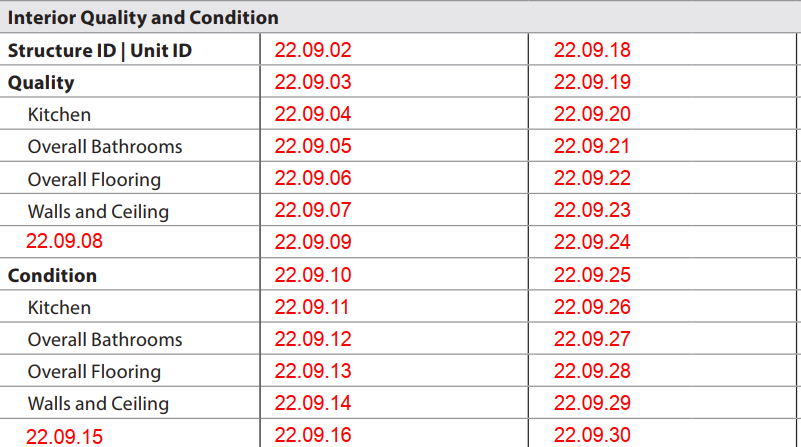
Sales Comparison Approach: Interior Quality and Condition
| Report Field ID | Report Label | When Row Displays | When to Include for each Comparable | Allowable Answers / Format | Origin of Subject Property Information | Adjustable Row | Definition / Additional Guidance |
|---|---|---|---|---|---|---|---|
| 22.09.02 22.09.18 |
Structure ID | Unit ID | When Units Excluding ADUs is more than 1 for the subject or any comparable | Required when Units Excluding ADUs is more than 1 | Free-form | Unit Interior - Structure Identifier 10.001 |
No | Examples: Building 1, Building 2 |
| 22.09.02 22.09.18 |
Structure ID | Unit ID | When Units Excluding ADUs is more than 1 for the subject or any comparable | Displays in this subsection if Units Excluding ADUs is more than 1 | Free-form | Unit Interior - Unit Identifier 10.002 |
No | Redisplays from 22.07.01, 22.07.17 if applicable. Examples: Unit 1, Unit 2, Primary Dwelling, ADU |
| 22.09.03 22.09.19 |
Quality | Always | Always required | Q1 to Q6 | Unit Interior - Interior Quality Rating 10.034 |
No | The Interior Quality Rating for the unit provides support for the Overall Quality Rating. Adjustments are made in the Overall Quality Rating row. Reference Appendix 2: Condition and Quality Rating Definitions for definitions. |
| 22.09.04 22.09.20 |
Kitchen | If relevant, for each kitchen in the unit | Required when the row is included in the sales comparison grid | Free-form | Kitchen Quality Summary does not populate from Unit Interior; the appraiser must enter information for the subject property | No | Kitchen Quality Summary: A short description summarizing the quality of the kitchen. Note: If there are multiple kitchens in the unit for the subject or any comparable, explain the details in Reconciliation of Sales Comparison Approach (22.16.01). |
| 22.09.05 22.09.21 |
Overall Bathrooms | If relevant | Required when the row is included in the sales comparison grid | Free-form | Overall Bathrooms Quality Summary does not populate from Unit Interior; the appraiser must enter information for the subject property | No | Overall Bathrooms Quality Summary: A short description summarizing the overall quality of all bathrooms in the unit. |
| 22.09.06 22.09.22 |
Overall Flooring | If relevant | Required when the row is included in the sales comparison grid | Free-form | Overall Flooring Quality Summary does not populate from Unit Interior; the appraiser must enter information for the subject property | No | Overall Flooring Quality Summary: A short description summarizing the overall quality of all flooring in the unit. |
| 22.09.07 22.09.23 |
Walls and Ceiling | If relevant | Required when the row is included in the sales comparison grid | Free-form | Walls and Ceiling Quality Summary does not populate from Unit Interior; the appraiser must enter information for the subject property | No | Walls and Ceiling Quality Summary: A short description summarizing the overall quality of the walls and ceilings in the unit. |
| 22.09.09 22.09.24 |
[Other Interior Feature] 22.09.08 Interior Feature Other Description 10.044 populates from Unit Interior |
If relevant, for each additional feature | Required when the row is included in the sales comparison grid | Free-form | Unit Interior - Interior Feature Other Description 10.044 (Report Label) Other Interior Feature Quality Summary 22.08.09 does not populate from Unit Interior; the appraiser must enter information for the subject property |
No | If needed to support the quality rating, additional rows may be included for any features not predefined that were added to the Interior Features table in the Unit Interior section. Example: Other Interior Feature Example in Unit Interior and Sales Comparison Approach Other Interior Feature Quality Summary: A short description summarizing the quality of the additional feature. Example: Custom designed high grade Notes: - If the feature does not exist for the comparable, enter "None". - If the comparable has an interior feature that the subject does not have, report as an Additional Row in the Unit(s) subsection (22.07.15) and not here. |
| 22.09.10 22.09.25 |
Condition | Always | Always required | C1 to C6 | Unit Interior - Interior Condition Rating 10.035 |
No | The Interior Condition Rating for the unit provides support for the Overall Condition Rating. Adjustments are made in the Overall Condition Rating row. Reference Appendix 2: Condition and Quality Rating Definitions for definitions. Note: For the subject property, reflects the condition as if any required repairs, inspections, or completions have been satisfactorily completed. |
| 22.09.11 22.09.26 |
Kitchen | If relevant, for each kitchen in the unit | Required when the row is included in the sales comparison grid | Choose an allowable answer from the Definition / Additional Guidance column | Unit Interior - Room Update Status 10.038 (for kitchen) |
No | - Fully Updated - Partially Updated - Not Updated Note: If there are multiple kitchens in the unit for the subject or any comparable, the appraiser must explain the details in Reconciliation of Sales Comparison Approach (22.16.01). |
| 22.09.12 22.09.27 |
Overall Bathrooms | If relevant | Required when the row is included in the sales comparison grid | Choose an allowable answer from the Definition / Additional Guidance column | Unit Interior - Overall Update Status for Bathrooms 10.043 |
No | - Fully Updated - Significantly Updated - Moderately Updated - Not Updated |
| 22.09.13 22.09.28 |
Overall Flooring | If relevant | Required when the row is included in the sales comparison grid | Choose an allowable answer from the Definition / Additional Guidance column | Unit Interior - Overall Update Status for Flooring 10.049 |
- Fully Updated - Significantly Updated - Moderately Updated - Not Updated |
|
| 22.09.14 22.09.29 |
Walls and Ceiling | If relevant | Required when the row is included in the sales comparison grid | Free-form | Walls and Ceiling Condition Summary does not populate from Unit Interior; the appraiser must enter information for the subject property | Walls and Ceiling Condition Summary: A short description summarizing the overall condition of the walls and ceilings in the unit. | |
| 22.09.16 22.09.30 |
[Other Interior Feature] 22.09.15 Other Interior Feature Description 10.044 populates from Unit Interior |
If relevant, for each additional feature | Required when the row is included in the sales comparison grid | Free-form | Unit Interior - Interior Feature Other Description 10.044 (Report Label) Other Interior Feature Condition Summary 22.09.16 does not populate from Unit Interior; the appraiser must enter information for the subject property |
If needed to support the condition rating, additional rows may be included for any features not predefined that were added to the Interior Features table in the Unit Interior section. Example: Other Interior Feature Example in Unit Interior and Sales Comparison Approach Other Interior Feature Condition Summary: A short description summarizing the condition of the additional feature. Notes: - If the feature does not exist for the comparable, enter "None". - If the comparable has an interior feature that the subject does not have, report as an Additional Row in the Unit(s) subsection (22.07.15) and not here. |
ADU Interior Quality and Condition#
The ADU Interior Quality and Condition subsection displays on the sales comparison grid if the subject or any comparables have ADU(s).
- When interior features are included in the ADU Interior Quality and Condition subsection, it provides context for:
- Interior Quality Rating for the ADU, and for the Overall Quality Rating.
- Interior Condition Rating for the ADU, and for the Overall Condition Rating.
- Any adjustments are made in the Overall Quality Rating (22.11.04) or Overall Condition Rating (22.11.06) row, and not here.
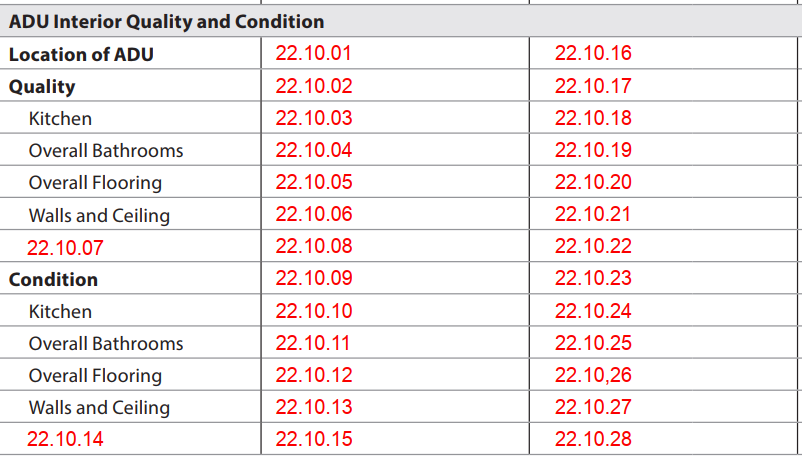
Sales Comparison Approach: ADU Interior Quality and Condition
| Report Field ID | Report Label | When Row Displays | When to Include for each Comparable | Allowable Answers / Format | Origin of Subject Property Information | Adjustable Row | Definition / Additional Guidance |
|---|---|---|---|---|---|---|---|
| 22.10.01 22.10.16 |
Location of ADU | When Unit is an ADU is Yes for the subject or any comparable |
Required if Unit is an ADU is Yes | Dwelling or Outbuilding | - Structure Type Not on Report | No | Structure Type: The type of structure that contains the ADU. If the ADU is in a dwelling, "Dwelling" displays. Note: Location of ADU redisplays from 22.07.02 and 22.07.18. |
| 22.10.01 22.10.16 |
Location of ADU | When Unit is an ADU is Yes for the subject or any comparable |
Required if Unit is an ADU is Yes, and the ADU is in an outbuilding | Choose an allowable answer from 10.000 | Unit Interior - Outbuilding Type 10.000 |
No | If the ADU is in an outbuilding, Outbuilding Type displays. Note: Location of ADU redisplays from 22.07.02 and 22.07.18. |
| 22.10.02 22.10.17 |
Quality | When Unit is an ADU is Yes for the subject or any comparable |
Always required | Q1 to Q6 | Unit Interior - Interior Quality Rating 10.034 |
No | The Interior Quality Rating for the ADU provides support for the Overall Quality Rating. Adjustments are made in the Overall Quality Rating row. Reference Appendix 2: Condition and Quality Rating Definitions for definitions. |
| 22.10.03 22.10.18 |
Kitchen | If relevant | Required when the row is included in the sales comparison grid | Free-form | Kitchen Quality Summary does not populate from Unit Interior; the appraiser must enter information for the subject property | No | Kitchen Quality Summary: A short description summarizing the quality of the kitchen in the ADU. |
| 22.10.04 22.10.19 |
Overall Bathrooms | If relevant | Required when the row is included in the sales comparison grid | Free-form | Overall Bathrooms Quality Summary does not populate from Unit Interior; the appraiser must enter information for the subject property | No | Overall Bathrooms Quality Summary: A short description summarizing the overall quality of all bathrooms in the ADU. |
| 22.10.05 22.10.20 |
Overall Flooring | If relevant | Required when the row is included in the sales comparison grid | Free-form | Overall Flooring Quality Summary does not populate from Unit Interior; the appraiser must enter information for the subject property | No | Overall Flooring Quality Summary: A short description summarizing the overall quality of all flooring in the ADU. |
| 22.10.06 22.10.21 |
Walls and Ceiling | If relevant | Required when the row is included in the sales comparison grid | Free-form | Walls and Ceiling Quality Summary does not populate from Unit Interior; the appraiser must enter information for the subject property | No | Walls and Ceiling Quality Summary: A short description summarizing the overall quality of the walls and ceilings in the ADU. |
| 22.10.08 22.10.22 |
[Other Interior Feature] 22.10.07 Other Interior Feature Description 10.044 populates from Unit Interior |
If relevant, for each additional feature | Required when the row is included in the sales comparison grid | Free-form | Unit Interior - Interior Feature Other Description 10.044 (Report Label) Other Interior Feature Quality Summary 22.10.08 does not populate from Unit Interior; the appraiser must enter information for the subject property |
No | If needed to support the quality rating, additional rows may be included for any features not predefined that were added to the Interior Features table in the Unit Interior section for the ADU. Example: Other Interior Feature Example in Unit Interior and Sales Comparison Approach Other Interior Feature Quality Summary: A short description summarizing the quality of the additional feature. Example: Custom designed high grade Notes: - If the feature does not exist for the comparable ADU, enter "None". - If the comparable ADU has an interior feature that the subject does not have, report this as an Additional Row in the Unit(s) subsection for the ADU (22.07.15) and not here. |
| 22.10.09 22.10.23 |
Condition | When Unit is an ADU is Yes for the subject or any comparable | Always required | C1 to C6 | Unit Interior - Interior Condition Rating 10.035 |
No | The Interior Condition Rating for the ADU provides support for the Overall Condition Rating. Adjustments are made in the Overall Condition Rating row. Reference Appendix 2: Condition and Quality Rating Definitions for definitions. Note: For the subject property, reflects the condition as if any required repairs, inspections, or completions have been satisfactorily completed. |
| 22.10.10 22.10.24 |
Kitchen | If relevant | Required when the row is included in the sales comparison grid | Choose an allowable answer from the Definition / Additional Guidance column | Unit Interior - Room Update Status 10.038 (for kitchen) |
No | - Fully Updated - Partially Updated - Not Updated |
| 22.10.11 22.10.25 |
Overall Bathrooms | If relevant | Required when the row is included in the sales comparison grid | Choose an allowable answer from the Definition / Additional Guidance column | Unit Interior - Overall Update Status for Bathrooms 10.043 |
No | Based on the appraiser's analysis and determination considering the overall level of updating, the update status of all bathroom(s) in the ADU in aggregate. - Fully Updated - Significantly Updated - Moderately Updated - Not Updated |
| 22.10.12 22.10.26 |
Overall Flooring | If relevant | Required when the row is included in the sales comparison grid | Choose an allowable answer from the Definition / Additional Guidance column | Unit Interior - Overall Update Status for Flooring 10.049 |
No | Based on the appraiser's analysis and determination considering the overall level of updating, the update status of all flooring in the ADU in aggregate. - Fully Updated - Significantly Updated - Moderately Updated - Not Updated |
| 22.10.13 22.10.27 |
Walls and Ceiling | If relevant | Required when the row is included in the sales comparison grid | Free-form | Walls and Ceiling Condition Summary does not populate from Unit Interior; the appraiser must enter information for the subject property | No | Walls and Ceiling Condition Summary: A short description summarizing the overall condition of the walls and ceilings in the ADU. |
| 22.10.15 22.10.28 |
[Other Interior Feature] 22.10.14 Other Interior Feature Description 10.044 populates from Unit Interior |
If relevant, for each additional feature | Required when the row is included in the sales comparison grid | Free-form | Unit Interior - Interior Feature Other Description 10.044 (Report Label) Other Interior Feature Condition Summary 22.10.15 does not populate from Unit Interior; the appraiser must enter information for the subject property |
No | If needed to support the condition rating, additional rows may be included for any features not predefined that were added to the Interior Features table in the Unit Interior section for the ADU. Example: Other Interior Feature Example in Unit Interior and Sales Comparison Approach Other Interior Feature Condition Summary: A short description summarizing the condition of the additional feature. Notes: - If the feature does not exist for the comparable ADU, enter "None". - If the comparable ADU has an interior feature that the subject does not have, report as an Additional Row in the Unit(s) subsection for the ADU (22.07.15) and not here. |
Overall Quality and Condition#
This subsection represents the reconciliation of all the interior and exterior quality and condition information included in the sales comparison grid. Any adjustment is an aggregated conclusion. Reference Appendix 2: Condition and Quality Rating Definitions for definitions.

Sales Comparison Approach: Overall Quality and Condition
| Report Field ID | Report Label | When Row Displays | When to Include for each Comparable | Allowable Answers / Format | Origin of Subject Property Information | Adjustable Row | Definition / Additional Guidance |
|---|---|---|---|---|---|---|---|
| 22.11.01 22.11.03 |
Quality | Always | Always required | Q1 to Q6 | Overall Quality and Condition - Overall Quality Rating 15.000 |
Yes 22.11.04 |
Overall Quality Rating: The overall quality rating of all dwellings on the property. Any Quality adjustments made in this row include interior and exterior quality. |
| 22.11.02 22.11.05 |
Condition | Always | Always required | C1 to C6 | Overall Quality and Condition - Overall Condition Rating 15.005 |
Yes 22.11.06 |
Overall Condition Rating: The overall condition rating of all dwellings on the property. Any Condition adjustments made in this row include interior and exterior condition. |
Property Amenities#
The Property Amenities subsection displays on the sales comparison grid when relevant to analysis and conclusions.
Property amenities are solely owned or restricted to use by the property owner, and do not include:
- Project amenities that are owned and maintained by the HOA and subject to shared use
- In the sales grid, these are reported in the Project Information subsection (22.02).
- Site characteristics and view
- In the sales grid, these are reported in the Site subsection (22.03).
- Waterfront improvements, such as piers, docks, and bulkheads
- In the sales grid, these are reported in the Water Frontage with Private Access subsection (22.04).
Amenity Category groups similar amenities together for inclusion as individual line entries (rows) in the sales comparison grid.
- Outdoor Accessories
- Outdoor Living
- Water Features
- Whole Home
- Miscellaneous
Notes:
- For the subject property, when an Amenity Category (row) is included in the sales comparison grid, all amenities in that category populate from the Subject Property Amenities section.
- Amenity Count may be used when there are no additional details about the amenity to be reported. Example: Amenity Examples in Subject Property Amenities and Sales Comparison Approach
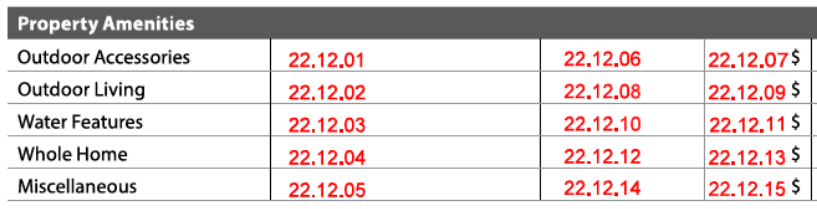
Sales Comparison Approach: Property Amenities
| Report Field ID | Report Label | When Row Displays | When to Include for each Comparable | Allowable Answers / Format | Origin of Subject Property Information | Adjustable Row | Definition / Additional Guidance |
|---|---|---|---|---|---|---|---|
| Not on Report | This is an appraiser input that does not display in the sales grid | N/A | Always required | Yes | No | Subject Property Amenities - Property Amenities Exist 14.000 |
No | Property Amenities Exist Indicates whether the property has amenities, excluding those attributable to the project, waterfront improvements, or site characteristics/view. |
| 22.12.01 22.12.06 |
Outdoor Accessories | If relevant | If applicable when the row is included in the sales comparison grid | Choose one or more allowable answers from the Definition / Additional Guidance column | Subject Property Amenities - Amenity Category 14.001 is Outdoor Accessories - Amenity Type 14.002 |
Yes 22.12.07 |
For Amenity Category Outdoor Accessories, Amenity Type - Fence - Irrigation System - Outdoor Fireplace - Outdoor Kitchen - Outdoor Riding Ring - Sports Court |
| 22.12.01 22.12.06 |
Outdoor Accessories | If relevant | If applicable for the indicated outdoor accessory amenity | Number | Subject Property Amenities - Amenity Count 14.004 |
Yes 22.12.07 |
Amenity Count (for the indicated outdoor accessory amenity) |
| 22.12.02 22.12.08 |
Outdoor Living | If relevant | If applicable when the row is included in the sales comparison grid | Choose one or more allowable answers from the Definition / Additional Guidance column | Subject Property Amenities - Amenity Category 14.001 is Outdoor Living - Amenity Type 14.002 |
Yes 22.12.09 |
For Amenity Category Outdoor Living, Amenity Type - Balcony - Deck - Gazebo - Patio - Porch - Portico |
| 22.12.03 22.12.10 |
Water Features | If relevant | If applicable when the row is included in the sales comparison grid | Choose one or more allowable answers from the Definition / Additional Guidance column | Subject Property Amenities - Amenity Category 14.001 is Water Features - Amenity Type 14.002 |
Yes 22.12.11 |
For Amenity Category Water Features, Amenity Type - Inground Pool - Inground Spa - Outdoor Shower - Sauna Note: If the pool, spa, or sauna is indoor, select Indoor as Amenity Feature. |
| 22.12.03 22.12.10 |
Water Features | If relevant | If applicable for the Inground Pool, Inground Spa, or Sauna | Choose one or more allowable answers from the Definition / Additional Guidance column | Subject Property Amenities - Amenity Feature 14.004 |
Yes 22.12.11 |
Amenity Feature - Caged - Heated - Indoor - Other (Describe) |
| 22.12.03 22.12.10 |
Water Features | If relevant | If applicable for the Outdoor Shower | Number | Subject Property Amenities - Amenity Count 14.004 |
Yes 22.12.11 |
Amenity Count (for the Outdoor Shower) |
| 22.12.04 22.12.12 |
Whole Home | If relevant | If applicable when the row is included in the sales comparison grid | Choose one or more allowable answers from the Definition / Additional Guidance column | Subject Property Amenities - Amenity Category 14.001 is Whole Home - Amenity Type 14.002 |
Yes 22.12.13 |
For Amenity Category Whole Home, Amenity Type - EV Station - Elevator - Fire Suppression System - Indoor Fireplace - Multiple Zone HVAC - Smart Home System - Whole House Ventilation - Wood Stove |
| 22.12.04 22.12.12 |
Whole Home | If relevant | If applicable for the indicated whole home amenity | Number | Subject Property Amenities - Amenity Count 14.004 |
Yes 22.12.13 |
Amenity Count (for the indicated whole home amenity) Example: Indoor Fireplace - 2 |
| 22.12.05 22.12.14 |
Miscellaneous | If relevant | If applicable when the row is included in the sales comparison grid | Choose one or more allowable answers from the Definition / Additional Guidance column | Subject Property Amenities - Amenity Category 14.001 is Miscellaneous - Amenity Type 14.002 |
Yes 22.12.15 |
For Amenity Category Miscellaneous, Amenity Type - Airstrip - Club Membership - Shared Laundry Facilities - Other (Describe) |
| 22.12.05 22.12.14 |
Miscellaneous | If relevant | If applicable for the indicated miscellaneous amenity | Number | Subject Property Amenities - Amenity Count 14.004 |
Yes 22.12.15 |
Amenity Count (for the indicated miscellaneous amenity) |
Vehicle Storage#
The Vehicle Storage subsection always displays on the sales comparison grid. Information about the subject property's garage area populates from the Vehicle Storage section. If the subject or comparable(s) have additional features that impact value and/or marketability, Additional Rows are utilized to support adjustments and conclusions, such as heat, cooling, or additional area. Reference Appendix 4: Detached Garage Examples for additional information and examples.
Examples:
- Detached garage with an ADU above or sharing a common wall with the garage:
- ADU(s) if any, are reported in the Units(s) subsection (22.07).
- The portion of the garage dedicated to vehicle storage is reported in the Vehicle Storage subsection.
- Detached garage with a finished workshop and a bathroom:
- The portion of the garage dedicated to vehicle storage is reported in the Vehicle Storage subsection.
- The workshop and bathroom are reported in the Outbuilding subsection (22.14) with Outbuilding Type selected as Other, and described as Workshop/Garage.

Sales Comparison Approach: Vehicle Storage
| Report Field ID | Report Label | When Row Displays | When to Include for each Comparable | Allowable Answers / Format | Origin of Subject Property Information | Adjustable Row | Definition / Additional Guidance |
|---|---|---|---|---|---|---|---|
| 22.13.04 | Vehicle Storage (subsection heading) | Always | Yes 22.13.04 |
Any adjustment for Vehicle Storage must be made in this row. | |||
| 22.13.01 22.13.05 |
Type | Spaces | Detail | Always | Always required | Choose one or more allowable answers from the Definition / Additional Guidance column | Vehicle Storage - Vehicle Storage Type 13.000 - 13.001 |
No | Vehicle Storage Type - None - Carport - Common Carport - Driveway - Garage - Open Lot - Parking Garage - Shared Driveway - Other (Describe) |
| 22.13.01 22.13.05 |
Type | Spaces | Detail | Always | Required if Vehicle Storage Type is Driveway or Shared Driveway | Yes | No | Vehicle Storage - 10 or More Parking Spaces 13.002 |
No | 10 or More Parking Spaces - Select Yes if the driveway or shared driveway has 10 or more parking spaces. In this case, "10 or More" displays. - Select No if the driveway or shared driveway has less than 10 parking spaces, and provide the number of parking spaces. |
| 22.13.01 22.13.05 |
Type | Spaces | Detail | Always | Required for all Vehicle Storage Types except driveways or shared driveways with 10 or more spaces | Whole number | Vehicle Storage - Dedicated Parking Spaces 13.002 |
No | Dedicated Parking Spaces: The number of parking spaces dedicated to the property within the indicated Vehicle Storage Type. A parking space is defined as the area that accommodates a vehicle. Note: Half spaces are accounted for in the overall size reported as Vehicle Storage Area (22.13.01, 22.13.05), not as a parking space. |
| 22.13.01 22.13.05 |
Type | Spaces | Detail | Always | Required when Vehicle Storage Type is Common Carport, Open Lot or Parking Garage | Choose an allowable answer from the Definition / Additional Guidance column | Vehicle Storage - Parking Space Assignment Type 13.003 |
No | Parking Space Assignment Type: The ownership rights to the parking space(s). - Assigned - Owned - Unassigned |
| 22.13.01 22.13.05 |
Type | Spaces | Detail | Always | Required when Vehicle Storage Type is Carport or Garage | Choose an allowable answer from the Definition / Additional Guidance column | Vehicle Storage - Vehicle Storage Attachment Type 13.003 |
No | Vehicle Storage Attachment Type: The way that the indicated vehicle storage is attached to the dwelling. - Attached - Built-in - Detached |
| 22.13.01 22.13.05 |
Type | Spaces | Detail | Always | Required when Vehicle Storage Type is Driveway or Shared Driveway | Choose an allowable answer from the Definition / Additional Guidance column | Vehicle Storage - Driveway Surface Material 13.003 |
No | Driveway Surface Material: The predominant driveway surface material. - Asphalt - Brick - Concrete - Cobblestone - Dirt - Gravel - Other (Describe) |
| 22.13.01 22.13.05 |
Type | Spaces | Detail | Always | If relevant when Vehicle Storage Type is Carport or Garage | Number of square feet | Vehicle Storage - Vehicle Storage Area 13.003 when Vehicle Storage Type is Carport or Garage |
No | Vehicle Storage Area Provides support for the Vehicle Storage adjustment. For the comparables, Vehicle Storage Area may be included if relevant or to provide additional context. Notes: - Half spaces are accounted for here. - For detached garages that include other uses (ADUs or additional areas), only report area that is specific to the vehicle storage. |
| 22.13.03 22.13.06 |
Additional data element displays as the Report Label 22.13.02 | If relevant | Required when the row is included in the sales comparison grid | Free-form | Additional Row does not prepopulate from Vehicle Storage. The appraiser must enter information for the subject property. | No | Additional Row This row displays on the sales comparison grid when an additional data element relevant to the Vehicle Storage subsection is needed that is not predefined. Example: Attached garages with additional features such as heat, cooling, or bathroom. Note: Only put one data element in each row and add additional rows as needed for other data elements. |
Outbuilding#
The Outbuilding subsection displays on the sales comparison grid when the subject or any comparable has outbuilding(s) that are real property, other than standalone ADUs or ADU/Garages which are reported in the Unit(s) and/or Vehicle Storage subsection.
- The "When Row Displays" and "When to Include for each Comparable" columns in this subchapter reflect this.
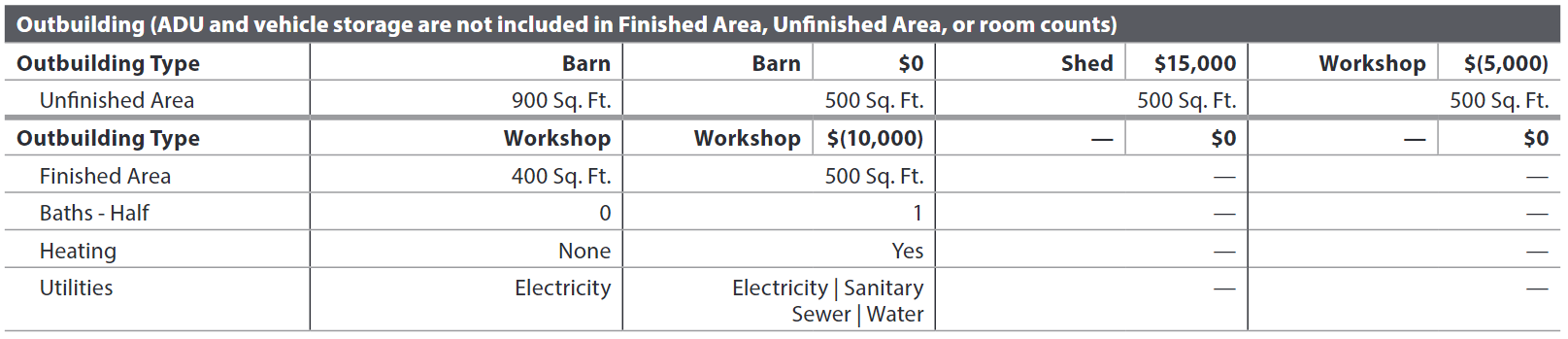
ADU and vehicle storage are not included in Finished Area, Unfinished Area, or room counts. Reference Appendix 4: Detached Garage Examples for more information and examples of outbuildings that include garage areas.
Outbuilding information repeats if the subject or any comparable has multiple outbuildings. When there are multiple outbuildings, align like-to-like Outbuilding Types when possible.
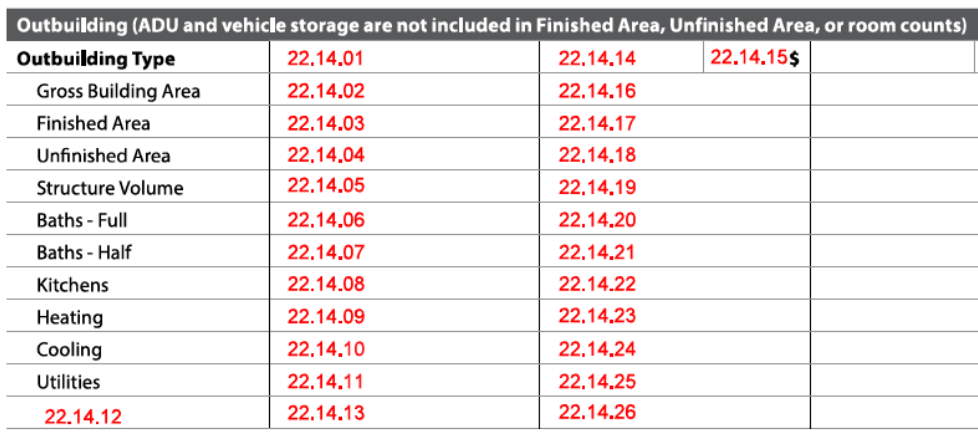
Sales Comparison Approach: Outbuilding
| Report Field ID | Report Label | When Row Displays | When to Include for each Comparable | Allowable Answers / Format | Origin of Subject Property Information | Adjustable Row | Definition / Additional Guidance |
|---|---|---|---|---|---|---|---|
| Not on Report | This is an appraiser input that does not display in the sales grid | N/A | Required when the outbuilding is considered real property | Yes | Outbuilding - Considered Real Property 12.002 |
No | Outbuilding Considered Real Property: Indicates whether the outbuilding is considered real property (e.g., permanently affixed to the land). Note: Outbuildings that are not considered real property should not be included in the sales grid. |
| 22.14.01 22.14.14 22.14.15 |
Outbuilding Type | When the subject or any comparable has outbuilding(s) that are not standalone ADUs or ADU/Garages | Always required | Choose an allowable answer from 12.001 | Outbuilding - Outbuilding Type 12.001 |
Yes 22.14.15 |
Any adjustment for the outbuilding is made in this row, to support conclusions based on market support. Notes: - Standalone ADUs that are not manufactured homes are reported in the Unit(s) subsection and do not display in the Outbuilding subsection. - If the outbuilding contains an ADU, Outbuilding Type redisplays from Location of ADU (22.07.02, 22.07.18, 22.10.01, 22.10.16). |
| Not on Report | This is an appraiser input that does not display in the sales grid | N/A | Always required | Number | Outbuilding - Units in Structure 12.003 |
No | Units in Structure: The number of accessory dwelling units in the outbuilding. - If there are no ADUs in the Outbuilding, enter 0. - If there is an ADU in the outbuilding, provide the number of ADUs (1 or more). Examples include: - ADU/Garage: A detached garage with a living unit above or attached by a common wall - Standalone ADU |
| 22.14.02 22.14.16 |
Gross Building Area | If relevant | Required when the row is included in the sales comparison grid | Number of square feet | Outbuilding - Gross Building Area 12.006 |
No | - Gross Building Area for the outbuilding includes area for vehicle storage, ADU(s), and any other uses. - Ensure that attributes are only adjusted for once. - ADU is accounted for in the Unit(s) subsection. - Vehicle storage is accounted for in the Vehicle Storage subsection. - Gross Building Area may be provided instead of Finished Area and / or Unfinished Area, such as when the detailed area is not known for all the comparables. - Indicate in Reconciliation of Sales Comparison Approach (22.16.01) if area is estimated for the comparable. |
| 22.14.03 22.14.17 |
Finished Area | If relevant | Required when the row is included in the sales comparison grid | Number of square feet | Outbuilding - Outbuilding Finished Area Excluding Vehicle Storage and ADU 12.011 |
No | - Include this row in the sales comparison grid when the specific breakdown between finished and unfinished area for the comparables is available and needed to support conclusions. - Indicate in Reconciliation of Sales Comparison Approach (22.16.01) if area is estimated for the comparable. |
| 22.14.04 22.14.18 |
Unfinished Area | If relevant | Required when the row is included in the sales comparison grid | Number of square feet | Outbuilding - Outbuilding Unfinished Area Excluding Vehicle Storage and ADU 12.013 |
No | - Include this row in the sales comparison grid when the specific breakdown between finished and unfinished area for the comparables is available and needed to support conclusions. - Indicate in Reconciliation of Sales Comparison Approach (22.16.01) if area is estimated for the comparable. |
| 22.14.05 22.14.19 |
Structure Volume | If relevant | Required when the row is included in the sales comparison grid | Number of cubic feet | Outbuilding - Structure Volume 12.005 |
No | The total volume of the outbuilding, including finished and unfinished areas. When applicable, report the volume provided. |
| 22.14.06 22.14.20 |
Baths - Full | If relevant | Required when the row is included in the sales comparison grid | Number | Outbuilding 12.012 - Room Type is Bath - Full - Number of Rooms |
No | Note: If the subject or a given comparable does not have any full baths in the outbuilding, enter 0. |
| 22.14.07 22.14.21 |
Baths - Half | If relevant | Required when the row is included in the sales comparison grid | Number | Outbuilding 12.012 - Room Type is Bath - Half - Number of Rooms |
No | Note: If the subject or a given comparable does not have any half baths in the outbuilding, enter 0. |
| 22.14.08 22.14.22 |
Kitchens | If relevant | Required when the row is included in the sales comparison grid | Number | Outbuilding 12.012 - Room Type is Kitchen - Number of Rooms |
No | Note: If the subject or a given comparable does not have a kitchen in the outbuilding, enter 0. |
| 22.14.09 22.14.23 |
Heating | If relevant | Required when the row is included in the sales comparison grid | Yes | No | Outbuilding - Heating System Exists 12.008 If the outbuilding does not contain ADU(s) |
No | Heating System Exists - If No, "None" displays. |
| 22.14.09 | Heating | If relevant | Heating System Type is not reported for comparables | Choose one or more allowable answers from the Definition / Additional guidance column | Outbuilding - Heating System Type 12.014 if the outbuilding contains ADU(s) |
No | - None - Baseboard - Fireplace - Forced Warm Air - Gravity Air - Mini Split - Passive Solar - Radiant - Radiators - Stove - Other (Describe) |
| 22.14.10 22.14.24 |
Cooling | If relevant | Required when the row is included in the sales comparison grid | Yes | No | Outbuilding - Cooling System Exists 12.009 12.016 |
No | Cooling System Exists: Indicates whether there is permanent cooling in the structure. - If No, "None" displays. |
| 22.14.10 | Cooling | If relevant | Cooling System Type is not reported for comparables | Choose one or more allowable answers from the Definition / Additional guidance column | Outbuilding - Cooling System Type 12.016 If the outbuilding contains ADU(s) |
No | - Centralized - Individual - Other (Describe) |
| 22.14.11 22.14.25 |
Utilities | If relevant | Required when the row is included in the sales comparison grid | Choose one or more allowable answers from the Definition / Additional Guidance column | Outbuilding - Utilities 12.010 |
No | The utilities that have been extended to the outbuilding. - None - Electricity - Gas - Sanitary Sewer - Water - Other (Describe) |
| 22.14.13 22.14.26 |
Additional data element displays as the Report Label 22.14.12 | If relevant | Required when the row is included in the sales comparison grid | Free-form | Additional Row does not populate from Outbuilding; the appraiser must enter information for the subject property | No | Additional Row This row displays on the sales comparison grid when an additional data element relevant to the outbuilding is needed that is not predefined. Note: Only put one data element in each row and add additional rows as needed for other data elements. |
Summary#
The Summary subsection always displays on the sales comparison grid.
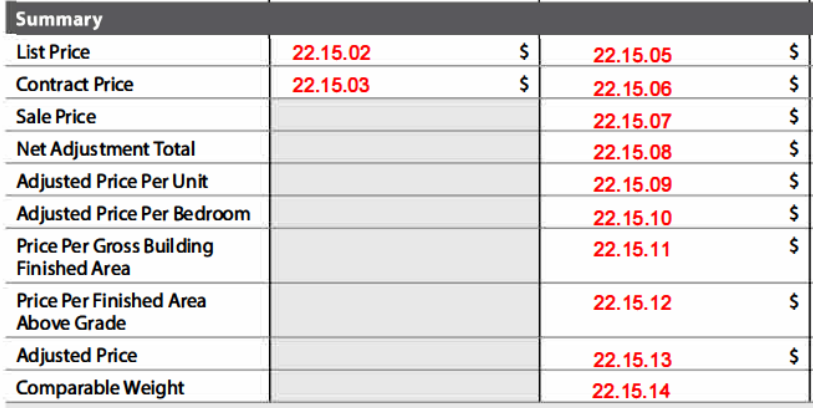
Sales Comparison Approach: Summary
| Report Field ID | Report Label | When Row Displays | When to Include for each Comparable | Allowable Answers / Format | Origin of Subject Property Information | Adjustable Row | Definition / Additional Guidance |
|---|---|---|---|---|---|---|---|
| 22.15.02 22.15.05 |
List Price | Always | If available | Dollar amount | Subject Listing Information - List Price 19.009 for most recent listing |
No | List Price: The last known list price for the transaction. This row redisplays from the General Information subsection 22.01.02, 22.01.20. |
| 22.15.06 | Contract Price | When the Assignment Reason = "Purchase" or "Construction" or "Short Sale" for the Subject, or if relevant | Required when Listing Status is Pending, and the row is included in the sales comparison grid | Yes | No | Contract Price Unknown is only applicable to comparables | No | Contract Price Unknown - Yes (Unknown - the comparable has been included in the sales grid, but the contract price is unknown.) - No (Contract Price is known and must be provided) If relevant, this row redisplays from the General Information subsection 22.01.04, 22.01.22. |
| 22.15.03 22.15.06 |
Contract Price | When the Assignment Reason = "Purchase" or "Construction" or "Short Sale" for the Subject, or if relevant | Required if Contract Price Unknown is No | Dollar amount | Sales Contract - Contract Price 20.004 |
No | |
| 22.15.07 | Sale Price | Always | Required if Listing Status is Settled Sale | Dollar amount | Sale Price is only applicable to comparables | No | This row redisplays from the General Information subsection 22.01.23. |
| 22.15.08 | Net Adjustment Total | Always | Always required | Dollar amount | Net Adjustment Total is only applicable to comparables | No | Calculated: The sum of all Adjustment Amounts for the comparable. Can be positive, negative, or 0. |
| 22.15.09 | Adjusted Price Per Unit | When Units Excluding ADUs is more than 1 for the subject or any comparable | Required if Units Excluding ADUs is more than 1 | Dollar amount | Adjusted Price Per Unit is only applicable to comparables | No | Calculated: Adjusted Price of Comparable / Units Excluding ADUs |
| 22.15.10 | Adjusted Price Per Bedroom | When Units Excluding ADUs is more than 1 for the subject or any comparable | Required if Units Excluding ADUs is more than 1 | Dollar amount | Adjusted Price Per Bedroom is only applicable to comparables | No | Calculated: Adjusted Price of Comparables / Number of Bedrooms in Units including ADUs Note: Bedrooms that are not associated with a unit or an ADU are not included in this calculation. |
| 22.15.11 | Price Per Gross Building Finished Area | When Units Excluding ADUs is more than 1 for the subject | Required if Units Excluding ADUs is more than 1 for the subject | Dollar amount | Price Per Gross Building Finished Area is only applicable to comparables | No | Calculated: Price / Gross Building Finished Area 22.05.25 Price is defined as follows in this calculation: - Use Sale Price if the comparable is a settled sale. - Otherwise, use Contract Price if known. - Otherwise, use List Price. |
| 22.15.12 | Price Per Finished Area Above Grade | When Units Excluding ADUs is 1 and there is Finished Area Above Grade or Finished Area Above Grade (Nonstandard) for the subject or any comparable | Required if Units Excluding ADUs is 1 and there is finished area above grade (standard or nonstandard) | Dollar amount | Price Per Finished Area Above Grade is only applicable to comparables | No | Calculated: Price / (Finished Area Above Grade 22.07.30 + Finished Area Above Grade (Nonstandard) 22.07.32 for all units including ADUs) Price is defined as follows in this calculation: - Use Sale Price if the comparable is a settled sale. - Otherwise, use Contract Price if known. - Otherwise, use List Price. Note: - Noncontinuous finished area is not included. |
| 22.15.13 | Adjusted Price | Always | Always required | Dollar amount | Adjusted Price is only applicable to comparables | No | Adjusted Price of Comparable Calculated: - Sale Price + Net Adjustment Total (if Listing Status is Settled Sale) - List Price + Net Adjustment Total (if Listing Status is not Settled Sale) |
| 22.15.14 | Comparable Weight | Always | Always required | Choose an allowable answer from table (Comparable Weight) | Comparable Weight is only applicable to comparables | No | Comparable Weight: The relative emphasis given to the comparable by the appraiser in determining the indicated value by the sales comparison approach. - Most - Less - No Weight Examples of scenarios with 3 comparables: - The appraiser relied primarily on 2 comparables that were given equal consideration and included a third comparable as supporting the data. Select Most, Most, and Less. - The appraiser relied primarily on 1 comparable that was given most consideration, and included 2 comparables that were considered to be representative but less relevant than the primary comparable. Select Most, Less, and Less. - All comparables were equally considered good market indicators. Select Most, Most, and Most. |
Comparable Weight - Choose one answer for each Comparable
| Allowable Answer | Definition / Additional Guidance |
|---|---|
| Most | The contribution of the comparable was given more or most emphasis compared to other comparables. |
| Less | The contribution of the comparable was given less emphasis than comparables weighted as Most. |
| No Weight | The comparable was included but given no weight. Example: The property is similar to the subject but was given no weight due to extenuating circumstances, such as a model match that was not a typical market transaction. Note: Do not select this answer if a property was considered (but not included in the sales grid) to demonstrate a special or specific feature, but overall the property was not considered significant enough to affect value. These should be included in the Additional Properties Analyzed Not Used subsection. |
Indicated Value by Sales Comparison Approach#

Sales Comparison Approach - Indicated Value by Sales Comparison Approach
| Report Field ID | Report Label | When to Include | Allowable Answers / Format | Definition / Additional Guidance |
|---|---|---|---|---|
| 22.15.15 | Indicated Value | Always required | Dollar amount | The indicated value of the subject property as determined by the Sales Comparison Approach method of property valuation. |
Reconciliation of Sales Comparison Approach#

Sales Comparison Approach - Reconciliation of Sales Comparison Approach
| Report Field ID | Report Label | When to Include | Allowable Answers / Format | Definition / Additional Guidance |
|---|---|---|---|---|
| 22.16.01 | Reconciliation of Sales Comparison Approach | Always required | Free-form | Report additional details and analysis to support conclusions, including how Comparable Weight was determined. Note: Overall reconciliation of value is reported in the Reconciliation section. |
Additional Properties Analyzed Not Used#
The Additional Properties Analyzed Not Used subsection displays when relevant:
- Initially, for the appraiser to provide additional context, or
- As part of any reconsideration process
Note: Do not include land sales here. When relevant, these are reported in the Site Valuation Methodology subsection of Site (4.105-4.115), or in Cost Approach (25.040-25.050).

Sales Comparison Approach - Additional Properties Analyzed Not Used
| Report Field ID | Report Label | When to Include | Allowable Answers / Format | Definition / Additional Guidance |
|---|---|---|---|---|
| 22.17.01 | # | Required for each additional property | 1, 2, 3 … | |
| 22.17.02 | Property Address | Required for each additional property | Free-form, in format that conforms to address standards in USPS Publication 28, Postal Addressing Standards | Property Address |
| 22.17.03 | Sale Date | If available when Listing Status is Settled Sale | mm/dd/yyyy | |
| 22.17.04 | Status | Required for each additional property | Choose an allowable answer from the Definition / Additional Guidance column | - Active - Off Market - Pending - Settled Sale |
| Not on Report | This is an appraiser input that does not display | Required for each additional property | Yes | No | Reconsideration Requested Indicates whether the client has requested the appraiser to consider this additional property in the Sales Comparison analysis after the appraiser submitted their analysis. |
| 22.17.05 | Reason Not Used | Required for each additional property | Choose an allowable answer from the Definition / Additional Guidance column | - Accessory Dwelling Unit - Age - Amenities - Area Below Grade - Bathroom Count - Bedroom Count - Condition - Dated Sale - Design or Style Variance - Finished Area - Gross Building Area - Lot Size - Outbuildings - Proximity - Quality - Sale or Transfer Type - Site Influence - Other (Describe) |
| 22.17.06 | Comment | Required for each additional property | Free-form | Additional details and analysis to support the reason for not including in the sales comparison grid. |
Sales Comparison Map#
Sales Comparison Approach - Sales Comparison Map
| Report Field ID | Report Label | When to Include | Allowable Answers / Format | Definition / Additional Guidance |
|---|---|---|---|---|
| See iGuide | Sales Comparison Map | Always required | Image | A map showing the subject and all sales comparables must be provided. |
Sales Comparison Approach Exhibits#
The Sales Comparison Approach Exhibits subsection always displays.
Sales Comparison Approach Exhibits
| Report Field ID | Report Label | When to Include | Allowable Answers / Format | Definition / Additional Guidance |
|---|---|---|---|---|
| See iGuide | Sales Comparison Approach Exhibits | Always required | Photo or image | Property Photo Photos of the comparable properties display in this subsection with the Comparable #. The thumbnails from the top of the sales comparison grid are redisplayed, in addition to any other photos that are provided. A caption should be provided to further describe each photo. |