Section 24
Income Approach
Appendix F-1, page 305
The Income Approach section includes information about Gross Rent Multiplier (GRM) comparables (comps), market rent, and the GRM. The GRM uses the Total Monthly Market Rent for the subject as determined in the Rental Information section through the Comparable Rental Analysis subsection and reported in the Rent Schedule (23.01.21). The Income Approach section provides space for additional commentary and exhibits.
Notes:
- The comparable sales used to support the GRM comps may be different than those used in the Sales Comparison Approach. The Income Approach section enables the appraiser to report the sales used in the analysis of how the GRM for the subject was derived.
- If there is an Income Approach, there must also be a rent schedule (Rental Information section must be included).
- All comps used in the GRM comparison grid must be settled sales. Comparable listings may be provided as additional support for the GRM and are reported in Income Approach Commentary (24.025) instead of the GRM comparison grid.
Income Approach displays when Income Approach Developed by Appraiser is Yes, and the "When to Include" column in this chapter reflect this.
Income Approach Developed by Appraiser
| Report Field ID | Report Label | When to Include | Allowable Answers / Format | Definition / Additional Guidance |
|---|---|---|---|---|
| Not on Report | This is an appraiser input that does not display | Always required | Yes | No | Income Approach Developed by Appraiser - Yes (The Income Approach section is included) - No (The Income Approach section is not included) |
Gross Rent Multiplier Comparables#
Key Concepts#
The Gross Rent Multiplier Comparables subsection provides detailed information about the properties (GRM comps) that were used to determine the GRM for the subject property.
Subject Property Information in the Income Approach section#
Information previously entered for the subject property populates from the applicable section to Income Approach and does not have to be re-entered. The "Origin of Subject Property Information" column in this chapter shows the original location of the information.
There is other information that the appraiser must input directly into the Income Approach section.
Grayed out Cells#
Information that is never applicable for the subject property is grayed out in the GRM comparison grid.
Example:
- Data Source, Proximity to Subject and Comparable Weight are not applicable for the subject property and are always grayed out.

How Rows Display in the GRM Comparison Grid#
There are three ways that rows display in the GRM comparison grid depending on characteristics of the subject and / or comparables.
- Rows that always display (e.g., Property Address, Sale Price, and Gross Monthly Rent), or
- A row that displays if applicable based on property characteristics (Accessory Dwelling Units), or
- Rows that may display if relevant to support analysis and conclusions.
Examples:
| Report Label | Row Always Displays | Row Displays if Applicable (Conditionally Displays) |
Row Displays if Relevant (May Display) |
|---|---|---|---|
| Units Excluding ADUs | √ | ||
| Accessory Dwelling Units | When the subject or any GRM comparable has ADUs | ||
| Gross Building Finished Area | √ |
For a full list, see Appendix F-1: URAR Reference Guide Supplement - Summary of Rows in Comparable Grids.
General Guidance on Rows that May Display#
Some rows display on the GRM comparison grid if relevant:
- To report meaningful attributes, or
- To support conclusions, scope of work, or policy.
Notes:
- These rows must be brought into the GRM comparison grid when there is relevant and meaningful information for the subject and all comparables, and adding the row leads to credible results. Not reporting a meaningful attribute can be misleading by omission.
- These rows are indicated in this chapter with the Report Label in blue italics, and "If relevant" in the "When Row Displays" column.
Additional Rows#
One or more additional rows may be added to provide context and impactful details. These rows must only be used when atypical characteristics are observed. Do not add rows for information that is already available as a predefined row.
GRM Comparison Grid#
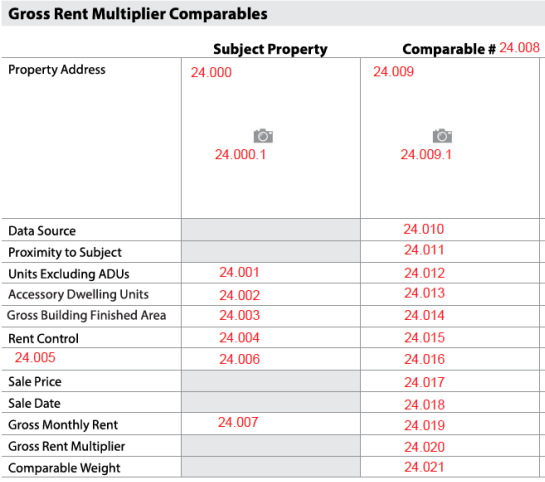
Income Approach: Gross Rent Multiplier Comparables
| Report Field ID | Report Label | When Row Displays | When to Include for each Comparable | Allowable Answers / Format | Origin of Subject Property Information | Adjustable Row | Definition / Additional Guidance |
|---|---|---|---|---|---|---|---|
| 24.008 | Comparable # | Always | Always required | 1, 2, 3 … | GRM Comparable # is only applicable to comparables | No | GRM Comparable # |
| 24.000 24.009 |
Property Address | Always | Always required | Free-form, in format that conforms to address standards in USPS Publication 28, Postal Addressing Standards | Subject Property - Property Address 3.000 |
No | |
| See iGuide | Property Address | Always | Always required | Photo | No | Property Photo Photo of the property, typically the front. Note: GRM comparable photos are required and redisplay in Income Approach Exhibits with the Comparable #. |
|
| 24.010 | Data Source | Always | Always required | Choose one or more allowable answers from the Definition / Additional Guidance column | GRM Comparable Data Source is only applicable to comparables | No | GRM Comparable Data Source - Assessor Record - Builder or Developer - Condominium Questionnaire - Cooperative Board - Cooperative Questionnaire - Data Aggregator - Exterior Inspection - HOA - Land Survey - Lender - MLS - Previous Appraisal File - Property Management Company - Property Owner - Property Tenant - Real Estate Agent - Other (Describe) |
| 24.010 | Data Source | Always | Required when GRM Comparable Data Source is MLS, or if applicable for other data sources | Free-form | Data Source Identifier is only applicable to comparables | No | Data Source Identifier: A unique number or identifier assigned to the GRM comparable by the data source. Notes: - If GRM Comparable Data Source is MLS, the MLS number is required. - If a data source has an identifier, it must be reported on the URAR. |
| 24.011 | Proximity to Subject | Always | Always required | Number of miles or kilometers | Proximity to Subject is only applicable to comparables | No | Proximity to Subject Note: Can be 0, such as when the comparable is in the same building as the subject property or an adjacent property. |
| 24.011 | Proximity to Subject | Always | Required if Proximity to Subject is not 0 | Choose an allowable answer from the Definition / Additional Guidance column | Direction from Subject to Comparable is only applicable to comparables | No | Direction from Subject to Comparable - E - N - NE - NW - S - SE - SW - W |
| 24.001 24.012 |
Units Excluding ADUs | Always | Always required | Number | Subject Property - Units Excluding ADUs 3.005 |
No | Number of separate living units on the property, not counting any ADUs. ADUs are entered in a separate field but are considered in the overall unit count. Examples: - A single-family property (with or without an ADU) is reported as 1 unit in this field. - A three-unit property (with or without an ADU) is reported as 3 units in this field. |
| 24.002 24.013 |
Accessory Dwelling Units | When the subject or any GRM comparable has ADUs | Always required | Number | Subject Property - Number of ADUs on Subject Property 3.006 |
No | Number of ADUs on Property Notes: - Enter zero (0) if there are no ADUs on the property. - ADUs may be in the dwelling, attached to the dwelling, or associated with a separate building (outbuilding). |
| 24.003 24.014 |
Gross Building Finished Area | If relevant | Required when the row is included in the GRM comparison grid | Number of square feet | The appraiser must enter the information for the subject property. Note: Displays in Sales Comparison Approach, if applicable - Gross Building Finished Area 22.05.04 |
No | Total Gross Building Finished Area for Property Gross Building Finished Area (GBFA) for all dwellings regardless of grade level and whether the finished area is standard or nonstandard; includes common finished areas, ADUs (in dwellings), and below grade finished areas. Note: Does not include unfinished area. |
| 24.004 24.015 |
Rent Control | If relevant | Required when the row is included in the GRM comparison grid | Yes | No | Property Subject to Rent Control does not populate from other sections; the appraiser must enter information for the subject property | No | Property Subject to Rent Control: Indicates whether the property is subject to rent control. |
| 24.006 24.016 |
Additional data element displays as the Report Label 24.005 | If relevant | Required when the row is included in the GRM comparison grid | Free-form | Additional Row does not populate from other sections; the appraiser must enter information for the subject property | No | Additional Row This row displays on the GRM comparison grid when an additional data element is needed that is not predefined. Note: Only put one data element in each row and add additional rows as needed for other data elements. |
| 24.017 | Sale Price | Always | Always required | Dollar amount | Sale Price is only applicable to comparables | No | |
| 24.018 | Sale Date | Always | Always required | mm/dd/yyyy | Sale Date is only applicable to comparables | No | |
| 24.019 | Gross Monthly Rent | Always | Always required | Yes | No | Is Gross Monthly Rent Estimated is only applicable to comparables | No | Is Gross Monthly Rent Estimated? - Yes (actual monthly rent is not available) - No Note: If Yes, Gross Monthly Rent displays with a tilde (~) for the GRM comparable, and the reason the actual rent could not be obtained must be reported in Income Approach Commentary. |
| 24.007 24.019 |
Gross Monthly Rent | Always | Always required | Dollar amount | Rental Information - Total Monthly Actual Rent 23.01.14 |
No | Gross Monthly Rent for all units, also referred to as Total Monthly Actual Rent Notes: - Report the monthly rent for each GRM comparable. - For the subject, the Gross Monthly Rent 24.007 might not equal the Total Monthly Market Rent 24.022. |
| 24.020 | Gross Rent Multiplier | Always | Always required | Number | Gross Rent Multiplier is only reported here for comparables | No | Calculated for each GRM comparable: Sale Price / Gross Monthly Rent Note: Gross Rent Multiplier for the subject property is reported in 24.023 |
| 24.021 | Comparable Weight | Always | Always required | Choose an allowable answer from table (Comparable Weight) | Comparable Weight is only applicable to comparables | No | The relative emphasis given to the GRM comparable by the appraiser in support of the indicated value by the income approach. Examples of scenarios with 3 comparables: - The appraiser relied primarily on 2 comparables that were given equal consideration and included a third comparable as supporting the data. Select Most, Most, and Less. - The appraiser relied primarily on 1 comparable that was given most consideration, and included 2 comparables that were considered to be representative but less relevant than the primary comparable. Select Most, Less, and Less. - All comparables were equally considered good market indicators. Select Most, Most, and Most. |
Comparable Weight - Choose one answer for each Comparable
| Allowable Answer | Definition / Additional Guidance |
|---|---|
| Most | The contribution of the comparable was given more or most emphasis compared to other comparables. |
| Less | The contribution of the comparable was given less emphasis than comparables weighted as Most. |
| No Weight | The comparable was included but given no weight. Example: The property is similar to the subject but was given no weight due to extenuating circumstances, such as a model match that was not a typical market transaction. |
Indicated Value by Income Approach#
The Indicated Value by Income Approach subsection always displays when Income Approach is included in the report. It references information about the subject property.

Income Approach - Indicated Value by Income Approach
| Report Field ID | Report Label | When to Include | Allowable Answers / Format | Definition / Additional Guidance |
|---|---|---|---|---|
| 24.022 | Total Monthly Market Rent | Always required | Dollar amount | Redisplays from the Rental Information section 23.01.21. Note: For the subject, the Gross Monthly Rent 24.007 may not equal the Total Monthly Market Rent 24.022. |
| 24.023 | x Gross Rent Multiplier | Always required | Number | The factor used in calculating the indicated value of the subject property when using the Income Approach method of property valuation. Note: This information is input by the appraiser based on their analysis of the Gross Rent Multipliers for the GRM comparables 24.020. |
| 24.024 | = Indicated Value by Income Approach | Always required | Dollar amount | Calculated: Total Monthly Market Rent x Gross Rent Multiplier |
Income Approach Commentary#
The Income Approach Commentary subsection always displays when Income Approach is included in the report.

Income Approach Commentary
| Report Field ID | Report Label | When to Include | Allowable Answers / Format | Definition / Additional Guidance |
|---|---|---|---|---|
| 24.025 | Income Approach Commentary | Always required | Free-form | Report additional details and analysis to support conclusions, including how Comparable Weight and Gross Rent Multiplier were determined. Note: Overall reconciliation of value is reported in the Reconciliation section. |
Income Approach Exhibits#
All photos or images related to the Income Approach section are displayed in the Income Approach Exhibits subsection.
Income Approach Exhibits
| Report Field ID | Report Label | When to Include | Allowable Answers / Format | Definition / Additional Guidance |
|---|---|---|---|---|
| See iGuide | Income Approach Exhibits | Always required | Image | Map of Subject and GRM Comparables A map of the subject and GRM comparables must be provided, which can display in Income Approach Exhibits with the caption "Map of GRM Comparables". An additional caption may be provided. Note: Can be provided as one map in the Sales Comparison Approach section. |
| See iGuide | Income Approach Exhibits | Always required | Photos or images | Property Photo Photos of the GRM comparable properties display in this subsection with the Comparable #. The thumbnails from the top of the GRM comparison grid are redisplayed, in addition to any other photos that are provided. An additional caption may be provided. |
| See iGuide | Income Approach Exhibits | If relevant | Photos or images | Income Approach Exhibit Other photos or images related to the Income Approach section may be provided, which display in Income Approach Exhibits. A caption should be provided to further describe the photo or image. |