Section 10
Unit Interior - [Outbuilding Type] - [Structure Identifier] - [Unit Identifier]
Appendix B-1, page 188
The Unit Interior section describes the interior of each unit (including an ADU) and provides space for commentary and exhibits to support the description, and to report any defects, damages, or deficiencies.
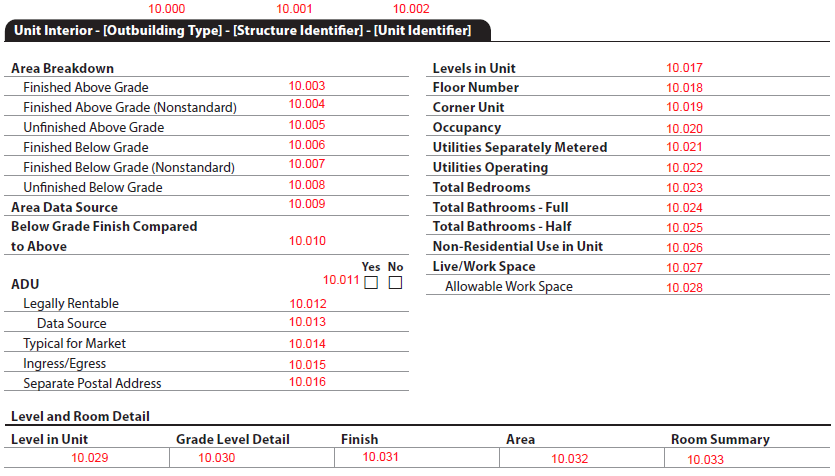
The Unit Interior section always displays.
- When there is a single living unit (LivingUnitExcludingADUCount = 1 AND AccessoryDwellingUnitTotalCount = 0), the Unit Interior section displays after the Dwelling Exterior section.
- When there are multiple living units (LivingUnitExcludingADUCount > 1 AND AccessoryDwellingUnitTotalCount = 0), the section displays after the applicable Dwelling Exterior section. Reference the Appendix D-1: 2- to 4-Unit Sample Scenario for an example.
- When there are ADUs (AccessoryDwellingUnitTotalCount > 0)
- In a dwelling, the section displays after the applicable Dwelling Exterior section. Reference Appendix D-1: SF4 for an example.
- In an outbuilding, the section displays after the applicable Outbuilding section. Reference Appendix D-1: SF3 for an example.
The Unit Interior section header provides context as to where the unit is located. (Figure 10 - 1)
Figure 10 - 1

Unit Interior: Section Header
| Report Field ID | Report Label | Unique ID | MISMO Data Point/Attribute Name | Display Rules |
|---|---|---|---|---|
| Unit Interior - [Outbuilding Type] - [Structure Identifier] - [Unit Identifier] | Black tab always displays - - When there is only one Dwelling Unit, display black tab as 'Unit Interior' - - When there are multiple Dwelling Units, display black tab as 'Unit Interior' - [Outbuilding Type] - [Structure Identifier] - [Unit Identifier] as applicable. |
|||
| 10.000 | Outbuilding Type | 0300.0025 | OutbuildingType | Display when ImprovementType = "Outbuilding" |
| 10.001 | Structure Identifier | 0300.0101 | StructureIdentifier | Display when ImprovementType = "Dwelling" AND LivingUnitExcludingADUCount > 1 - Structure Identifier redisplays from the Dwelling Exterior or Outbuilding sections. |
| 10.002 | Unit Identifier | 0700.0114 | UnitIdentifier | Display when LivingUnitExcludingADUCount > 1 OR AccessoryDwellingUnitTotalCount > 0 |
Section Header Examples#
- A single-family property with only one unit and no ADU would display 'Unit Interior' (Figure 10 - 2)
Figure 10 - 2

- An ADU in a Detached Garage might display 'Unit Interior - Detached Garage - ADU' (Figure 10 - 3)
- OutbuildingType = "Other"
- OutbuildingTypeOtherDescription = "ADUGarage"
- UnitIdentifier = "ADU"
Figure 10 - 3

- A unit in a 2-4 with one Dwelling might display 'Unit Interior - Unit 3' (Figure 10 - 4)
- UnitIdentifier= "Unit 3"
Figure 10 - 4

- A unit in a 2-4 with multiple Dwellings might display 'Unit Interior - Building 2 - Unit 2' (Figure 10 - 5)
- StructureIdentifier = "Building 2"
- UnitIdentifier= "Unit 2"
Figure 10 - 5

Unit Interior: General Information - Area Breakdown and Data Source, Finish of Below Grade Areas
| Report Field ID | Report Label | Unique ID | MISMO Data Point/Attribute Name | Display Rules |
|---|---|---|---|---|
| Area Breakdown (Figure 10 - 6) | Always displays | |||
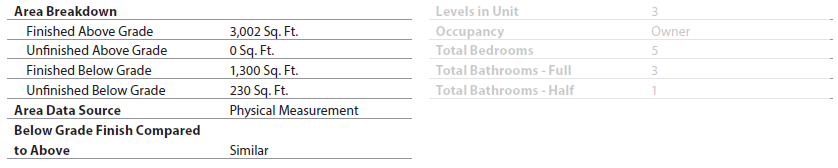
| 10.003 | Finished Above Grade | 0700.0140 | UnitStandardAboveGradeFinishedAreaMeasure | - Display Area and Unit of Measure in same cell (example: 3,002 Sq. Ft. ) - Display even if zero |
| @UnitOfMeasureType | ||||
| 10.004 | Finished Above Grade (Nonstandard) | 0700.0141 | UnitNonStandardAboveGradeFinishedAreaMeasure | - Display Area and Unit of Measure in same cell - If zero, do not display the row |
| @UnitOfMeasureType | ||||
| 10.005 | Unfinished Above Grade | 0700.0142 | UnitAboveGradeUnfinishedAreaMeasure | - Display Area and Unit of Measure in same cell - Display even if zero |
| @UnitOfMeasureType | ||||
| 10.006 | Finished Below Grade | 0700.0143 | UnitStandardBelowGradeFinishedAreaMeasure | - Display Area and Unit of Measure in same cell - Display even if zero |
| @UnitOfMeasureType | ||||
| 10.007 | Finished Below Grade (Nonstandard) | 1800.0398 | UnitNonStandardBelowGradeFinishedAreaMeasure | - Display Area and Unit of Measure in same cell - If zero, do not display the row |
| @UnitOfMeasureType | ||||
| 10.008 | Unfinished Below Grade | 0700.0144 | UnitBelowGradeUnfinishedAreaMeasure | - Display Area and Unit of Measure in same cell - Display even if zero |
| @UnitOfMeasureType | ||||
| Area Data Source/Below Grade Finish Compared to Above | Always displays | |||
| 10.009 | Area Data Source | 0700.0125 | DataSourceType | Always displays area data source(s). If there are multiple, display as stacked. - An arcrole is required for each data source from DATA_SOURCE_n to PROPERTY_UNIT_AREA_n |
| 10.010 | Below Grade Finish Compared to Above | 0700.0064 | UnitBelowGradeFinishComparisonType | Display when (UnitStandardBelowGradeFinishedAreaMeasure > 0 OR UnitNonStandardBelowGradeFinishedAreaMeasure > 0) |
Figure 10 - 6



Unit Interior - ADU#
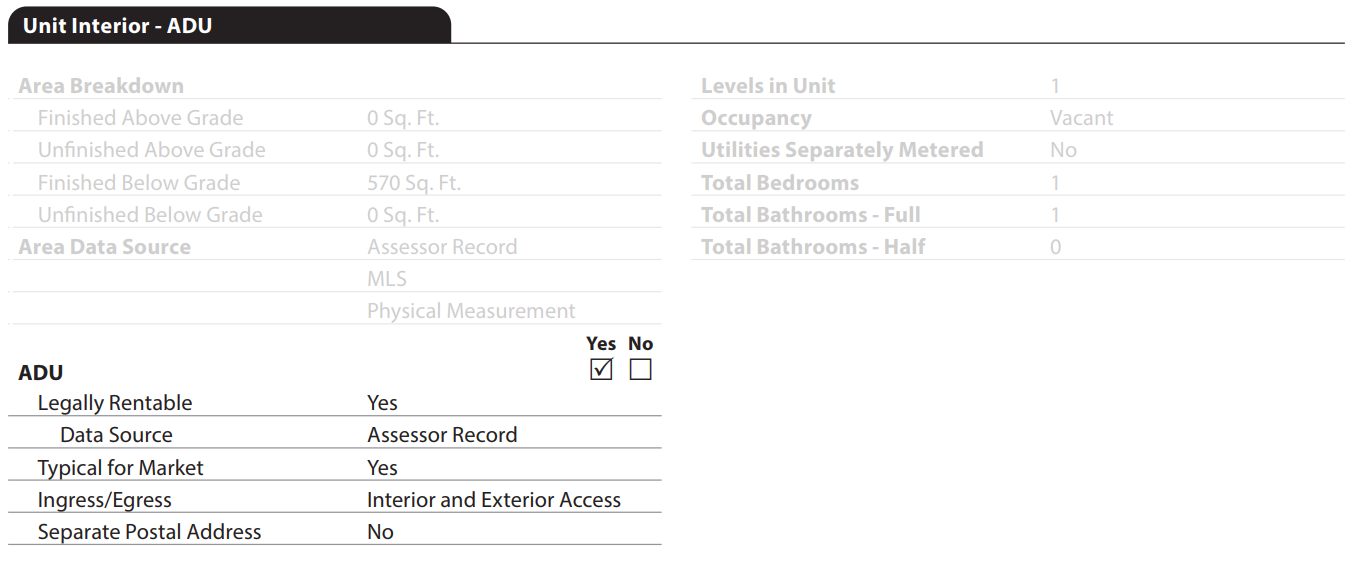
When the Accessory Dwelling Units - AccessoryDwellingUnitTotalCount (UID: 0100.0019, FID: 3.006) > "0", it indicates there is an ADU present in the subject property. The ADU checkboxes and related data will display in each instance of the Unit Interior section.
When there are no ADUs in the subject property, AccessoryDwellingUnitTotalCount (UID: 0100.0019, FID: 3.006) = "0", the ADU checkboxes and related data do not display.
Unit Interior: General Information - ADU (Figure 10 - 7)
| Report Field ID | Report Label | Unique ID | MISMO Data Point/Attribute Name | Display Rules |
|---|---|---|---|---|
| 10.011 | ADU | 0700.0089 | AccessoryDwellingUnitIndicator | Display checkboxes on each instance of Unit Interior when AccessoryDwellingUnitTotalCount > 0 - When AccessoryDwellingUnitTotalCount = "0" checkboxes do not display |
| 10.012 | Legally Rentable | 0700.0098 | AccessoryDwellingUnitLegallyRentableIndicator | Display when AccessoryDwellingUnitIndicator = "true" |
| 10.013 | Data Source | 0700.0125 | DataSourceType | Display when AccessoryDwellingUnitLegallyRentableIndicator = "true" If there are multiple, display as stacked - An arcrole is required for each data source, from DATA_SOURCE_n to AccessoryDwellingUnitLegallyRentableIndicator_n |
| 10.014 | Typical for Market | 0700.0088 | AccessoryDwellingUnitTypicalToMarketIndicator | Display when AccessoryDwellingUnitIndicator = "true" |
| 10.015 | Ingress/Egress | 0700.0091 | AccessType | |
| 10.016 | Separate Postal Address | 0700.0090 | SeparatePostalAddressIndicator |
Figure 10 - 7
Unit Interior: General Information
| Report Field ID | Report Label | Unique ID | MISMO Data Point/Attribute Name | Display Rules |
|---|---|---|---|---|
| 10.017 | Levels in Unit | 0700.0063 | LevelCount | Always displays |
| 10.018 | Floor Number | 0700.0060 | FloorIdentifier | Display when (StructuralDesignType = "Lowrise" OR "Midrise" OR "Highrise") or exists. |
| 10.019 | Corner Unit | 0700.0058 | CornerUnitIndicator | |
| 10.020 | Occupancy | 0700.0070 | UnitOccupancyType | Always displays |
| 10.021 | Utilities Separately Metered | 0700.0072 | UtilitiesMeteredSeparatelyIndicator | Display when LivingUnitExcludingADUCount > 1 OR AccessoryDwellingUnitTotalCount > 0 |
| 10.022 | Utilities Operating | 0700.0068 | UnitUtilitiesOperatingIndicator | Display when UnitOccupancyType = "Vacant" AND (GovernmentAgencyAppraisalType = "FHA" OR "USDA") |
| 10.023 | Total Bedrooms | 0700.0118 | BedroomCount | Always displays - Provide the total count of full baths, half baths, and bedrooms per unit - Must match the Room Summary in the "Level and Room Detail" table - Can be delivered as "0" |
| 10.024 | Total Bathrooms - Full | 0700.0119 | FullBathroomCount | |
| 10.025 | Total Bathrooms - Half | 0700.0120 | HalfBathroomCount | |
| 10.026 | Non-Residential Use in Unit | 0700.0130 | UnitMixedUsageIndicator | Display when LandOwnedInCommonIndicator (UID: 0100.0047, FID: 3.015) = "true" |
| 10.027 | Live/Work Space | 0700.0100 | AllowableLiveWorkSpaceIndicator | |
| 10.028 | Allowable Work Space | 0700.0101 | AllowableWorkSpaceAreaMeasure | Display when AllowableLiveWorkSpaceIndicator = "true" |
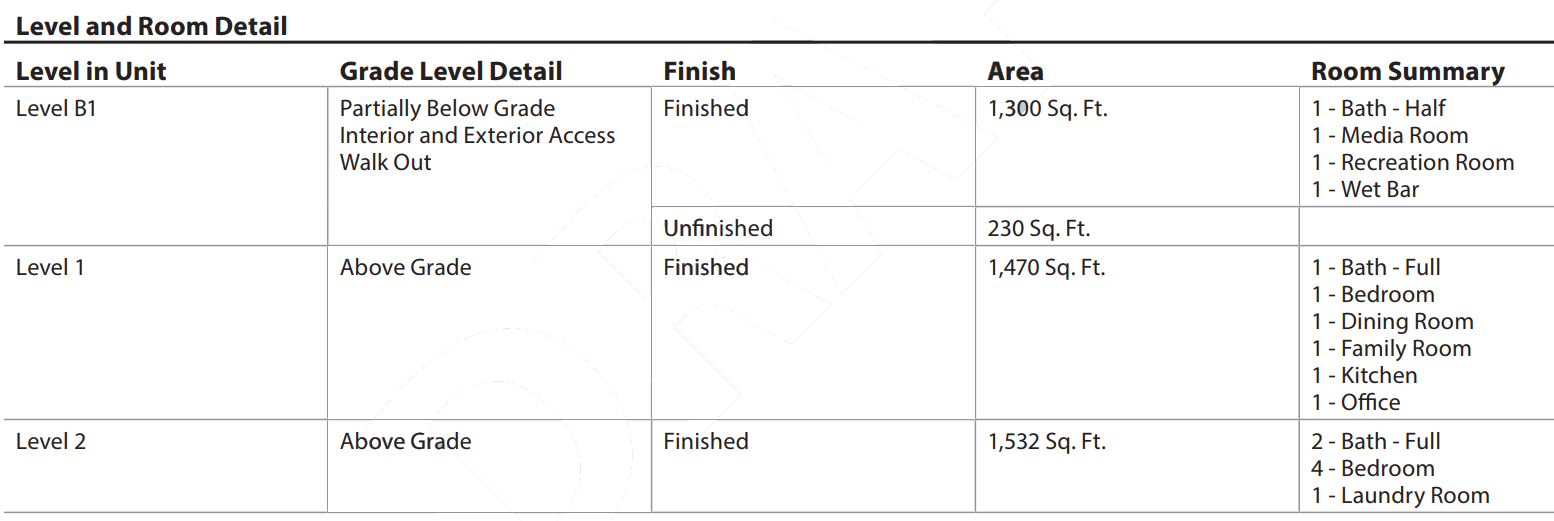
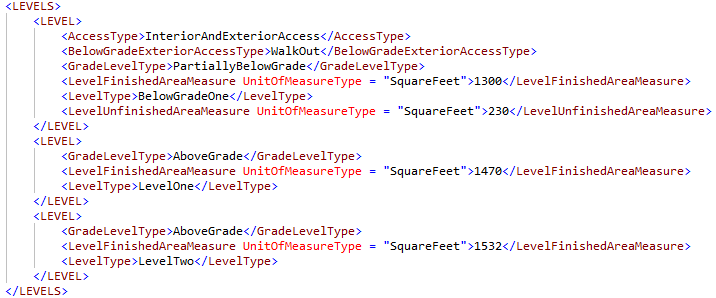
Unit Interior: Level and Room Detail (Figure 10 - 8)
| Report Field ID | Report Label | Unique ID | MISMO Data Point/Attribute Name | Display Rules |
|---|---|---|---|---|
| 10.029 | Level in Unit | 0700.0030 | LevelType | Always displays and repeats for each level - Display in order from the lowest grade to the highest. Example: B2, B1, 1, 2. |
| 10.030 | Grade Level Detail | 0700.0026 | AccessType | Display when GradeLevelType = "FullyBelowGrade" OR "PartiallyBelowGrade" |
| 0700.0027 | BelowGradeExteriorAccessType | Display when AccessType = "ExteriorAccessOnly" OR "InteriorAndExteriorAccess" | ||
| 0700.0029 | GradeLevelType | Always displays | ||
| 10.031 | Finish | 0700.0137 | LevelFinishedAreaMeasure | Display when Finished Area > 0. If 0, the row does not display. - Display text "Finished" in the Finish column - Display Area and Unit of Measure in same cell in the Area column - Finished Area repeats for each level |
| 10.032 | Area | @UnitOfMeasureType | ||
| 10.031 | Finish | 0700.0138 | LevelUnfinishedAreaMeasure | Display when Unfinished Area > 0. If 0, the row does not display. - Display text "Unfinished" in the Finish column - Display Area and Unit of Measure in same cell in the Area column - Unfinished Area repeats for each level |
| 10.032 | Area | @UnitOfMeasureType | ||
| 10.033 | Room Summary | 0700.0035 | RoomType | The room count in the 'Level and Room Detail' table is not delivered in data but is derived by counting the number of each RoomType per LevelType. Display the number followed by a dash, then the display value for the room type. (Figure 10 - 8) |
Figure 10 - 8
Quality and Condition#
The Quality and Condition subsection always displays.
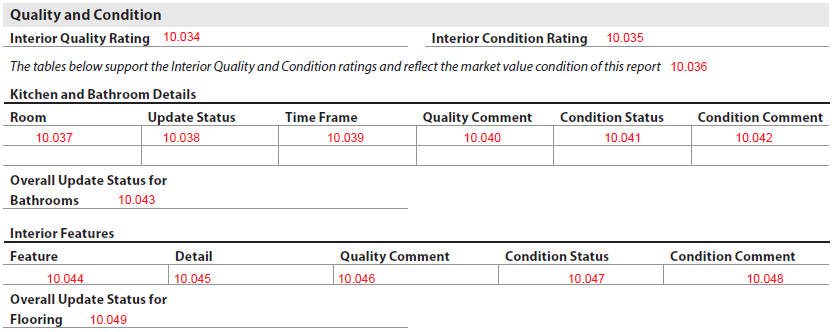
The interior quality and condition ratings in this subsection provide support to the Overall Quality and Condition Ratings section.
- Interior Quality Rating - InteriorQualityRatingCode (UID: 0700.0067, FID: 10.034)
- Interior Condition Rating - InteriorConditionRatingCode (UID: 0700.0066, FID: 10.035)
Kitchen and Bathroom Details#
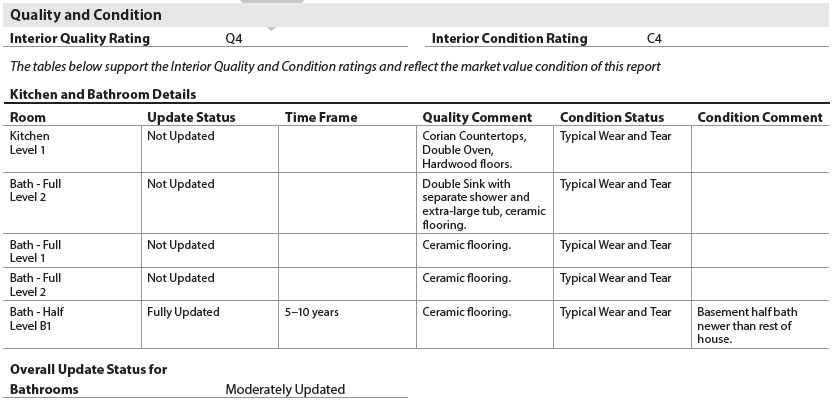
The Kitchen and Bathroom Details table always displays in Unit Interior. The following text always displays above the table in italics, "The tables below support the Interior Quality and Condition ratings and reflect the market value condition of this report".
This section provides additional information about the Kitchen(s) and Bath(s) indicated in the Level and Room Detail table from the previous section.
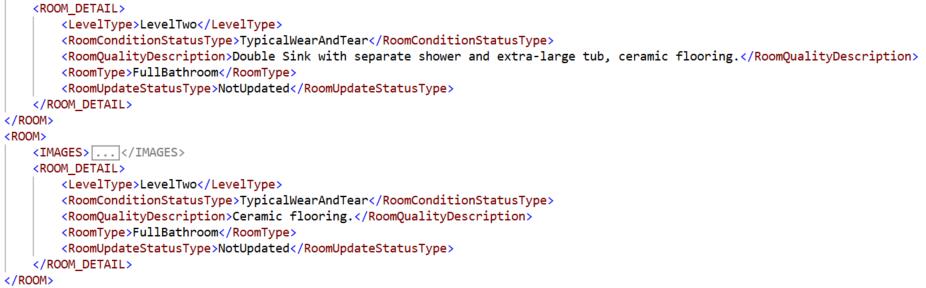
When displaying Room - RoomType (UID: 0700.0035, FID: 10.037) and Level - LevelType (UID: 0700.0121, FID: 10.037):
- "Kitchen" always displays first
- If there are multiple kitchens in the unit, each will display on a separate row
- "Bath - Full" and "Bath - Half", if applicable, display after Kitchen(s)
- Each room must specify the location in terms of Level (Figure 10 - 9)
- The level displays in the same cell under the room
Figure 10 - 9
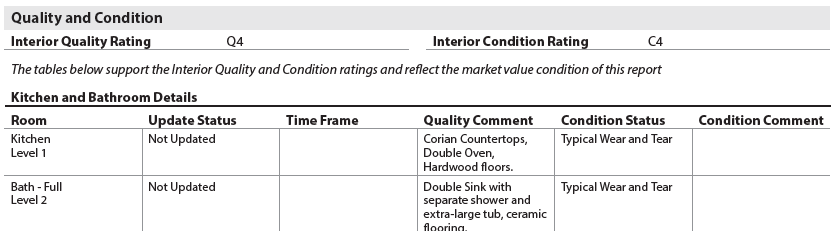
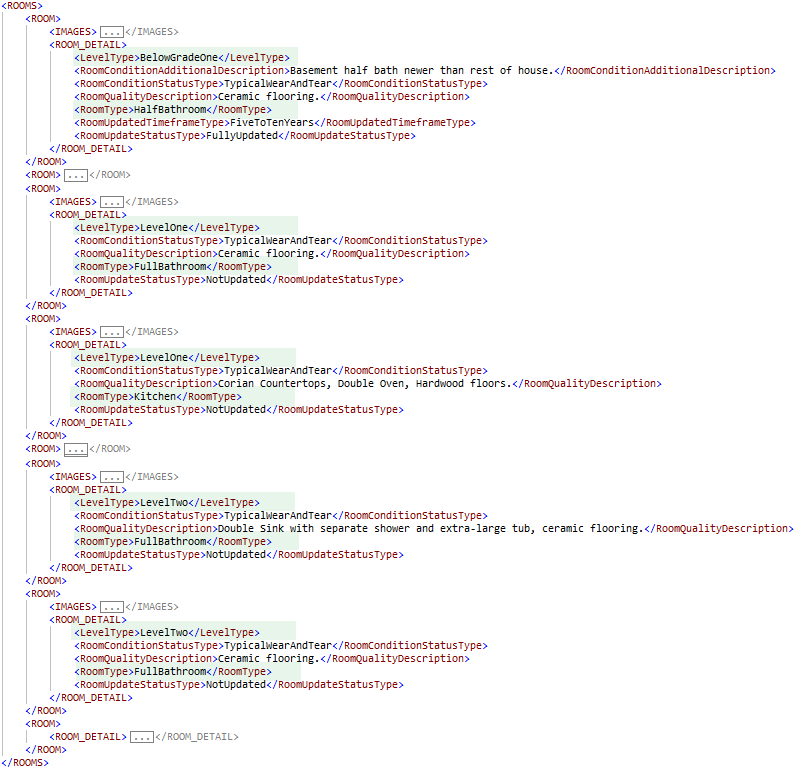
When RoomType = "Kitchen" OR "FullBathroom" OR "HalfBathroom", additional details are required. Each kitchen and bath will display on a separate row. (Figure 10 - 10)
Unit Interior: Quality and Condition - Kitchen and Bathroom Details
| Report Field ID | Report Label | Unique ID | MISMO Data Point Name | Display Rules |
|---|---|---|---|---|
| 10.037 | Room | 0700.0035 | RoomType | Display for each Kitchen and Bath in unit |
| 0700.0121 | LevelType | |||
| 10.038 | Update Status | 0700.0036 | RoomUpdateStatusType | Display for each Kitchen and Bath in unit |
| 10.039 | Time Frame | 0700.0034 | RoomUpdatedTimeframeType | Display when RoomUpdateStatusType = "FullyUpdated" OR "PartiallyUpdated" |
| 10.040 | Quality Comment | 0700.0044 | RoomQualityDescription | Display when provided |
| 10.041 | Condition Status | 0700.0033 | RoomConditionStatusType | Display for each Kitchen and Bath in unit |
| 10.042 | Condition Comment | 0700.0113 | RoomConditionAdditionalDescription | Display when provided |
| 10.043 | Overall Update Status for Bathrooms | 0700.0117 | OverallBathroomsUpdateStatusType | Always display |
Figure 10 - 10
Interior Features#
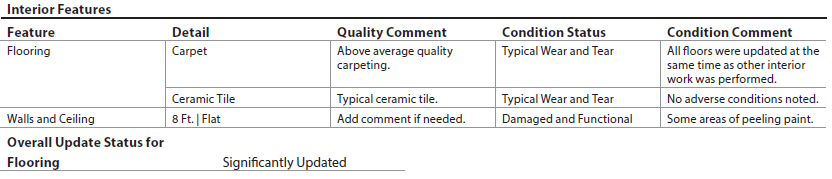
The Interior Features table provides specifics about the interior quality and condition ratings. It includes a row for each of the following:
- Flooring
- Walls and Ceiling
- Other, if provided
Unit Interior: Quality and Condition
| Report Field ID | Report Label | Unique ID | MISMO Data Point Name | Display Rules |
|---|---|---|---|---|
| 10.044 | Flooring | 0700.0046 | ImprovementComponentType = "Flooring" | Always displays |
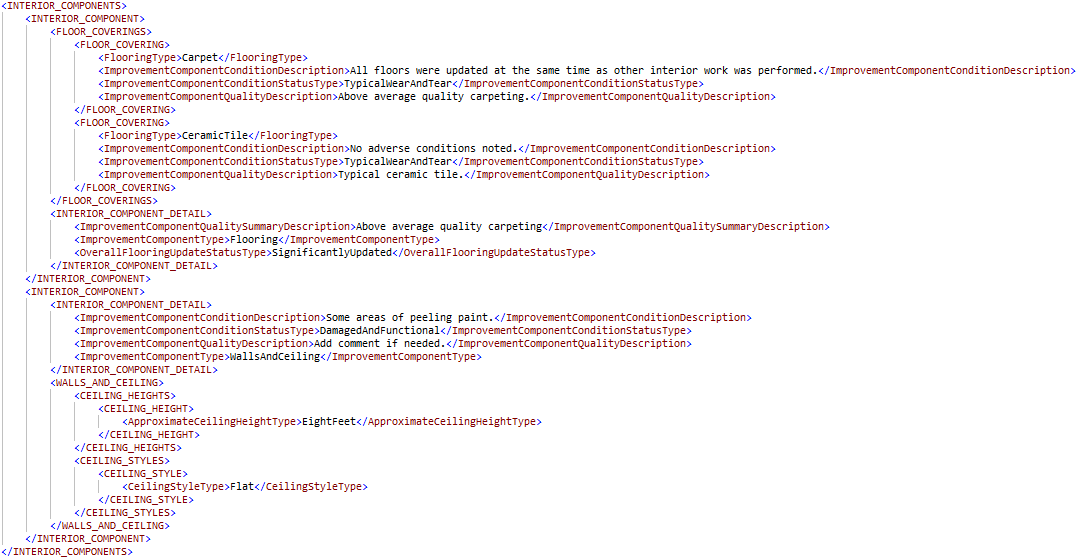
| 10.045 | Detail | 0700.0041 | FlooringType | Display when ImprovementComponentType = "Flooring" - When there are multiple types of flooring in the unit, each flooring type displays on a separate row. (Figure 10 - 11) |
| 10.046 | Quality Comment | 0700.0106 | ImprovementComponentQualityDescription | Display when ImprovementComponentType = "Flooring" AND Exists |
| 10.047 | Condition Status | 0700.0104 | ImprovementComponentConditionStatusType | Display when ImprovementComponentType = "Flooring" |
| 10.048 | Condition Comment | 0700.0111 | ImprovementComponentConditionDescription | Display when ImprovementComponentType = "Flooring" AND Exists |
| 10.049 | Overall Update Status for Flooring | 0700.0122 | OverallFlooringUpdateStatusType | Display when ImprovementComponentType = "Flooring" |
| 10.044 | Walls and Ceiling | 0700.0046 | ImprovementComponentType = "WallsAndCeiling" | Always displays |
| 10.045 | Detail | 0700.0050 | ApproximateCeilingHeightType | Display when ImprovementComponentType = "WallsAndCeiling" Display all values of ApproximateCeilingHeightType separated by a "|" followed by all values of CeilingStyleType separated by a "|" Example: 8 Ft. | 9 Ft. | 2 or more stories | Cathedral | Coffered | Flat |
| 0700.0108 | CeilingStyleType | |||
| 10.046 | Quality Comment | 0700.0107 | ImprovementComponentQualityDescription | Display when ImprovementComponentType = "WallsAndCeiling" AND Exists |
| 10.047 | Condition Status | 0700.0045 | ImprovementComponentConditionStatusType | Display when ImprovementComponentType = "WallsAndCeiling" |
| 10.048 | Condition Comment | 0700.0112 | ImprovementComponentConditionDescription | Display when ImprovementComponentType = "WallsAndCeiling" AND Exists |
| 10.044 | Other (Describe) | 0700.0046 | ImprovementComponentType = "Other" | When ImprovementComponentType = "Other" the description displays |
| 10.045 | Detail | 0700.0043 | ImprovementComponentTypeAdditionalDescription | When ImprovementComponentType = "Other" |
| 10.046 | Quality Comment | 0700.0107 | ImprovementComponentQualityDescription | Display when ImprovementComponentType = "Other" AND Exists |
| 10.047 | Condition Status | 0700.0045 | ImprovementComponentConditionStatusType | Display when ImprovementComponentType "Other" |
| 10.048 | Condition Comment | 0700.0112 | ImprovementComponentConditionDescription | Display when ImprovementComponentType = "Other" AND Exists |
Figure 10 - 11
Accessibility Features for Individuals with Disabilities#
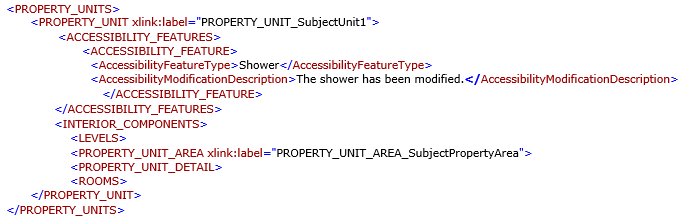
The Accessibility Features for Individuals with Disabilities subsection displays when Features for Individuals w/Disabilities - AccessibilityFeatureType (UID: 0700.0005, FID: 10.050) <> "None" AND ((ImprovementType = "Dwelling") OR (ImprovementType = "Outbuilding" AND OutbuildingRealPropertyIndicator = "true" AND AccessoryDwellingUnitIndicator = "true")).

Unit Interior: Accessibility Features for Individuals with Disabilities (Figure 10 - 12)
| Report Field ID | Report Label | Unique ID | MISMO Data Point Name | Display Rules |
|---|---|---|---|---|
| 10.050 | Features for Individuals w/Disabilities | 0700.0005 | AccessibilityFeatureType | Display when AccessibilityFeatureType <> "None" AND ((ImprovementType = "Dwelling") OR (ImprovementType = "Outbuilding" AND OutbuildingRealPropertyIndicator = "true" AND AccessoryDwellingUnitIndicator = "true")) - When there are multiple accessibility features, each feature will display on a separate row. |
| 10.051 | Comment | 0700.0007 | AccessibilityModificationDescription | Display when AccessibilityFeatureType <> "None" AND Exists |
Figure 10 - 12

Apparent Defects, Damages, Deficiencies (Unit Interior - [Outbuilding Type] - [Structure Identifier] - [Unit Identifier])#
The Apparent Defects, Damages, Deficiencies (Unit Interior) subsection always displays. (Figure 10 - 13)

Unit Interior: Apparent Defects, Damages, Deficiencies (Unit Interior)
| Report Field ID | Report Label | Unique ID | MISMO Data Point/Attribute Name | Display Rules |
|---|---|---|---|---|
| Apparent Defects, Damages, Deficiencies Unit Interior - [Outbuilding Type] - [Structure Identifier] - [Unit Identifier] | Subsection header (gray bar) always displays. - − The information will redisplay from the Unit Interior section header (black tab) when a specific unit has apparent defects, damages, deficiencies. - − When there is only one Dwelling Unit, display as 'Apparent Defects, Damages, Deficiencies - Unit Interior'. - − When there are multiple Dwelling Units, display as 'Apparent Defects, Damages, Deficiencies - Unit Interior' - [Outbuilding Type] - [Structure Identifier] - [Unit Identifier] as applicable. |
|||
| 10.052 | Outbuilding Type | 0300.0025 | OutbuildingType | Display when ImprovementType = "Outbuilding" |
| 10.053 | Structure Identifier | 0300.0101 | StructureIdentifier | Display when DwellingCount > 1 OR OutbuildingCount > 1 - Structure Identifier redisplays from the Dwelling Exterior or Outbuilding section. |
| 10.054 | Unit Identifier | 0700.0114 | UnitIdentifier | Display when LivingUnitExcludingADUCount > 1 OR AccessoryDwellingUnitTotalCount > 0 |
UnitInteriorDefectsExistIndicator (UID: 3900.0107, FID: 10.055)
- When false, display "None".
- When true, display static text in italics (FID: 10.055), "The items listed below represent the As Is condition as of the effective date of this report" and the table displays with the following required data for each apparent defect, damage, deficiency. (Figure 10 - 13)
Unit Interior - Apparent Defects, Damages, Deficiencies
| Report Field ID | Report Label | Unique ID | MISMO Data Point/Attribute Name | Display Rules |
|---|---|---|---|---|
| 10.056 | Feature | 3900.0130 | DefectComponentLabelType | Display when UnitInteriorDefectsExistIndicator = "true" |
| 10.057 | Location | 3900.0135 | DefectItemLocationType | |
| 10.058 | Description | 3900.0133 | DefectItemDescription | |
| 10.059 | Affects Soundness or Structural Integrity | 3900.0132 | DefectItemAffectsSoundnessStructuralIntegrityIndicator | |
| 10.060 | Recommended Action | 3900.0136 | DefectItemRecommendedActionType |
Figure 10 - 13

An arcrole is required for each apparent defect, damage, or deficiency identified in the interior of the unit from DEFECT_n to PROPERTY_UNIT_n. (See Arcrole Relationships - Unit Interior)
Unit Interior Commentary#
The Unit Interior Commentary subsection displays only when comments are provided. Any commentary must use UnitValuationCommentText (UID: 0700.0115, FID: 10.061)
Unit Interior Exhibits#
The Unit Interior Exhibits subsection displays when images are provided. All text must display above the image in bold font.
Level and Room Detail/Kitchen and Bathroom Details#
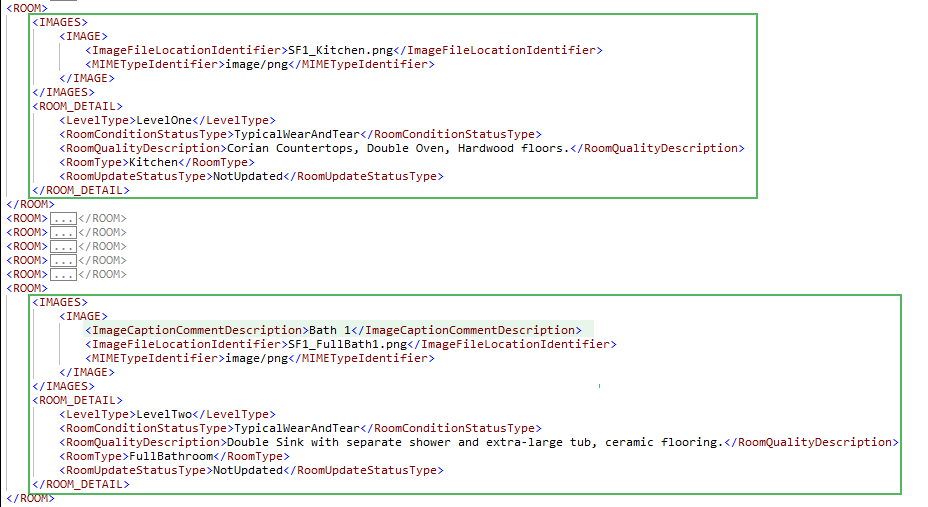
- Images provided for Level and Room Detail and Kitchen and Bathroom Details subsections must be delivered in the IMAGE container located in the instance of the ROOM container (based on RoomType) that represents the referenced room. For example, image data associated with the kitchen is included in the instance of the ROOM container where RoomType= "Kitchen".
- In Unit Interior Exhibits, display [Level - LevelType (UID: 0700.0121, FID: 10.033)] - [Room - RoomType (UID: 0700.0035, FID: 10.037)] in bold above the image.
- An additional image caption may be provided using ImageCaptionCommentDescription (UID: 1400.0780, FID: 10.033.2) and displays above the image following the Level - Room. (Figure 10 - 14)
Figure 10 - 14

Interior Features#
- Images provided for unit interior features (flooring, walls and ceiling, etc.,) of a living unit must be delivered in the IMAGES container under INTERIOR_COMPONENT container that represents the referenced interior feature.
- Display ImprovementComponentType (UID: 0700.0046, FID: 10.044.1) in bold above the image.
- An additional image caption may be provided using ImageCaptionCommentDescription (UID: 1400.0774, FID: 10.044.2) and displays above the image following the ImprovementComponentType.
Apparent Defects, Damages, Deficiencies#
- Images provided for Apparent Defects, Damages, Deficiencies (Unit Interior) are delivered in the IMAGE container located in the instance of the DEFECT container that represents the given defect.
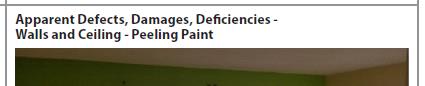
- The text "Apparent Defects, Damages, Deficiencies -" precedes the FeatureType (UID: 3900.0130, FID: 10.056) (Figure 10 - 15)
- An additional caption may be provided using ImageCaptionCommentDescription (UID: 1400.0929, FID: 10.056.2) and displays above the image following the FeatureType.
- In Figure 10 - 15, "Peeling Paint" is an additional caption.
Figure 10 - 15
Additional Exhibits#
- Other images provided must be delivered using ImageCategoryType (UID: 1400.0638, FID: 10.062.1) = "UnitInteriorExhibit"
- An image caption should be included using ImageCaptionCommentDescription (UID: 1400.0640, FID: 10.062.2)
Unit Interior - Arcrole Relationships#
Arcrole relationships establish "relationships" or linkages in the XML data file that may be visually obvious on the URAR Report. In the XML data specific instances of data points or containers must be connected to properly represent the information.
- Containers or datapoints to be linked are identified using "xlink:label."
- The RELATIONSHIP container holds the xlink:arcrole, xlink:from, and xlink:to attributes that describe the data relationships.
There are three arcrole relationships supported in the Unit Interior section.
- DATA_SOURCE to PROPERTY_UNIT_AREA
- DATA_SOURCE to AccessoryDwellingUnitLegallyRentableIndicator DATA_SOURCE to PROPERTY
- DEFECT to PROPERTY_UNIT
Data source to property unit area#
Provide the relationship that joins to the applicable instance of PROPERTY_UNIT_AREA (where the ValuationUseType = "SubjectProperty") to the data source used to determine the area of the unit.
| Unique ID | Parent Container | MISMO Attribute Name | Supported Attribute Enumerations |
|---|---|---|---|
| 0700.0131 | RELATIONSHIP | @xlink:arcrole | urn:fdc:mismo.org:2009:residential/DATA_SOURCE_IsDataSourceFor_PROPERTY_UNIT_AREA |
| 0700.0132 | RELATIONSHIP | @xlink:from | DATA_SOURCE_n |
| 0700.0133 | RELATIONSHIP | @xlink:to | PROPERTY_UNIT_AREA_n |
| 0700.0150 | PROPERTY_UNIT_AREA | @xlink:label | PROPERTY_UNIT_AREA_n |
| 0700.0124 | DATA_SOURCE | @xlink:label | DATA_SOURCE_n |
Data source to ADU legally rentable indicator#
Provide the relationship that joins the AccessoryDwellingUnitLegallyRentableIndicator data point (where the ValuationUseType = "SubjectProperty") to the data source used to determine the ADU is legally rentable.
| Unique ID | Parent Container | MISMO Attribute Name | Supported Attribute Enumerations |
|---|---|---|---|
| 0700.0134 | RELATIONSHIP | @xlink:arcrole | urn:fdc:mismo.org:2009:residential/DATA_SOURCE_IsDataSourceFor_AccessoryDwellingUnitLegallyRentableIndicator |
| 0700.0135 | RELATIONSHIP | @xlink:from | DATA_SOURCE_n |
| 0700.0136 | RELATIONSHIP | @xlink:to | AccessoryDwellingUnitLegallyRentableIndicator_n |
| 0700.0098 | PROPERTY_UNIT_DETAIL | @xlink:label | AccessoryDwellingUnitLegallyRentableIndicator_n |
| 0700.0124 | DATA_SOURCE | @xlink:label | DATA_SOURCE_n |
Defect to Property Unit arcrole#
Provide the relationship that joins the DEFECT to the applicable instance of PROPERTY_UNIT. One RELATIONSHIP container is required for each defect identified in the interior of the unit.
| Unique ID | Parent Container | MISMO Attribute Name | Supported Attribute Enumerations |
|---|---|---|---|
| 3900.0154 | RELATIONSHIP | @xlink:arcrole | urn:fdc:mismo.org:2009:residential/DEFECT ContainsDefectOf PROPERTY_UNIT |
| 3900.0155 | RELATIONSHIP | @xlink:from | DEFECT_n |
| 3900.0156 | RELATIONSHIP | @xlink:to | PROPERTY_UNIT_n |
| 3900.0129 | DEFECT | @xlink:label | DEFECT_n |
| 3900.0119 | PROPERTY_UNIT | @xlink:label | PROPERTY_UNIT_n |
Each defect reported in this section must be associated to the living unit where the defect was identified. i.e., DEFECT container must have an arcrole to the instance of the PROPERTY_UNIT container where the defect was identified.
The example below demonstrates the arcrole, there is a flooring defect (xlink:label = "Defect_FlooringDefect") that is related to subject property unit 1 (xlink:label = "PROPERTY_UNIT_SubjectUnit1").



Refer to the section Arcrole/Data Relationships in the MISMO XML Version 3.6 chapter for additional information.