Section 23
Rental Information
Appendix B-1, page 316
The Rental Information section includes information about the factors that influence rent and generate other income for the subject property and its rental comparables. This section provides space for commentary and exhibits.
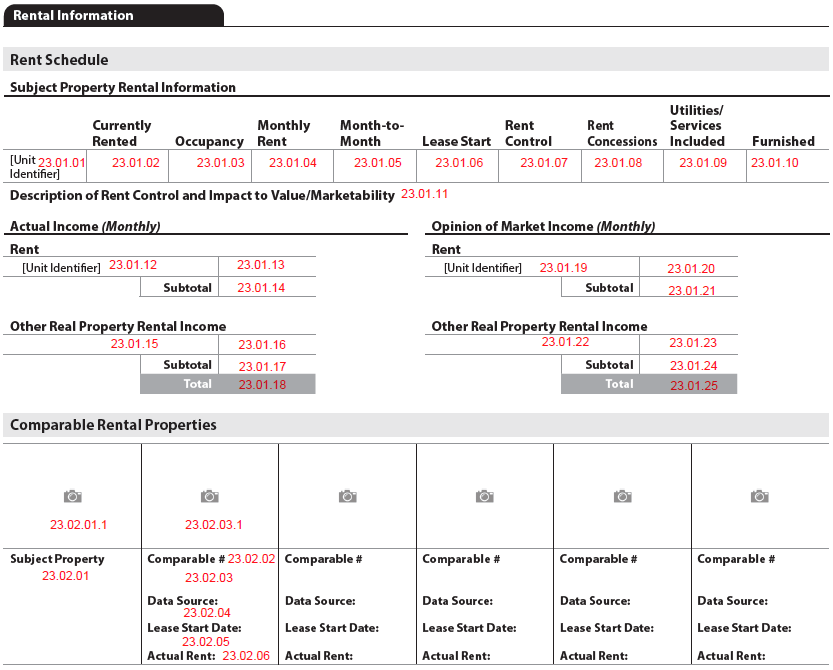
The Rental Information section displays when RentScheduleIndicator (UID: 1000.0031, FID: Not on report) = "true".
A subject property unit (including an ADU) is included in the Rental Information section when UnitIncludedInRentScheduleIndicator (UID: 0700.0065, FID: Not on report) = "true".
When there is an Income Approach included in the appraisal, Rental Information must be included.
Rent Schedule#
The Rent Schedule subsection always displays when the Rental Information section displays. It contains information about the subject property only.
Subject Property Rental Information#
The Subject Property Rental Information subsection always displays when the Rental Information section displays.
- For each subject property unit where UnitIncludedInRentScheduleIndicator (UID: 0700.0065, FID: Not on report) = "true", a new row displays in the table. The Unit Identifier (FID: 23.01.01) displays as the row header.
- The column headings in the table always display.

Rental Information: Subject Property Rental Information
| Report Field ID | Report Label | Unique ID | MISMO Data Point Name | Display Rules |
|---|---|---|---|---|
| 23.01.01 | No label | 0700.0114 | UnitIdentifier | When populated, redisplays from 10.002 |
| 23.01.02 | Currently Rented | 2000.0093 | UnitRentedIndicator | Must display |
| 23.01.03 | Occupancy | 0700.0070 | UnitOccupancyType | Redisplays from 10.020 |
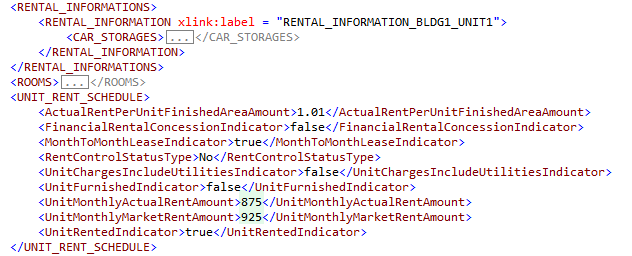
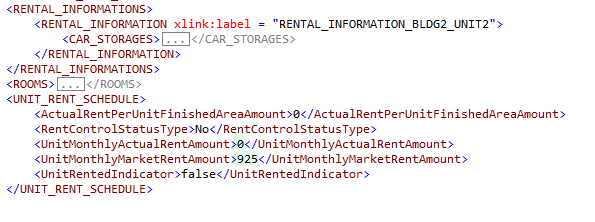
| 23.01.04 | Monthly Rent | 2000.0089 | UnitMonthlyActualRentAmount | Must display When UnitRentedIndicator = "false", this must be delivered as 0. |
| 23.01.05 | Month-to-Month | 2000.0087 | MonthToMonthLeaseIndicator | Display when UnitRentedIndicator = "true" |
| 23.01.06 | Lease Start | 2000.0086 | LeaseStartDate | Display when MonthToMonthLeaseIndicator = "false" and Exists |
| 23.01.07 | Rent Control | 2000.0088 | RentControlStatusType | Must display |
| 23.01.08 | Rent Concessions | 2000.0085 | FinancialRentalConcessionIndicator | Display when UnitRentedIndicator = "true" |
| 23.01.09 | Utilities/Services Included | 2000.0090 | UnitChargesIncludeUtilitiesIndicator | Display when UnitRentedIndicator = "true" |
| 23.01.10 | Furnished | 2000.0091 | UnitFurnishedIndicator | Display when UnitRentedIndicator = "true" |
| 23.01.11 | Description of Rent Control and Impact to Value/Marketability | 2000.0030 | RentControlDescription | Display when RentControlStatusType (UID: 2000.0088, FID: 23.01.07) = "true" for any unit in the table. A description of rent control for the subject property (overall, not for each unit). |
Actual Income (Monthly) and Opinion of Market Income (Monthly)#
The Actual Income (Monthly) and Opinion of Market Income (Monthly) follow the same layout. The left side collects actual information for each unit and the right side displays the opinion of market.
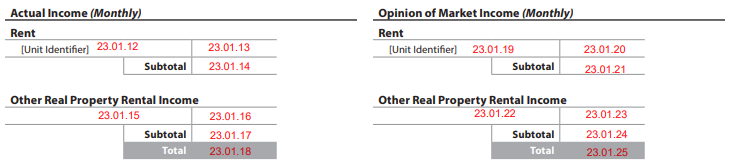
- Rent
- Unit Identifier displays for each subject property unit included in the rent schedule.
- Other Real Property Rental Income
- An Other Real Property Rental Income row displays for the actual income and opinion of market income.
- Subtotal
- Subtotals for actual and estimated income are captured in RENTAL_INFORMATION_SUMMARY_DETAIL.
- Total
- Totals for the actual and the opinion of market income are captured in RENTAL_INFORMATION_SUMMARY_DETAIL.
Rental Information: Actual Income & Opinion of Market Income
| Report Field ID | Report Label | Unique ID | MISMO Data Point Name | Display Rules |
|---|---|---|---|---|
| Actual Income (Monthly) | ||||
| Rent | ||||
| 23.01.12 | No label | 0700.0114 | UnitIdentifier | Redisplays from 10.002 and 23.01.01, when exists |
| 23.01.13 | No label | 2000.0089 | UnitMonthlyActualRentAmount | Redisplays from 23.01.04 Must display, deliver as zero if the unit is not currently rented |
| 23.01.14 | Subtotal | 2000.0032 | TotalMonthlyActualRentAmount | Must display Calculated: The sum of UnitMonthlyActualRentAmount (UID: 2000.089, FID: 23.01.13) for all units in the Rental Information section. |
| Other Real Property Rental Income | ||||
| 23.01.15 | No label | 2000.0022 | AdditionalRentalIncomeType | Always displays |
| 23.01.16 | No label | 2000.0024 | MonthlyActualAdditionalIncomeAmount | Always displays Note: Must be 0 if AdditionalRentalIncomeType is "None" |
| 23.01.17 | Subtotal | 2000.0031 | TotalMonthlyActualAdditionalIncomeAmount | Always displays Calculated: The sum of MonthlyActualAdditionalIncomeAmount (UID: 2000.024, FID: 23.01.16) for all instances of AdditionalRentalIncomeType |
| 23.01.18 | Total | 2000.0033 | TotalMonthlyActualIncomeAmount | Always displays Calculated: TotalMonthlyActualRentAmount (UID: 2000.0032, FID: 23.01.14) + TotalMonthlyActualAdditionalIncomeAmount (UID: 2000.0031, FID: 23.01.17) |
| Opinion of Market Income (Monthly) | ||||
| Rent | ||||
| 23.01.19 | No label | 0700.0114 | UnitIdentifier | Redisplays from 10.002 and 23.01.01, when exists |
| 23.01.20 | No label | 2000.0092 | UnitMonthlyMarketRentAmount | Redisplays from 23.03.23 Must display |
| 23.01.21 | Subtotal | 2000.0035 | TotalMonthlyMarketRentAmount | Must display Calculated: The sum of UnitMonthlyMarketRentAmount (UID: 2000.092, FID: 23.01.20) for all units in the Rental Information section. Note: If the Income Approach is included in the report, also displays in 24.022 |
| Other Real Property Rental Income | ||||
| 23.01.22 | No label | 2000.0022 | AdditionalRentalIncomeType | Always displays |
| 23.01.23 | No label | 2000.0025 | MonthlyEstimatedAdditionalIncomeAmount | Always displays Note: Must be 0 if AdditionalRentalIncomeType is "None" |
| 23.01.24 | Subtotal | 2000.0034 | TotalMonthlyEstimatedAdditionalIncomeAmount | Always displays Calculated: The sum of MonthlyEstimatedAdditionalIncomeAmount (UID: 2000.025, FID: 23.01.23) for all instances of AdditionalRentalIncomeType |
| 23.01.25 | Total | 2000.0036 | TotalMonthlyEstimatedIncomeAmount | Always displays Calculated: TotalMonthlyMarketRentAmount (UID: 2000.0035, FID: 23.01.21) + TotalMonthlyEstimatedAdditionalIncomeAmount (UID: 2000.0034, FID: 23.01.24) |
Figure 23 - 1
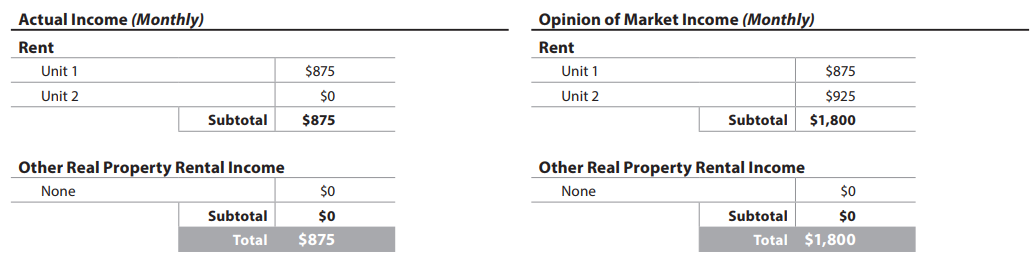
Comparable Rental Properties#
The Comparable Rental Properties subsection always displays when the Rental Information section displays. It includes a thumbnail photo and information about the subject property and each rental comparable.
- Each comparable rental represents a unit and not necessarily the entire comparable property.
- A comparable rental unit can be compared to more than one subject property unit.
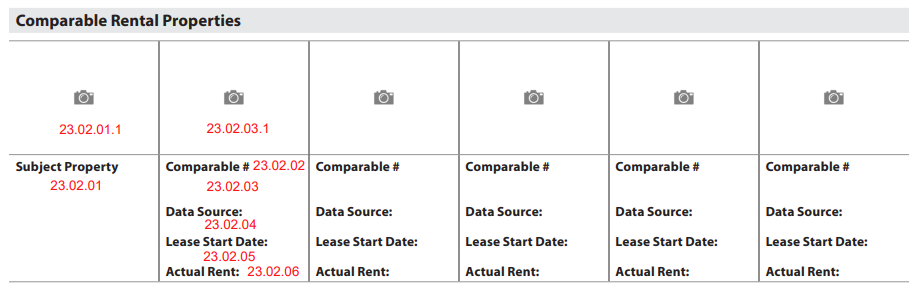
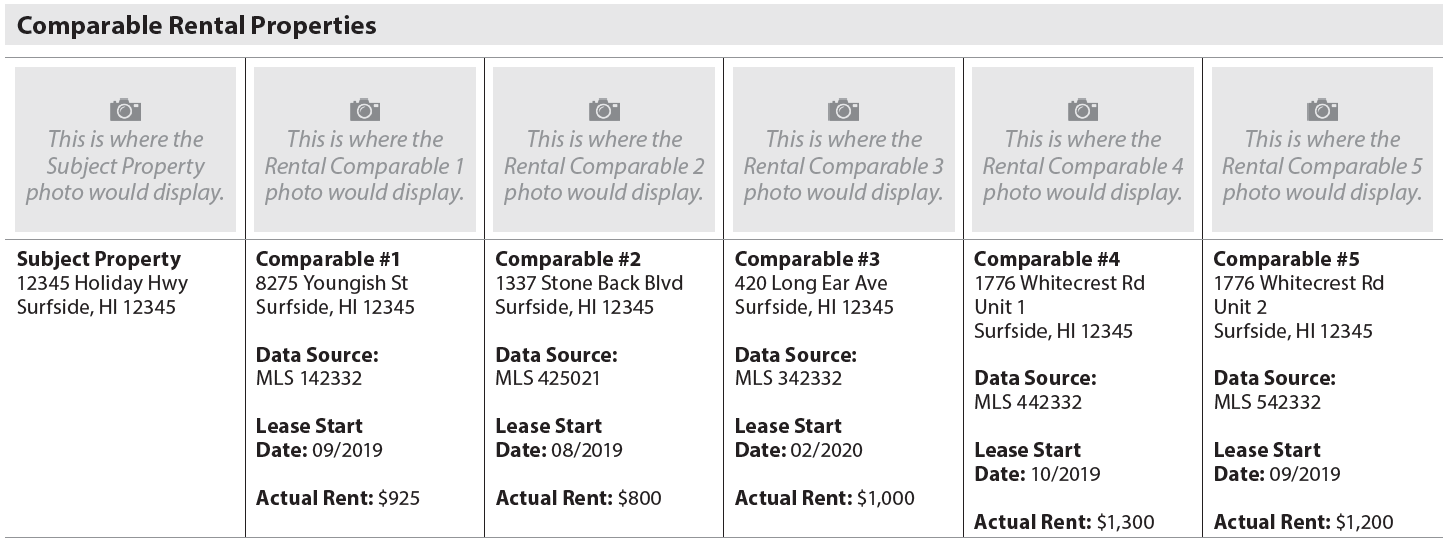
The Comparable Rental Properties subsection displays in a grid with the Subject Property and up to 5 rental comparables Comparable # - PropertyOrdinalNumber (UID: 2000.0078, FID: 23.02.02). (Figure 23 - 2) If there are more than 5 rental comparables, display another grid with Comparables 6 - 10, 11 - 15, etc.
Figure 23 - 2
Subject Property Information#
Subject property information in this subsection represents the subject property overall, regardless of how many units are included in Rental Information.
Rental Information: Comparable Rental Properties - Subject Property Information
| Report Field ID | Report Label | Unique ID | MISMO Data Point Name | Display Rules |
|---|---|---|---|---|
| 23.02.01.1 | No label | 1400.0619 | ImageCategoryType | A thumbnail of the property photo for the subject property always displays here. It is delivered with ImageCategoryType = "PropertyPhoto". The subject property photo does not re-display in Rental Information Exhibits. |
| 23.02.01 | No label | 0100.0007 | AddressLineText | Redisplays from 3.000 |
| 1200.0052 | AddressUnitDesignatorType | Redisplays from 3.000 IF AddressUnitIdentifier Exists | ||
| 0100.0008 | AddressUnitIdentifier | Redisplays from 3.000 IF Exists | ||
| 0100.0009 | CityName | Redisplays from 3.000 | ||
| 0100.0012 | StateCode | Redisplays from 3.000 | ||
| 0100.0011 | PostalCode | Redisplays from 3.000 |
Comparable Property Information#
Information about each comparable rental unit displays once, regardless of how many times a comparable rental unit is used in the Comparable Rental Analysis subsection (rental grids). Comparables in this subsection are displayed in Comparable # order.
- Information about each comparable rental unit displayed in this section must be provided in a separate instance of the PROPERTY container.
- Each instance of the PROPERTY container must include both a "ValuationUseType" and a "PropertyOrdinalNumber".
- "ValuationUseType" attribute must be populated as "RentalComparable".
- "PropertyOrdinalNumber" in PROPERTY/COMPARABLE/COMPARABLE_DETAIL must be populated with a unique, positive, whole number that is displayed next to "Comparable #" on the report.
- A combination of these 2 data elements is used to uniquely identify a comparable rental unit.
- When there is more than one unit in a property and both units are used as a comparable, details about each of these units must be provided in a separate instance of the PROPERTY container using a unique value for the "PropertyOrdinalNumber".
For example, in the above snippet, comparable #4 and #5 are 2 units in the same property. Therefore, information about each of these units (information displayed in Comparable Rental Properties subsection and Comparable Rental Analysis subsection) must be provided in a separate instance of the PROPERTY container.
Rental Information: Comparable Rental Properties - Comparable Property Information
| Report Field ID | Report Label | Unique ID | MISMO Data Point Name | Display Rules |
|---|---|---|---|---|
| 23.02.03.01 | No label | 1400.0651 | ImageCategoryType | A thumbnail of the property photo for the comparable unit displays when provided. It is delivered with ImageCategoryType = "PropertyPhoto". When applicable, photo redisplays in Rental Information Exhibits. |
| 23.02.02 | Comparable # | 2000.0078 | PropertyOrdinalNumber | Always displays. Numbered sequentially beginning at 1. Redisplays in 23.03.24 when the comparable unit is compared to a subject property unit. |
| 23.02.03 | No label | 2000.0061 | AddressLineText | Always displays |
| 2000.0117 | AddressUnitDesignatorType | Display when AddressUnitIdentifier Exists | ||
| 2000.0062 | AddressUnitIdentifier | Display if exists | ||
| 2000.0063 | CityName | Always displays | ||
| 2000.0065 | StateCode | |||
| 2000.0064 | PostalCode | |||
| 23.02.04 | Data Source: | 0700.0125 | DataSourceType | Always displays Separate multiple data sources with "|" |
| 1800.0347 | DataSourceIdentifier | Display when DataSourceType = "MLS" OR if Exists Display DataSourceType and DataSourceIdentifier in the same cell. Separate multiple data sources with "|" |
||
| 23.02.05 | Lease Start Date: | 2000.0038 | LeaseStartDate | Display if exists |
| 23.02.06 | Actual Rent: | 2000.0041 | UnitMonthlyActualRentAmount | Always displays |
Comparable Rental Analysis#
The Comparable Rental Analysis subsection displays when the Rental Information section displays. It includes all subject property units with UnitIncludedInRentScheduleIndicator (UID: 0700.0065, FID: Not on report) = "true".
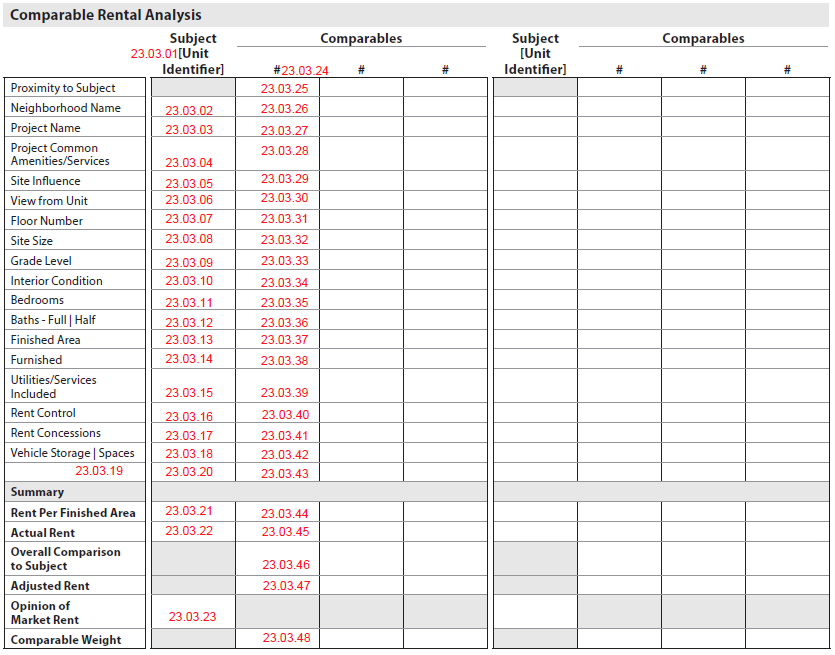
Unit to Unit Comparison#
The Comparable Rental Analysis grid reflects a unit-to-unit comparison instead of a property-to-property comparison. Comparable units must be provided for each subject unit that is included in the Rental Information section (UnitIncludedInRentScheduleIndicator (UID: 0700.0065, FID: Not on report) is "true").
- Each comparable represents a unit and not necessarily the entire property.
- The Comparable # - PropertyOrdinalNumber (UID: 2000.0078, FID: 23.02.02, 23.03.24) references the comparable unit in the Comparable Rental Properties subsection, and not the column order in the grid.
- A comparable unit may be compared to more than one subject unit. Identification of which comparable unit(s) are being compared to which subject unit(s) is done using an arcrole (for details see Rental Information - Arcrole Relationship).
- Each subject property unit in Rental Information (UnitIncludedInRentScheduleIndicator (UID: 0700.0065, FID: Not on report) = "true"):
- Has its own "rental grid", to reflect the unit-to-unit comparison.
- Can have between 3 and 7 comparable units per subject property unit.
- Each subject property unit in Rental Information (UnitIncludedInRentScheduleIndicator (UID: 0700.0065, FID: Not on report) = "true"):
- Has its own "rental grid" to reflect the unit-to-unit comparison.
- Can have between 3 and 7 comparable units per subject property unit.
The display varies depending on how many subject property units are displaying in Rental Information, and how many comparables each subject property unit has.
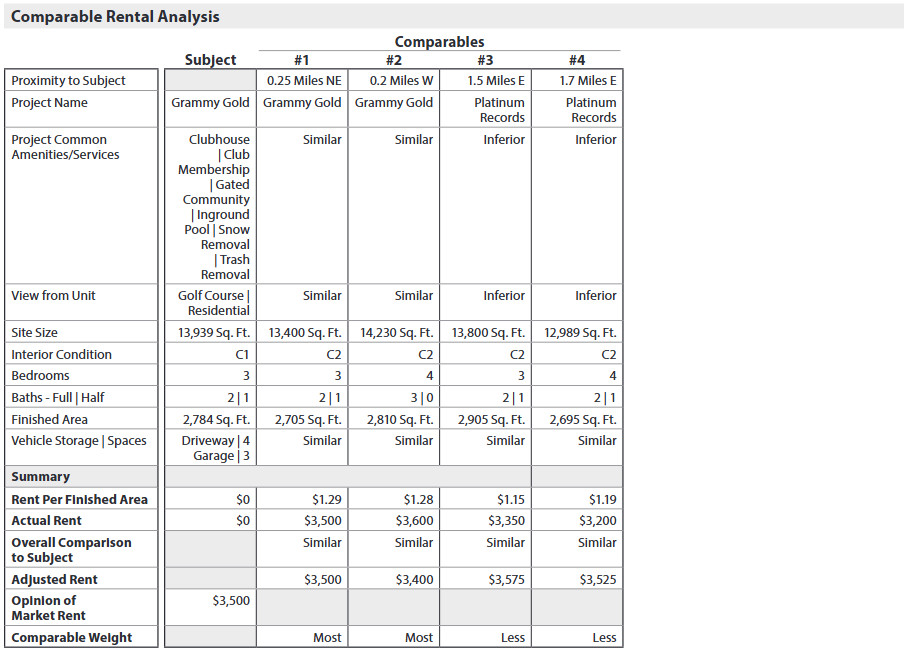
Example 1: One Subject Unit with 4 Rental Comparables (Figure 23 - 3)#
If there is one subject unit in Rental Information with 3 rental comparable units:
- Display the subject unit and the 4 rental comparable units in a single grid.
- Display Comp #s in numerical order.
Figure 23 - 3
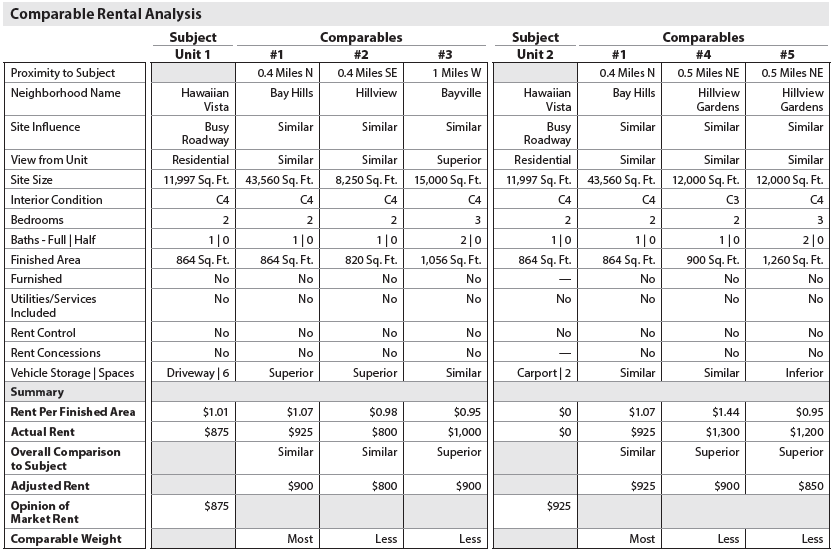
Example: Multiple Subject Units, each with 3 Rental Comparables (Figure 23 - 4)#
If there are multiple subject units in Rental Information, each with 3 rental comparables:
- Display 2 grids (2 subject units and their rental comparable units) going across the page. (Figure 23 - 4) ▪ Display additional grids (additional subject property units and their rental comparable units) underneath. ▪ Display applicable Comp #s for each subject property units in numerical order.
Figure 23 - 4
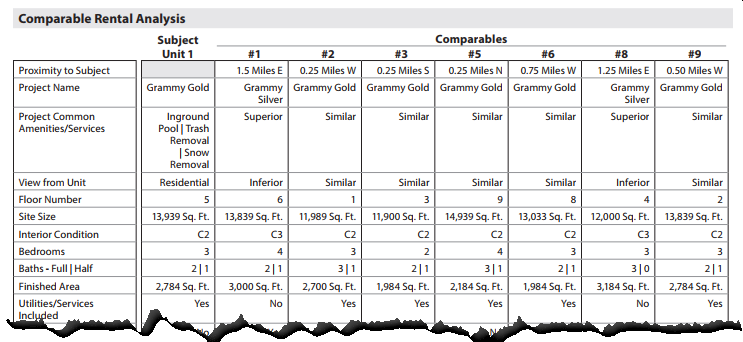
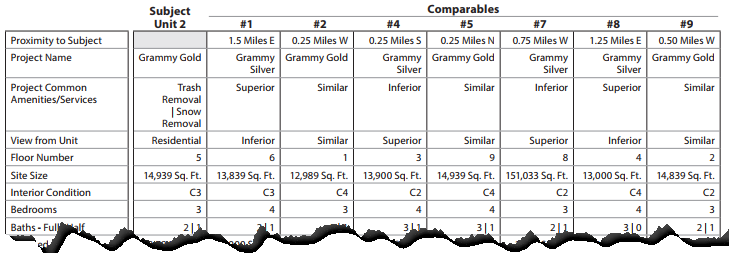
Units with more than 3 Rental Comparables (Figure 23 - 5)#
If any unit in Rental Information has between 4 and 7 rental comparables:
- Display each subject property unit and its comparable units in a single grid.
- If there are multiple units in Rental Information, display the next subject unit's grid underneath.
- Display applicable Comp #s for each subject property unit in numerical order.
Example:
- Comp #s used in this example are the PropertyOrdinalNumber (UID: 2000.0078, FID: 23.02.02, 23.03.24) from the Comparable Rental Properties subsection.
- 2 subject units in Rental Information, each with the maximum of 7 rental comparables.
- There are 9 rental comparables overall, 7 compared to each subject property unit. (Figure 23 - 4)
- Comps 1, 2, 5, 8, and 9 are used for both subject property units ▪ Comps 3 and 6 are only used for Unit 1 ▪ Comps 4 and 7 are only used for Unit 2.
Figure 23-5
Heading at the top of each Comparable Rental Analysis#
The heading at the top of each rental comparison grid provides context as to the subject property unit and its associated rental comparable units.
Rental Information: Comparable Rental Analysis - Column Heading at the top of each Rental Comparison Grid
| Report Field ID | Report Label | Unique ID | MISMO Data Point Name | Display Rules |
|---|---|---|---|---|
| 23.03.01 | Subject | 0700.0114 | UnitIdentifier | If populated, redisplays from 23.01.01, 23.01.12, and 23.01.19. |
| 23.03.24 | # | 2000.0078 | PropertyOrdinalNumber | For each rental comparable being compared to the subject unit, redisplays from 23.02.02. Display comparables in numerical order, left to right. |
Rows in Comparable Rental Analysis#
Reference "Supplement - Approaches to Value Grids" spreadsheet for more information.
Comparison to Subject Unit#
Some features (rows) in Comparable Rental Analysis require a comparison to the subject unit (Similar, Superior, Inferior) instead of reporting the specific characteristics of the comparable unit. (Figure 23 - 3) These are noted in "Supplement - Approaches to Value Grids", (Rental Comp Grid tab), with a checkmark in column G.
- Project Common Amenities/Services
- Site Influence
- View from Unit
- Vehicle Storage | Spaces
- Overall Comparison to Subject
Rental Analysis Commentary#
The Rental Analysis Commentary subsection displays when the Rental Information section is included. Any commentary must use ValuationCommentText (UID: 2000.0047, FID: 23.04.01) and ValuationAnalysisCategoryType (UID: 2000.0048, FID: 23.04.01) = "ComparableRental".

Rental Information Exhibits#
The Rental Information Exhibits subsection displays when the Rental Information section is included in the report. All text must display above the image in bold font.
Map of Rental Comparables#
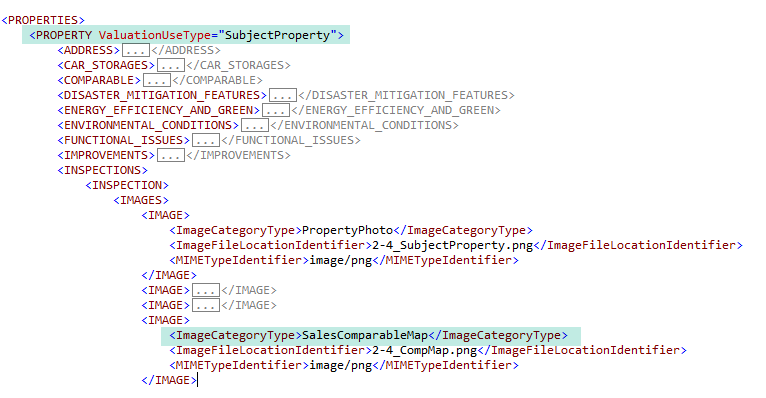
A map showing the subject property and all rental comparables must be provided and is delivered in the instance of PROPERTY where @ValuationUseType (UID: 0100.0043, FID: Not on report) = "SubjectProperty".
- The map must be delivered using ImageCategoryType (UID: 1400.0638, FID: 23.05.01.1) = "RentalComparableMap". When it displays within the Rental Information Exhibits subsection the caption "Map of Rental Comparables" displays above the map in bold font. ▪ The Rental Comparable Map may also be combined with other maps and displayed as one map in the Sales Comparison Approach section.
Photos of Rental Comparables#
Images for the comparable properties are delivered in the instance of PROPERTY where @ValuationUseType (UID: 2000.0094, FID: Not on report) = "RentalComparable" and display in this subsection with the Comparable # - PropertyOrdinalNumber (UID: 2000.0078 FID: 23.05.03) in bold. The thumbnails from the Comparable Rental Properties subsection (FID: 23.02.02) are redisplayed, when provided, in addition to any other comparable photos provided.
- Images of comparable properties must be delivered using ImageCategoryType (UID: 1400.0651, FID: Not on report) = "PropertyPhoto".
- When a comparable property has multiple images with the ImageCategoryType = "PropertyPhoto", only one displays as the thumbnail in the Comparable Rental Properties subsection (FID: 23.02.02).
Additional Exhibits#
- Any additional images provided for the Rental Information section must be delivered using ImageCategoryType (UID: 1400.0638, FID: 23.05.02.1) = "RentalInformationExhibit".
- An image caption may be included using ImageCaptionCommentDescription (UID: 1400.0640, FID: 23.05.02.2), and displays above the image in bold.
Rental Information - Arcrole Relationships#
Arcrole relationships, establishes "relationships" or linkages in the XML data file that may be visually obvious on the URAR Report. In the XML data, specific instances of data points or containers must be connected to properly represent the information.
- Containers or datapoints to be linked are identified using "xlink:label."
- The RELATIONSHIP container holds the xlink:arcrole, xlink:from, and xlink:to attributes that describe the data relationships.
Rental Comparable - Overall Property Information Data Source#
When the data source is associated with a rental comparable, provide the relationship that joins the applicable instance of PROPERTY where the ValuationUseType = "RentalComparable".
| Unique ID | Parent Container | MISMO Attribute Name | Supported Attribute Enumerations |
|---|---|---|---|
| 2000.0109 | RELATIONSHIP | @xlink:arcrole | urn:fdc:mismo.org:2009:residential/DATA_SOURCE_IsDataSourceFor_PROPERTY |
| 2000.0110 | RELATIONSHIP | @xlink:from | DATA_SOURCE_n |
| 2000.0111 | RELATIONSHIP | @xlink:to | PROPERTY_n |
| 0700.0124 | DATA_SOURCE | @xlink:label | DATA_SOURCE_n |
| 2000.0094 | PROPERTY | @xlink:label | PROPERTY_n |
RENTAL_INFORMATION to RENTAL_INFORMATION#
Rental Grid - Identifies the comparable rental unit being compared to the subject rental unit - When the subject property has a living unit included in the rent schedule, the RENTAL_INFORMATION container from the comparable should be linked (via Arc Role) to the RENTAL_INFORMATION container of the subject unit to which it was compared.
| Unique ID | Parent Container | MISMO Attribute Name | Supported Attribute Enumerations |
|---|---|---|---|
| 1400.0216 | RELATIONSHIP | @xlink:arcrole | urn:fdc:mismo.org:2009:residential/RENTAL_INFORMATION_IsComparableFor_RENTAL_INFORMATION |
| 1400.0217 | RELATIONSHIP | @xlink:from | RENTAL_INFORMATION_n |
| 1400.0218 | RELATIONSHIP | @xlink:to | RENTAL_INFORMATION_n |
| 2000.0027 | RENTAL_INFORMATION | @xlink:label | RENTAL_INFORMATION_n |
| 2000.0060 | RENTAL_INFORMATION | @xlink:label | RENTAL_INFORMATION_n |
- For each living unit of the subject property that was included in the rent schedule, the comparables instance of the RENTAL_INFORMATION container should be linked to the RENTAL_INFORMATION container of the subject property unit to which it was compared. Such an arcrole will provide identification of which comparable unit(s) are being compared to which subject unit(s).
- When a given comparable unit is compared to more than one subject unit, the XML must contain multiple instances of the RENTAL_INFORMATION container (one instance for each comparison) within a single instance of the PROPERTY container. For example, if a given comparable unit was compared with 4 units of the subject property, then 4 instances of the RENTAL_INFORMATION container must be delivered in the same instance of the PROPERTY container representing the comparable unit. Each instance of the RENTAL_INFORMATION container from the comparable instance of the PROPERTY container must be linked to the associated subject unit to which it was compared as explained below.
▪ In Figure 23 - 4, Comparable #1 is used as a comparable unit for Subject Unit 1 and Subject Unit 2. In such a scenario, a single instance of the PROPERTY container (representing Comparable #1) must be delivered with two instances of the RENTAL_INFORMATION container, as shown below.
- The RENTAL_INFORMATION container (with xlink:label="RENTAL_INFORMATION_RENTCOMP1_SUBJECTUNIT1") was compared to Subject Unit 1 (with xlink:label="RENTAL_INFORMATION_BLDG1_UNIT1") located in building 1. The arcrole must establish the relationship between Comparable #1 and Subject Unit 1 as follows.
- The RENTAL_INFORMATION container ( in Comparable #1) with xlink:label="RENTAL_INFORMATION_RENTCOMP1_SUBJECTUNIT2" was compared to Subject Unit 2 (with xlink:label="RENTAL_INFORMATION_BLDG2_UNIT2") located in building 2. The arcrole must establish the relationship between Comparable #1 and Subject Unit 2 as follows.
- The RENTAL_INFORMATION container (with xlink:label="RENTAL_INFORMATION_RENTCOMP1_SUBJECTUNIT1") was compared to Subject Unit 1 (with xlink:label="RENTAL_INFORMATION_BLDG1_UNIT1") located in building 1. The arcrole must establish the relationship between Comparable #1 and Subject Unit 1 as follows.