Section 13
Vehicle Storage
Appendix B-1, page 227
The Vehicle Storage section provides information about all vehicle storage for the property. This section provides space for additional commentary, exhibits, and any apparent defects, damages, or deficiencies.
Vehicle storage can be:
- A driveway or shared driveway
- An attached or detached carport
- Part of a dwelling, such as a built in or attached garage
- Its own outbuilding, such as a detached garage (sometimes also captured as an outbuilding)
- A shared parking garage, common carport, or open lot in a condominium, cooperative, condop, or PUD (with or without assigned spaces)
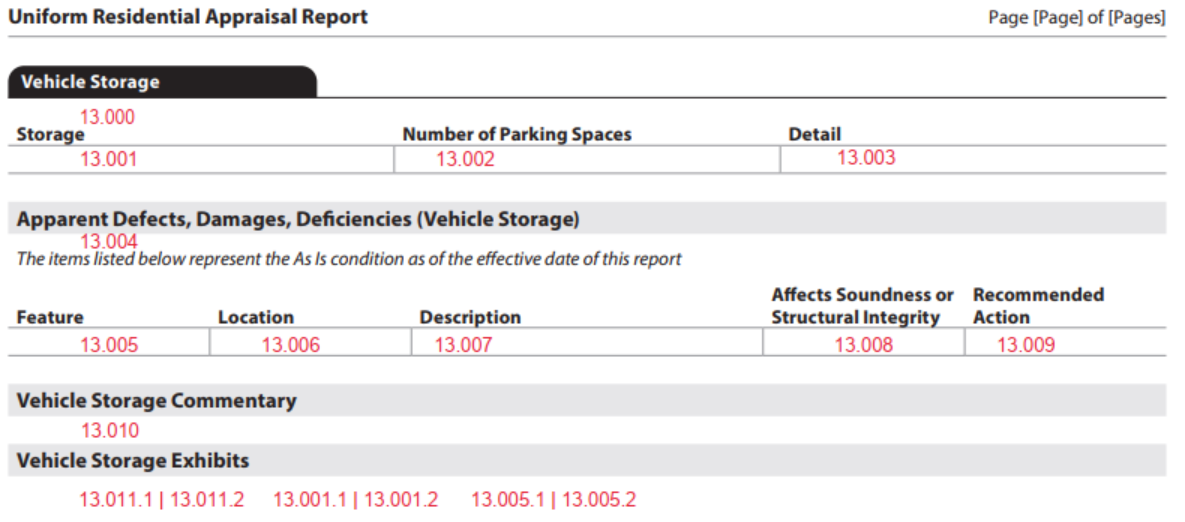
The Vehicle Storage section always displays. Details must be provided about each type and instance of vehicle storage for the property.
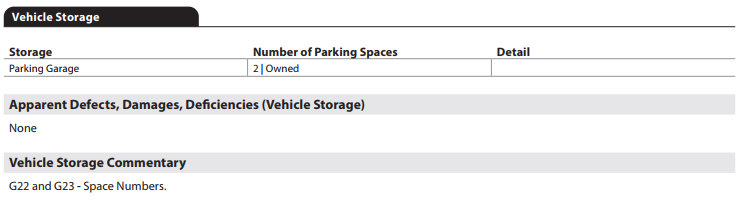
- When CarStorageType (UID: 3200.0006, FID: 13.000) = "None", display "None"; the Vehicle Storage detail table and the Apparent Defects, Damages, Deficiencies subsection does not display. (Figure 13 - 1)
Figure 13 - 1

- When CarStorageType (UID: 3200.0006, FID: 13.001) <> None, display the Vehicle Storage detail table. Each instance of CarStorageType displays on a separate line of the table. (Figure 13 - 2) Refer to the UAD Specification enumerations tab (column labeled "URAR Display Value") for the details on display values.
- Storage - CarStorageType is displayed.
- Number of Parking Spaces - See UAD Specification for details on how parking is captured and displayed for each car storage type. Special display characteristics are listed below. ▪ When CarStorageType = "Driveway" OR "SharedDriveway" AND TenOrMoreParkingSpacesIndicator (UID: 3200.0011, FID: 13.002) − is "true", display "10 or More". − is "false", display the ParkingSpacesCount (0 to 9). ▪ When (CarStorageType = "Carport" OR "CommonCarport" OR "Garage" OR "OpenLot" OR "Other" OR "ParkingGarage") display ParkingSpacesCount (UID: 3200.0010, FID: 13.002) ▪ When CarStorageType = "CommonCarport" OR "OpenLot" OR "ParkingGarage" display ProjectParkingSpaceAssignmentType (UID: 3200.0012, FID: 13.002). Display spaces and Assignment Type separated by "|"delimiter.
- Detail - CarStorageAttachmentType (UID: 3200.0005, FID: 13.003), ImprovedSurfaceMaterialType (UID: 3200.0008, FID: 13.003), CarStorageAreaMeasure (UID: 3200.0004, FID: 13.003) display as stacked. (Figure 13 - 2)
Figure 13 - 1

The Apparent Defects, Damages, Deficiencies (Vehicle Storage) subsection displays when the CarStorageType <> "None".
When VehicleStorageDefectsExistIndicator (UID: 3200.0021, FID: 13.004) = "true", display static text in italics (FID: 13.004), "The items listed below represent the As Is condition as of the effective date of this report" and additional data is required in the table below the text. (Figure 13 - 3)
When defects, damages, or deficiencies exist the following data is required for each occurrence:
- Feature - CarStorageType (UID: 3200.0006, FID: 13.0005|13.005.1)
- Location - Is the DefectItemLocationType (UID: 3900.0183, FID: 13.006) = "Other" AND DefectItemLocationTypeOtherDescription (UID: 3900.0184, FID: 13.006).
- Description - DefectItemDescription (UID: 3900.0181, FID: 13.007)
- Affects Soundness or Structural Integrity - DefectItemAffectsSoundnessStructuralIntegrityIndicator (UID: 3900.0180, FID: 13.008)
- Recommended Action - DefectItemRecommendedActionType (UID: 3900.0185, FID: 13.009)
When VehicleStorageDefectsExistIndicator (UID: 3200.0021, FID: 13.004) = "false", display "None" and the table does not display in the subsection. (Figure 13 - 4)
Figure 13 - 2

Figure 13 - 3
.
Vehicle Storage Commentary#
The Vehicle Storage Commentary subsection displays when comments are provided. Commentary must use ValuationCommentText (UID: 0100.0044, FID: 13.010) and ValuationAnalysisCategoryType (UID: 0100.0045, FID: 13.010) = "VehicleStorage".
Vehicle Storage Exhibits#
The Vehicle Storage Exhibits subsection displays when images are provided. All text provided for each image will display in bold font.
Car Storage Type#
- Images provided for car storage must be delivered in the IMAGE container in the instance of the in the CAR_STORAGE container that represents the referenced vehicle storage. E.g., image data associated with driveway must be provided in the IMAGE container in the instance of the CAR_STORAGE where CarStorageType= " Driveway".
- The enumerated value of the CarStorageType (UID: 1400.0638, FID: 13.001.1) displays above the image. When the photo represents multiple Vehicle Storage Types, display all of them.
- An additional image caption may be provided using ImageCaptionCommentDescription (UID: 1400.0640, FID: 13.001.2) and will display above the image following the storage type.
Apparent Defects, Damages, Deficiencies#
- Images provided for Apparent Defects, Damages, Deficiencies (Vehicle Storage) must be delivered in the IMAGE container located in the instance of the DEFECT container that represents the given defect.
- The text "Apparent Defects, Damages, Deficiencies - " precedes the CarStorageType (UID: 1400.0638, FID: 13.005.1).
- An additional caption may be provided using ImageCaptionCommentDescription (UID: 1400.0640, FID: 13.005.2) and will also display above the image following the storage type.
Additional Exhibits#
- Any additional images provided must be delivered using ImageCategoryType (UID: 1400.0638, FID: 13.011.1) = "VehicleStorageExhibit".
- An image caption should be included using ImageCaptionCommentDescription (UID: 1400.0640, FID: 13.011.2).
Reference Key Concept - Image Data for detailed guidance on the various ways images are handled in the URAR.
Vehicle Storage - Arcrole Relationships#
Arcrole relationships establish "relationships" or linkages in the XML data file that may be visually obvious on the URAR Report. In the XML data specific instances of data points or containers must be connected to properly represent the information.
- Containers or datapoints to be linked are identified using "xlink:label."
- The RELATIONSHIP container holds the xlink:arcrole, xlink:from, and xlink:to attributes that describe the data relationships.
DEFECT to CAR_STORAGE#
Provide the relationship that joins the relevant DEFECT to the CAR_STORAGE instance that has the defect, damage or deficiency. One RELATIONSHIP container is required for each defect identified on the exterior of the dwelling.
| Unique ID | Parent Container | MISMO Attribute Name | Supported Attribute Enumerations |
|---|---|---|---|
| 3900.0091 | RELATIONSHIP | @xlink:arcrole | urn:fdc:mismo.org:2009:residential/DEFECT ContainsDefectOf CAR_STORAGE |
| 3900.0092 | RELATIONSHIP | @xlink:from | DEFECT_n |
| 3900.0093 | RELATIONSHIP | @xlink:to | CAR_STORAGE_n |
| 3200.0003 | CAR_STORAGE | @xlink:to | CAR_STORAGE_n |
| 3900.0179 | DEFECT | @xlink:label | DEFECT_n |
Refer to the section Arcrole/Data Relationships in the MISMO XML Version 3.6 chapter for additional information.