Section 22
Sales Comparison Approach
Appendix B-1, page 291
The Sales Comparison Approach section captures a market analysis of the subject property via a grid of comparable transactions (comps) and their characteristics. The "sales grid" (or "sales comparison grid") displays a summary of the evidence in support of the appraiser's opinion of value in the form of market-driven adjustments for differences in characteristics. The section provides space for exhibits.
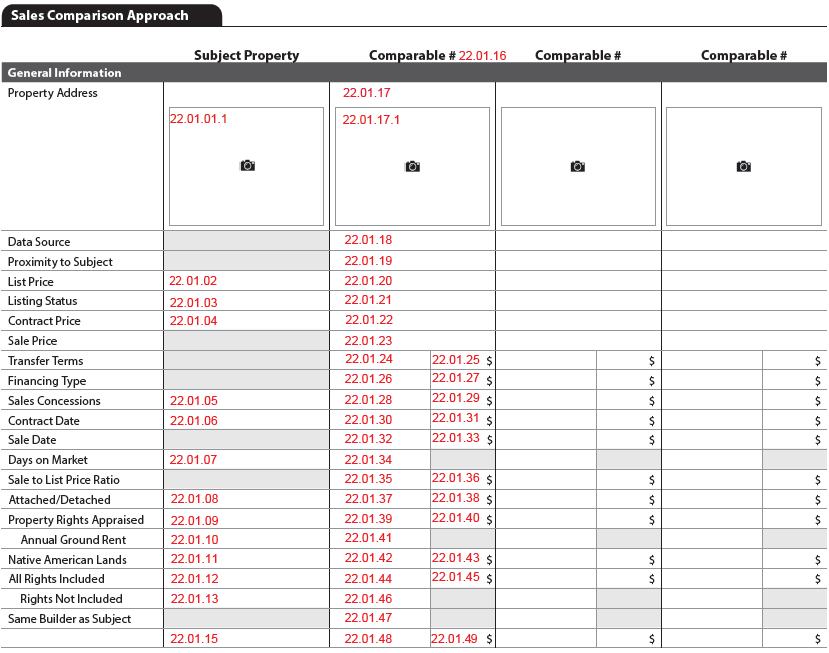
The Sales Comparison Approach section is dynamic and may include some or all the following subsections:
- General Information (Always displays)
- Project Information (If applicable, or if relevant)
- Site (Always displays)
- Water Frontage with Private Access (If applicable)
- Dwelling(s) (Always displays)
- Energy Efficient and Green Features (If relevant)
- Unit(s) (Always displays)
- Quality and Condition (Always displays)
- Property Amenities (If relevant)
- Vehicle Storage (Always displays)
- Outbuilding (If applicable)
- Summary (Always displays)
- Reconciliation of Sales Comparison Approach (Always displays)
- Sales Comparison Map (Always displays)
- Additional Properties Analyzed Not Used (If relevant)
- Sales Comparison Approach Exhibits (Always displays)
Reference "Supplement - Approaches to Value Grids" spreadsheet for more information.
Subject Property Information in the Sales Comparison Approach#
All information previously entered for the subject property populates from the appropriate section to the sales comparison grid. There is other information ("Sales Grid Only") that only displays in the sales comparison grid. The "Subject FID in Source Section" column of the "Supplement - Approaches to Value Grids" spreadsheet ("Sales Comp Grid" tab) shows the original location of the information or indicates "Sales Grid Only".
Fields That Are Not Applicable#
If a specific field in the sales grid is not applicable for the subject or a given comparable, the cell is either grayed out or displays a dash.
Grayed-Out Cells#
Information that is never applicable for the subject property or comparables is grayed out in the sales comparison grid. These are documented in Appendix E: Style Guide.
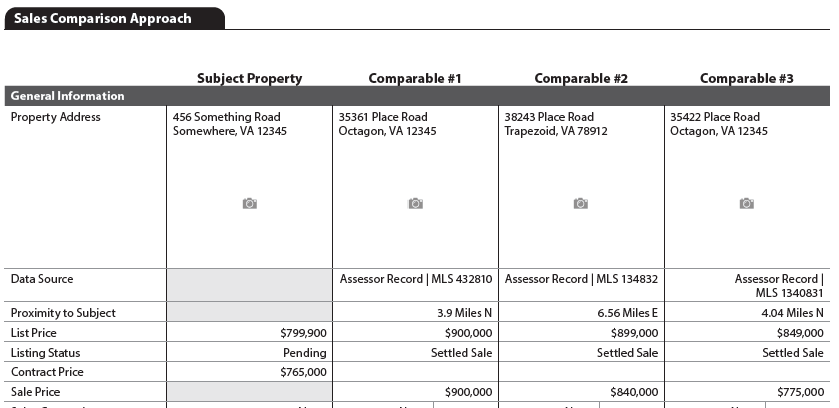
Example:
Proximity to Subject, Same Builder as Subject, and Sale Price are not applicable for the subject property and are always grayed out. (Figure 22 - 1)
Figure 22 - 1
Cells Displaying a Dash#
Information that is not applicable for the subject or comparable(s) displays an em-dash (--) in the sales comparison approach field. These are documented in "Supplement - Approaches to Value Grids" spreadsheet.
Examples:
- If there is no sales contract (SalesContractExistsIndicator (UID: 0600.0016, FID: 20.000) = "false"), or it was not reviewed by the appraiser (SalesContractReviewedIndicator (UID: 0600.0010, FID: 20.001) = "false"), the following cells display a dash for the subject property to show that the information is not applicable for this appraisal.
- Contract Price (if the row is included in the sales comparison approach)
- Sales Concessions
- Contract Date
▪ Comp #3 has a water feature, specifically an inground pool. Neither the subject nor the comps have any Water Features.
- In this case the Subject and Comps 1 and 2 display an em dash to show that Water Features is not applicable for the subject or comparables 1 and 2. (Figure 22 - 2)
Figure 22 - 2

Additional Rows#
AdditionalComparisonLineItemIdentifier#
Several subsections in the Sales Comparison Approach allow for extra rows to be added. The AdditionalComparisonLineItemIdentifier must be delivered when an additional row has been added and must be a unique label for each additional row in the Sales Comparison Approach. The same unique label must be delivered using AdditionalComparisonLineItemIdentifier (UID Subject-1800.0300; UID Comp-1800.0319) for all properties (subject and all comparables).
- General Information (FID: 22.01.14)
- Site (FID: 22.03.16)
- Dwelling(s) (FID: 22.05.18)
- Unit(s) (FID: 22.07.15)
- Vehicle Storage (FID: 22.13.02)
- Outbuilding (FID: 22.14.12)
A description must be provided using AdditionalComparisonLineItemDescription (UID Subject - 1800.0301; UID Comp - 1800.0306) for each comparable and the subject.
Adjustments#
Adjustments in the Sales Comparison Approach are either:
- At the row level (Figure 22 - 3), or
- An overall adjustment (Figure 22 - 4) at the subsection level, or
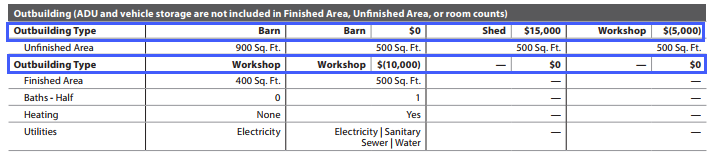
- In the case of Outbuilding, an adjustment for each instance of Outbuilding Type (Figure 22 - 5).
In all cases when an adjustment amount is provided, a ComparableAdjustmentType must be included. Adjustments are provided using ComparableAdjustmentAmount (UID: 1800.0317) AND ComparableAdjustmentType (UID: 1800.0318). Adjustments must be delivered in the XML even if the amount provided is zero (0).
Reference the "Implementation Guide Supplement - Comparable Grids" spreadsheet for specifics.
- An adjustment at the row level:
Figure 22 - 3

- An overall adjustment:
Figure 22 - 4
- An adjustment for each instance of Outbuilding Type:
Figure 22 - 5
Sales Comparison Approach displays when SalesComparisonApproachIndicator (UID: 1000.0032, FID: Not on report) = "true". Although the majority of appraisals include the Sales Comparison Approach, there are cases where this section would not be included.
- The Sales Comparison Approach section always begins at the top of a page.
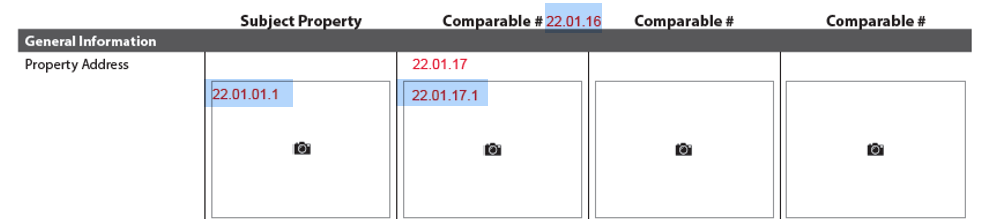
- Comparable # - the PropertyOrdinalNumber (UID: 1800.0192, FID: 22.01.16) must be indicated.
- Display the subject property and 3 comparable properties on the first page.
- If additional comps are provided, display the subject and comparables on subsequent pages.
- The scenario for Condo1 (Figure 22 - 6) provides an example of 4 comparable properties. ▪ Only the grid for Comp 4 displays with the subject.
Figure 22 - 6
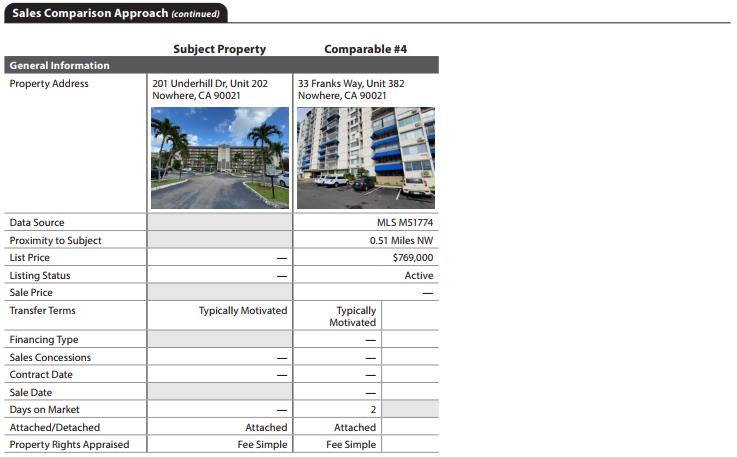
- The Comparable # and property address repeat at the top of each page with the row header Property Address. (Figure 22 - 7)
Figure 22 - 7
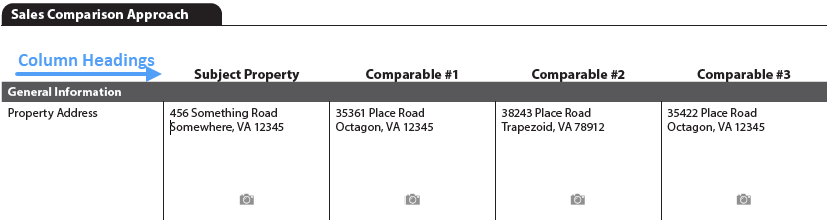
- An image of the property displays just below property addresses in General Information.
- Row Headers (Data Source, Proximity to Subject, List Price, etc.) are to remain in the order that they appear in the "Supplement - Approaches to Value Grids" spreadsheet.
General Information#
The General Information subsection always displays in the Sales Comparison Approach. A thumbnail photo of the subject and each comparable displays under the address.
General Information is the first of six subsections that has adjustments at the row level.
There are 21 defined rows in this subsection.
➢ 12 rows are required (Always) ➢ 2 rows are conditionally required (If Applicable) ➢ 1 row is conditionally required (If Applicable), or may be provided (If Relevant) ➢ 6 rows may be provided (If Relevant) ➢ Additional rows may be added to this section
Project Information#
The Project Information subsection displays when the subject or any comparable property is in a project (condominium, coop, or condop) - PropertyInProjectIndicator (UID: 0100.0065, FID: 3.011) = "true". Project Information is a unique subsection in that it may also be provided if relevant, such as for PUDs when there are significant monthly fees, common amenities, and services, and/or special assessments.
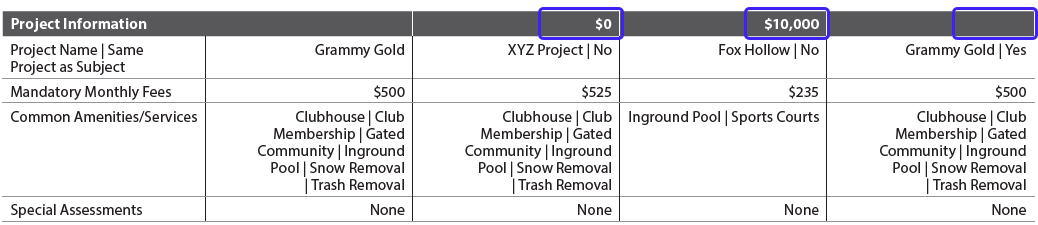
Project Information is the first of four subsections that has an overall adjustment at the subsection header level.
There are 4 defined rows in this subsection.
➢ No rows are required (Always) ➢ 1 row is conditionally required (If Applicable) ➢ 1 row is conditionally required (If Applicable), or may be provided (If Relevant) ➢ 2 rows may be provided (If Relevant)
Figure 22 - 8

Site#
The Site subsection always displays in the Sales Comparison Approach section.
Site is the second of six subsections that has adjustments at the row level.
There are 15 defined rows in this subsection.
➢ 2 rows are required (Always) ➢ 2 rows are conditionally required (If Applicable) ➢ 11 rows may be provided (If Relevant) ➢ Additional rows may be added to this section
Figure 22 - 9

Water Frontage with Private Access#
The Water Frontage with Private Access subsection displays when SiteInfluenceType - ((Subject UID: 1500.0087, FID: 22.03.13) (Comp UID: 1800.0228, FID: 22.03.42)) = "BodyOfWater" and PrivateAccessIndicator - ((Subject UID: 1500.0075, FID: 22.04.01) (Comp UID:1800.0279, FID:22.04.06)) = "true" for either the subject or comparables.
Water Frontage with Private Access is the second of four subsections that has an overall adjustment at the subsection header level.
There are 4 defined rows in this subsection.
➢ No rows are required (Always) ➢ 1 row is conditionally required (If Applicable) - with the same conditionality as the Water Frontage with Private Access gray bar ➢ 3 rows may be provided (If Relevant)
Figure 22 - 10

Dwelling(s)#
The Dwelling(s) subsection always displays in the Sales Comparison Approach section. It references buildings where ImprovementType (UID: 0300.0009, FID: Not on report) = "Dwelling".
Dwelling(s) is the third of six subsections that has adjustments at the row level.
There are 16 defined rows in this subsection.
➢ 2 rows are required (Always) ➢ 4 rows are conditionally required (If Applicable) ➢ 10 rows may be provided (If Relevant) ➢ Additional rows may be added to this section
If there are multiple dwellings, information is either:
- Listed separately for each dwelling in one row. Example: If there are two dwellings, the Year Built and Dwelling Style rows reflect the answers for all dwellings. (Figure 22-11, showing Year Built, where the vendor has included the subject property information for all dwellings).
- Combined for all dwellings in one row. Example: The Gross Building Finished Area and Noncontinuous Finished Area rows reflect the total area across all dwellings. These are both reflected as "Sales Grid Only" in the "Supplement - Approaches to Value Grids" spreadsheet.
- TotalFinishedAreaOfAllLivingUnitsIncludingADUAreaMeasure (UID:1800.0184, FID: 22.05.04), which must be directly input for the subject property if the row is included (Figure 22-11).
Figure 22 - 11

Energy Efficient and Green Features#
The Energy Efficient and Green Features subsection displays only when relevant to the analysis.
Energy Efficient and Green Features is the third of four subsections that has an overall adjustment at the section header level.
There are 3 defined rows in this subsection.
➢ No rows are required (Always) ➢ No rows are conditionally required (If Applicable) ➢ 3 rows may be provided (If Relevant)
Figure 22 - 12

Unit(s)#
The Unit(s) subsection always displays in the Sales Comparison Approach section. It repeats for each living unit including ADUs.
In the XML, PROPERTY_UNIT is under IMPROVEMENT where:
- ImprovementType = "Dwelling" (for ADUs or non-ADUs - AccessoryDwellingUnitIndicator can be "true" or "false")
- ImprovementType = "Outbuilding" AND OutbuildingRealPropertyIndicator = "true" AND AccessoryDwellingUnitIndicator = "true"
Unit(s) is the fourth of six subsections that has adjustments at the row level. (Figure 22 - 13)
There are 14 defined rows in this subsection.
➢ 5 rows are required (Always) ➢ 2 rows are conditionally required (If Applicable) ➢ 4 rows are conditionally required (If Applicable), or may be provided (If Relevant) ➢ 3 rows may be provided (If Relevant) ➢ Additional rows may be added to this section (Example: Basement Access in Figure 22-14)
Figure 22 - 13
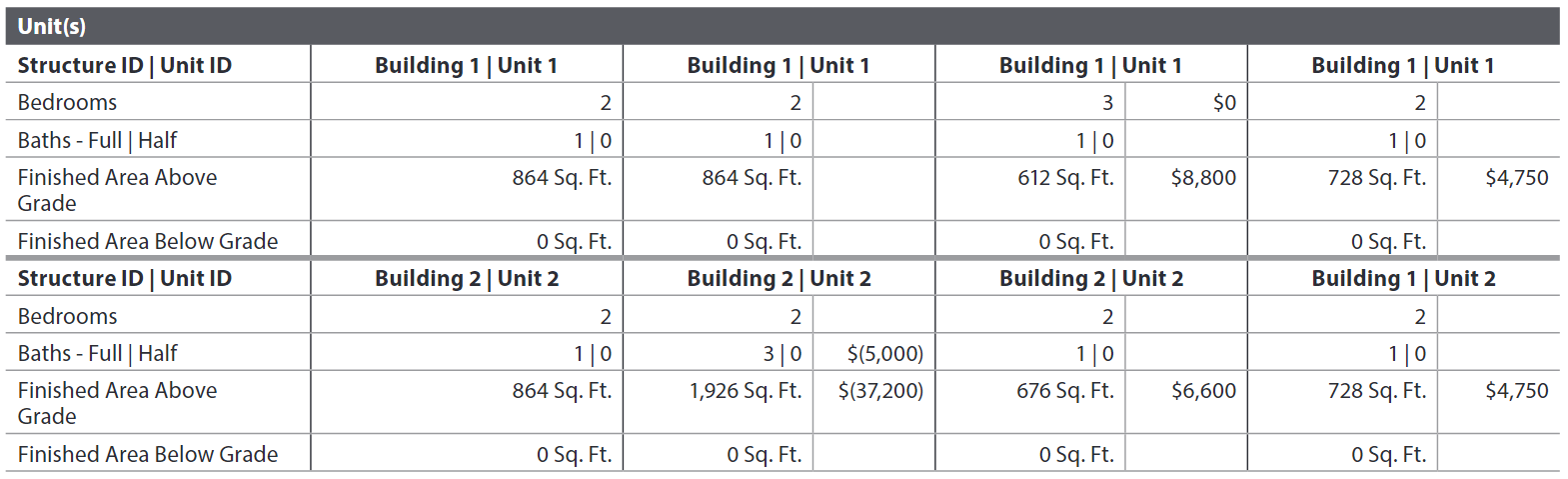
Figure 22 - 14

Quality and Condition (Ratings: 1-6, 1 is highest)#
The Quality and Condition subsection always displays in the Sales Comparison Approach section. This subsection has 3 parts:
- Exterior Quality and Condition
- Interior Quality and Condition
- ADU Quality and Condition
Quality and Condition is the only subsection that has no adjustments. Adjustments are made at the Overall Quality and Condition subsection level.
ImprovementComponentTypeOtherDescription#
In the Quality and Condition subsection, Other Exterior or Interior Features may be brought into the sales comparison grid from the Dwelling Exterior or Unit Interior sections, respectively. Each additional item ImprovementComponentTypeOtherDescription (UID Subject - 0300.0056; UID Comparable - 1800.0181) must be delivered and displays as the row header and must be included in the COMPARABLE_ADJUSTMENT container for the subject and each comparable. Each Other Feature must be unique.
- Exterior Quality (FID: 22.08.07)
- Exterior Condition (FID: 22.08.14)
- Interior Quality (FID: 22.09.08)
- Interior Condition (FID: 22.09.15)
- ADU Interior Quality (FID: 22.10.07)
- ADU Interior Condition (FID: 22.10.14)
A description must be provided using ImprovementComponentQualitySummaryDescription (UID Subject - 1800.0293; UID Comp - 1800.0146) for each comparable and the subject.
Exterior Quality and Condition#
The Exterior Quality and Condition subsection header displays when Homeowner Responsible for all Exterior Maintenance of Dwellings - HomeownerResponsibleForExteriorMaintenanceIndicator (UID: 0100.0046, FID: 3.016) = "true" for the subject property (ValuationUseType (UID: 0100.0043, FID: Not on report) = "Subject").
Figure 22 - 15
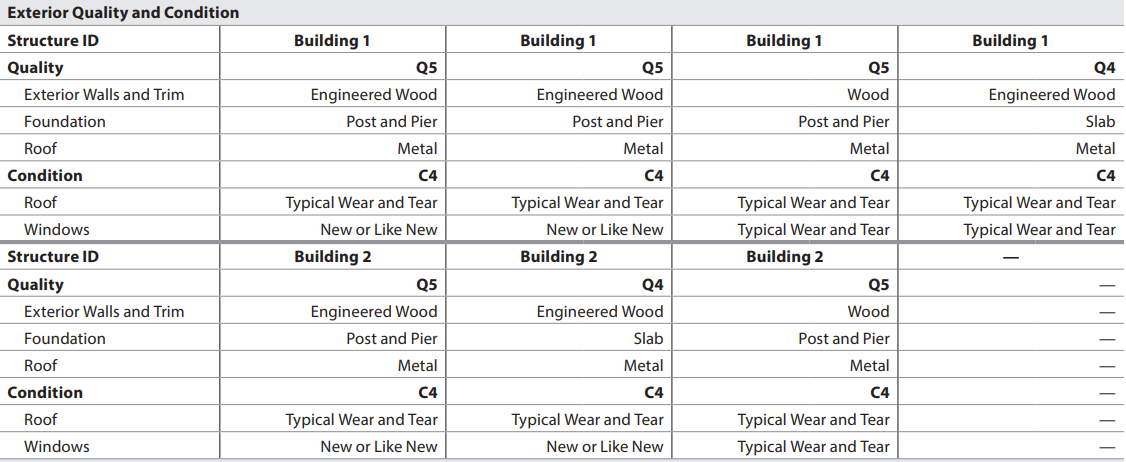
There are 11 defined rows in Exterior Quality and Condition.
➢ 3 rows are conditionally required (If Applicable) - with the same conditionality as the Exterior Quality and Condition gray bar ➢ 8 rows may be provided (If Relevant) ➢ Additional rows may be added
Interior Quality and Condition#
Interior Quality and Condition always displays and repeats in the sales comparison approach for each unit.
- For a single-family, only one unit displays in the sales grid and Structure ID and Unit ID are not applicable.
- For properties with multiple units, the interior quality and condition information repeats for each unit.
- Accessory Dwelling Units (ADUs) are addressed separately in the following subsection.
There are 11 defined rows in Interior Quality and Condition.
➢ 2 rows are required (Always) ➢ 1 row is conditionally required (If Applicable) ➢ 8 rows may be provided (If Relevant) ➢ Additional rows may be added
ADU Quality and Condition#
The ADU Interior Quality and Condition subsection displays on the sales comparison approach if the subject or any comparable(s) have an ADU.
There are 11 defined rows in ADU Interior Quality and Condition.
➢ 2 rows are required (Always) ➢ 1 row is conditionally required (If Applicable) ➢ 8 rows may be provided (If Relevant) ➢ Additional rows may be added
Overall Quality and Condition (Ratings: 1-6, 1 is highest)#
The Overall Quality and Condition subsection always displays in the Sales Comparison Approach section. It represents the reconciliation of all the interior and exterior quality and condition information included in the sales comparison grid.
Overall Quality and Condition is the fifth of six subsections that has adjustments at the row level.
There are 2 defined rows in this subsection.
➢ 2 rows are required (Always) ➢ No rows are conditionally required (If Applicable) ➢ No additional rows may be provided
Figure 22 - 16

Property Amenities#
The Property Amenities subsection displays only when relevant to the analysis in the Sales Comparison Approach.
The Property Amenities subsection displays on the sales comparison grid when relevant to analysis and conclusions. If no supporting rows are selected, the subsection does not display.
AmenityCategoryType groups similar amenities together for inclusion as individual line entries in the sales comparison grid. When an Amenity Category (row) is included, all amenities in that category populate for the subject property. If the Amenity Category is not included, none of the amenities for the category populate for the subject property.
- Outdoor Accessories
- Outdoor Living
- Water Features
- Whole Home
- Miscellaneous
Property Amenities is the sixth of six subsections that has adjustments at the row level.
There are 5 defined rows in this subsection.
➢ No rows are required (Always) ➢ No rows are conditionally required (If Applicable) ➢ 5 rows may be provided (If Relevant)
Figure 22 - 17

Vehicle Storage#
The Vehicle Storage subsection always displays in the Sales Comparison Approach section.
Vehicle Storage is the last of the four subsections that has an adjustment at the section header level.
- When AdditionalComparisonLineItemIdentifier is provided, ComparableAdjustmentType (UID: 1800.0318, FID: Not on report) must be delivered as SalesComparableAdditionalNonAdjustableComparisonItem for each additional row within Vehicle Storage.
There is 1 defined row in this subsection.
➢ 1 row is required (Always) ➢ No rows are conditionally required (If Applicable) ➢ No rows may be provided (If Relevant) ➢ Additional rows may be provided
Figure 22 - 18

Outbuilding (ADU and vehicle storage are not included in Finished Area, Unfinished Area, or room counts)#
The Outbuilding subsection displays in the Sales Comparison Approach section when there is at least one ImprovementType (UID: 0300.0009, FID: 22.07.02) = "Outbuilding" AND OutbuildingRealPropertyIndicator (UID: 0300.0024, FID: 12.002) = "true" AND OutbuildingType (UID: 0300.0025, FID: 26.042) <> "StandaloneADU" for the subject or any comparable. Standalone ADUs are addressed in the Units subsection of the Sales Comparison Approach and do not display here.
Outbuilding is the only subsection that has an adjustment at the row sub-header level for each instance of Outbuilding Type. (Figure 22 - 5)
- When an AdditionalComparisonLineItemIdentifier is provided, ComparableAdjustmentType (UID: 1800.0318, FID: Not on report) must be delivered as SalesComparableAdditionalNonAdjustableComparisonItem for each additional row within Outbuilding.
There are 11 defined rows in this subsection.
➢ No rows are required (Always) ➢ 1 row is conditionally required (If Applicable) ➢ 10 rows may be provided (If Relevant) ➢ Additional rows may be provided
Summary#
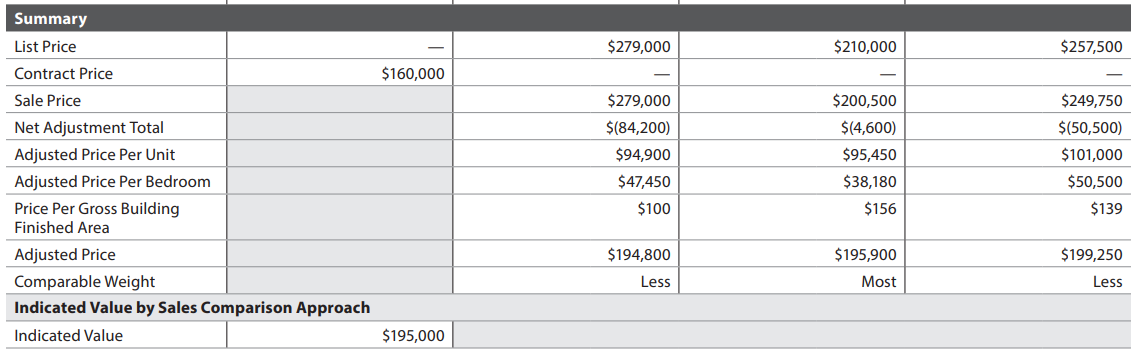
The Summary subsection always displays in the Sales Comparison Approach section.
Summary is the last subsection in the sales comparison grid and has no adjustments.
There are 10 defined rows in this subsection.
➢ 5 rows are required (Always) ➢ 4 rows are conditionally required (If Applicable) ➢ 1 row may be provided (If Applicable), or may be provided (If Relevant)
Figure 22 - 19
Indicated Value by Sales Comparison Approach#
The Indicated Value by Sales Comparison Approach sub-header always displays in the Summary subsection.
Indicated Value - ValueIndicatedBySalesComparisonAmount (UID: 1300.0006, FID: 22.15.15) always displays when SalesComparisonApproachIndicator = "true".
Reconciliation of Sales Comparison Approach#
The Reconciliation of the Sales Comparison Approach subsection always displays when SalesComparisonApproachIndicator = "true".
− SalesComparisonCommentDescription (UID: 1800.0278, FID: 22.16.01)

Additional Properties Analyzed Not Used#
The Additional Properties Analyzed Not Used subsection displays when relevant:
- Initially, for the appraiser to provide additional context to the reader, or
- As part of any reconsideration process

Properties noted in this subsection have @ValuationUseType = "PropertyAnalyzedNotUsed".
Sales Comparison Approach: Additional Properties Analyzed Not Used
| Report Field ID | Report Label | Unique ID | MISMO Data Point Name | Display Rules |
|---|---|---|---|---|
| 22.17.01 | # | 1900.0017 | PropertyOrdinalNumber | Display when @ValuationUseType = "PropertyAnalyzedNotUsed" |
| 22.17.02 | Property Address | 1900.0001 | AddressLineText | |
| 1900.0018 | AddressUnitDesignatorType | |||
| 1900.0002 | AddressUnitIdentifier | |||
| 1900.0003 | CityName | |||
| 1900.0004 | PostalCode | |||
| 1900.0005 | StateCode | |||
| 22.17.04 | Status | 1900.0007 | ListingStatusType | |
| 22.17.03 | Sale Date | 1900.0013 | OwnershipTransferDate | Display when ListingStatusType = "Settled Sale" AND Exists |
| 22.17.05 | Reason Not Used | 1900.0011 | ReasonPropertyNotUsedType | Display when @ValuationUseType = "PropertyAnalyzedNotUsed" |
| 22.17.06 | Comment | 1900.0009 | AdditionalPropertyAnalyzedNotUsedText |
Sales Comparison Map#
The Sales Comparison Map displays when SalesComparisonApproachIndicator = "true".
− ImageCategoryType (UID: 1400.0915, FID: Not on report) = "SalesComparableMap" (does not display)
Sales Comparison Approach Exhibits#
The Sales Comparison Approach Exhibits subsection is where the larger images of the thumbnails of the comparables display. Additional images may also be provided.
Comparable Photos#
- Images for the comparable properties are delivered in the instance of PROPERTY where @ValuationUseType (UID: 1800.0084, FID: Not on report) = "SalesComparable" of the instance of the PROPERTY container representing the relevant comparable property.
- (E.g., image data associated with sales comparable #1 must be included in the instance of the PROPERTY container with ValuationUseType= "SalesComparable" and PropertyOrdinalNumber= 1.)
- In Sales Comparison Approach Exhibits, display "Comparable #" followed by the ordinal number - PropertyOrdinalNumber (UID: 1800.0192, FID: 22.01.16) in bold font.
Additional Images#
- Any additional images provided must be delivered using ImageCategoryType (UID: 1400.0638, FID: 22.19.01.1) = "SalesComparisonApproachExhibit".
- An image caption should be included using ImageCaptionCommentDescription (UID: 1400.0640, FID: 22.19.01.2).
Reference Key Concept - Image Data for detailed guidance on the various ways images are handled in the URAR.
Sales Comparison Approach - Arcrole Relationships#
Arcrole relationships, establishes "relationships" or linkages in the XML data file that may be visually obvious on the URAR Report. In the XML data, specific instances of data points or containers must be connected to properly represent the information.
- Containers or datapoints to be linked are identified using "xlink:label."
- The RELATIONSHIP container holds the xlink:arcrole, xlink:from, and xlink:to attributes that describe the data relationships.
PROPERTY_UNIT to PROPERTY_UNIT#
When a comparable property has an adjustment for an item from the living unit, the PROPERTY_UNIT container from the comparable should be linked to the subject's instance of the PROPERTY_UNIT container to which it was compared.#
From Appendix D-1: 2- to 4-Unit Sample Scenario:
When the subject property or a sales comparable has more than 1 unit, identification of which comparable unit(s) are being compared to which subject unit(s) is done using an arcrole.
| Unique ID | Parent Container | MISMO Attribute Name | Supported Attribute Enumerations |
|---|---|---|---|
| 1800.0360 | RELATIONSHIP | @xlink:arcrole | urn:fdc:mismo.org:2009:residential/PROPERTY_UNIT_IsComparableFor_PROPERTY_UNIT |
| 1800.0361 | RELATIONSHIP | @xlink:from | PROPERTY_UNIT_n |
| 1800.0362 | RELATIONSHIP | @xlink:to | PROPERTY_UNIT_n |
| 3900.0157 | PROPERTY_UNIT | @xlink:label | PROPERTY_UNIT_n |
| 3900.0119 | PROPERTY_UNIT | @xlink:label | PROPERTY_UNIT_n |
The PROPERTY_UNIT container from the comparable property is linked to the subject's instance of the PROPERTY_UNIT container to which it was compared. In Figure 22 - 20, unit 2 of sales comparable #3, located in building 1 was compared with subject's unit 2, located in building 2. An arcrole connects these 2 units as shown below.
Unit 2 of sales comparable#3 has xlink:label

Subject's unit 2 located in building 2 has xlink:label as shown below.
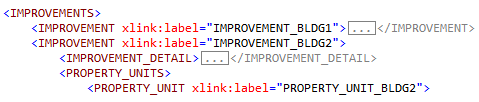
The containers are linked with an arcrole:

DATA_SOURCE to PROPERTY#
When the data source is associated with a sales comparable, provide the relationship that joins to the applicable instance of PROPERTY where the ValuationUseType = "SalesComparable".
| Unique ID | Parent Container | MISMO Attribute Name | Supported Attribute Enumerations |
|---|---|---|---|
| 1800.0374 | RELATIONSHIP | @xlink:arcrole | urn:fdc:mismo.org:2009:residential/DATA_SOURCE_IsDataSourceFor_PROPERTY |
| 1800.0375 | RELATIONSHIP | @xlink:from | DATA_SOURCE_n |
| 1800.0376 | RELATIONSHIP | @xlink:to | PROPERTY_n |
| 1800.0084 | PROPERTY | @xlink:label | PROPERTY_n |
| 0700.0124 | DATA_SOURCE | @xlink:label | DATA_SOURCE_n |
Refer to the section Arcrole/Data Relationships in the MISMO XML Version 3.6 chapter for additional information.