Section 26
Reconciliation
Appendix B-1, page 368
The Reconciliation section includes information about the different approaches to value, market value conditions, the final opinion of market value, reporting of client requested conditions (if any), and an overall reconciliation of value. This section also contains a summary of all identified defects, damages, and deficiencies, and provides space for additional commentary and exhibits.
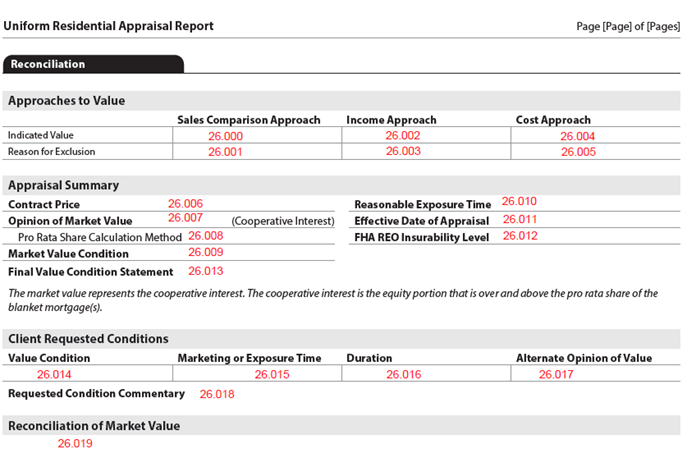
The Reconciliation section always displays.
Approaches to Value#
The Approaches to Value subsection always displays. When a value is not indicated for an approach, a Reason for Exclusion displays in the table. (Figure 26 - 1)
When Sales Comparison Approach is not developed, the only supported enumeration for the Reason for Exclusion - ValuationApproachExclusionReasonType (UID: 1300.0007, FID: 26.001) = "Other". The text describing the reason for exclusion must be delivered using ValuationApproachExclusionReasonTypeOtherDescription (UID: 1300.0008, FID: 26.001).
Reconciliation: Approaches to Value
| Report Field ID | Report Label | Unique ID | MISMO Data Point Name | Display Rules |
| Sales Comparison Approach | ||||
| 26.000 | Indicated Value | 1300.0006 | ValueIndicatedBySalesComparisonAmount | Display when SalesComparisonApproachIndicator = "true" |
| 26.001 | Reason for Exclusion | 1300.0007 | ValuationApproachExclusionReasonType | When SalesComparisonApproachIndicator = "false" − Provide ValuationApproachExclusionReasonType = "Other" AND ValuationApproachExclusionReasonTypeOtherDescription |
| 1300.0008 | ValuationApproachExclusionReasonTypeOtherDescription | |||
| Income Approach | ||||
| 26.002 | Indicated Value | 1200.0004 | ValueIndicatedByIncomeApproachAmount | Display when IncomeApproachIndicator = "true" |
| 26.003 | Reason for Exclusion | 1300.0004 | ValuationApproachExclusionReasonType | Display when IncomeApproachIndicator = "false" When multiple reasons are provided display as stacked. |
| 1300.0005 | ValuationApproachExclusionReasonTypeOtherDescription | Display when ValuationApproachExclusionReasonType = "Other" When multiple reasons are provided display as stacked. |
||
| Cost Approach | ||||
| 26.004 | Indicated Value | 1300.0001 | ValueIndicatedByCostApproachAmount | Display when CostApproachIndicator = "true" |
| 26.005 | Reason for Exclusion | 1300.0002 | ValuationApproachExclusionReasonType | Display when CostApproachIndicator = "false" When multiple reasons are provided display as stacked. |
| 1300.0003 | ValuationApproachExclusionReasonTypeOtherDescription | Display when ValuationApproachExclusionReasonType = "Other" When multiple reasons are provided display as stacked. |
Figure 26 - 1

Appraisal Summary#
The Appraisal Summary subsection always displays. However, there are fields within this subsection that may not display.
Reconciliation: Appraisal Summary
| Report Field ID | Report Label | Unique ID | MISMO Data Point Name | Display Rules |
|---|---|---|---|---|
| 26.006 | Contract Price | 0600.0008 | SalesContractAmount | Display when SalesContractReviewedIndicator = "true" Redisplay from Sales Contract section. |
| 26.007 | Opinion of Market Value | 1300.0017 | OpinionOfValueAmount | Always displays |
| 26.074 26.075 |
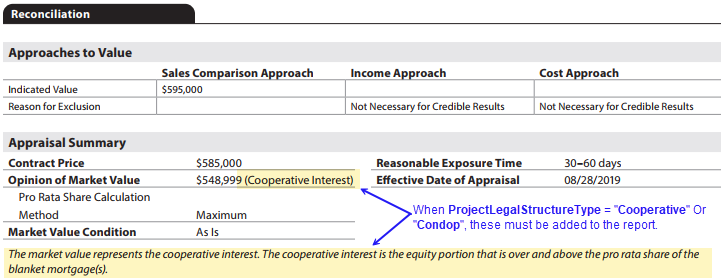
[Static text] | Not on report | N/A | When ProjectLegalStructureType = "Cooperative" OR "Condop": (Figure 26 - 2) − Display (Cooperative Interest) in parenthesis on the right. − Display text in italics below Market Value Condition: The market value represents the cooperative interest. The cooperative interest is the equity portion that is over and above the pro rata share of the blanket mortgage(s). |
| 26.008 | Pro Rata Share Calculation Method | 1300.0033 | LineOfCreditProRataShareSelectionMethodType | Display when (ProjectLegalStructureType = "Cooperative" OR "Condop") AND ProjectBlanketFinancingIndicator = "true" AND LineOfCreditIndicator = "true" For this to display, at least one lien must have LineOfCreditIndicator = "true" |
| 26.009 | Market Value Condition | 1300.0010 | PropertyValuationConditionalConclusionType | Always displays |
| − When multiple conditions are provided, display as stacked on separate lines. − Cannot be delivered as "AsIs" when any DefectItemRecommendedActionType <> "None". |
||||
| 26.010 | Reasonable Exposure Time | 1300.0013 | MarketingOrExposureDaysCount | Always displays The data must be provided in 1 of 2 ways: − a single number followed by "days", (e.g., 45 days) OR − two numbers indicating a range with the low and high numbers separated by "-" and followed by "days" (e.g., 30-60 days). |
| 1300.0014 1300.0015 |
MarketingOrExposureHighRangeDaysCount MarketingOrExposureLowRangeDaysCount |
|||
| 26.011 | Effective Date of Appraisal | 1300.0012 | AppraisalReportEffectiveDate | Always displays |
| 26.012 | FHA REO Insurability Level | 1300.0020 | FHA_REOInsurabilityLevelCode | Display when GovernmentAgencyAppraisalIndicator = "true" AND GovernmentAgencyAppraisalType = "FHA" AND ValuationAssignmentType = "REO" |
| 26.013 | Final Value Condition Statement | See Final Value Condition Statement for display rules. |
Figure 26 - 2
Final Value Condition Statement#
The Final Value Condition Statement is a text field, which is created based on the valid value(s) of Market Value Condition.
- Market Value Condition - PropertyValuationConditionalConclusionType (UID: 1300.0010, FID: 26.009)
Start with the text, "This appraisal is made"
Reconciliation: Final Value Condition Statement
| If Market Value Condition is… | Display Text |
|---|---|
| If Market Value Condition is… | Display Text |
| Subject to Completion Per Plans | subject to completion per plans and specifications on the basis of a hypothetical condition that the improvements have been completed |
| Subject to Inspection | subject to the itemized list of required inspections below based on the extraordinary assumption that the condition or deficiency does not require alteration or repair |
| Subject to Repair | subject to the itemized list of repairs recommended below on the basis of a hypothetical condition that the repairs or alterations have been completed in a professional manner |
Subject to Completion Per Plans/Inspection/Repair#
When PropertyValuationConditionalConclusionType (UID: 1300.0010, FID: 26.009) = "SubjectToCompletionPerPlans" OR "SubjectToInspection" OR "SubjectToRepair":
- The statement begins with the text, "This appraisal is made"
- Followed by "Display Text" for the corresponding market value condition. a. If there are multiple market value conditions, each "Display Text" is separated by ", and"
- End the sentence with a period.
- Add a final sentence, "This might have affected the assignment results."
Example of a singular market value: Subject to Completion Per Plans#
This appraisal is made subject to completion per plans and specifications on the basis of a hypothetical condition that the improvements have been completed. This might have affected the assignment results.
Example of two market values: Subject to Completion Per Plans and Subject to Repair#
This appraisal is made subject to completion per plans and specifications on the basis of a hypothetical condition that the improvements have been completed, and subject to the itemized list of repairs recommended below on the basis of a hypothetical condition that the repairs or alterations have been completed in a professional manner. This might have affected the assignment results.
Client Requested Conditions#
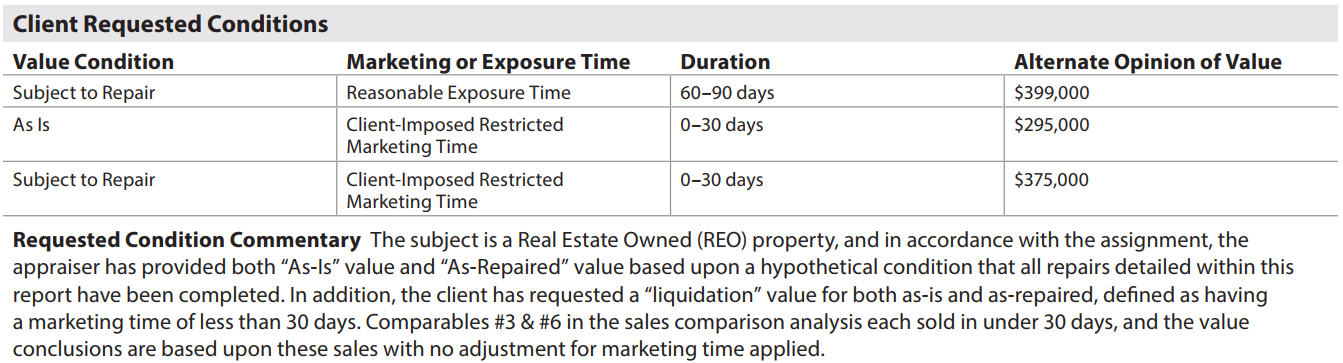
The Client Requested Conditions subsection displays when AdditionalClientRequestedConditionsIndicator (UID: 1300.0019, FID: Not on report) = "true". (Figure 26 - 3)
Reconciliation: Client Requested Conditions
| Report Field ID | Report Label | Unique ID | MISMO Data Point Name | Display Rules |
|---|---|---|---|---|
| 26.014 | Value Condition | 1300.0022 | PropertyValuationConditionalConclusionType | Display when AdditionalClientRequestedConditionsIndicator = "true" |
| 26.015 | Marketing or Exposure Time | 1300.0026 | MarketingOrExposureTimeType | |
| 26.016 | Duration | 1300.0023 | MarketingOrExposureDaysCount | Display when AdditionalClientRequestedConditionsIndicator = "true" The data must be provided in 1 of 2 ways: − a single number followed by "days", (e.g., 45 days) OR − two numbers indicating a range with the low and high numbers separated by "-" and followed by "days" (e.g., 30-60 days). |
| 1300.0024 1300.0025 |
MarketingOrExposureHighRangeDaysCount MarketingOrExposureLowRangeDaysCount |
|||
| 26.017 | Alternate Opinion of Value | 1300.0027 | AdditionalOpinionOfValueAmount | Display when AdditionalClientRequestedConditionsIndicator = "true" |
| 26.018 | Requested Condition Commentary | 1300.0029 | AdditionalClientRequestedConditionsCommentDescription |
Figure 26 - 3
Reconciliation of Market Value#
The Reconciliation of Market Value subsection always displays. Comments are required and must be delivered using ValuationReconciliationSummaryCommentDescription (UID: 1300.0021, FID: 26.019). If multiples, display on a separate row in the table.
Apparent Defects, Damages, Deficiencies#
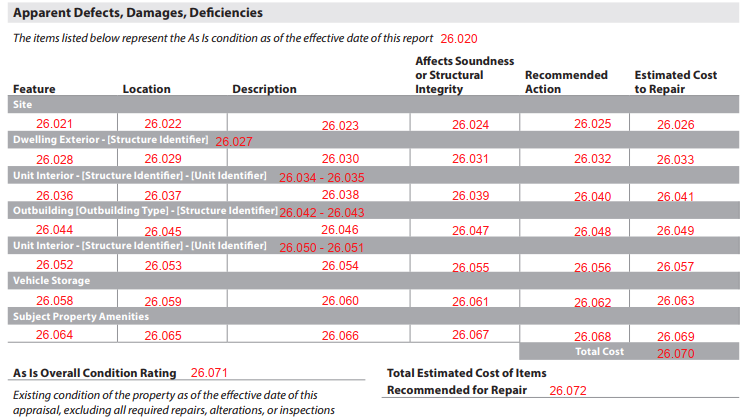
The Apparent Defects, Damages, Deficiencies subsection displays when at least one defect, damage or deficiency is indicated in the report. All defects, damages, and deficiencies for the appraisal are redisplayed in the Reconciliation section, along with cost to repair, if applicable.
Figure 26 - 3
Estimated Cost to Repair#
When CostToRepairType (UID: 3900.0001 FID: Not on report) = "itemized" (Figure 26 - 4)
- Display the column Estimated Cost to Repair and the Total Cost DefectCostToRepairTotalAmount (UID: 3900.0002, FID: 26.070) ▪ Calculated: The sum of all occurrences of DefectItemEstimatedCostToRepairAmount ▪ Right-justify label Total Cost and the amount
When CostToRepairType (UID: 3900.0001 FID: Not on report) = "TotalCost" (Figure 26 - 5)
- Display the label Total Estimated Cost of Items Recommended for Repair and DefectCostToRepairTotalAmount (UID: 3900.0002, FID: 26.072) below the table.
- Do not display the column Estimated Cost to Repair and Total Cost amount.
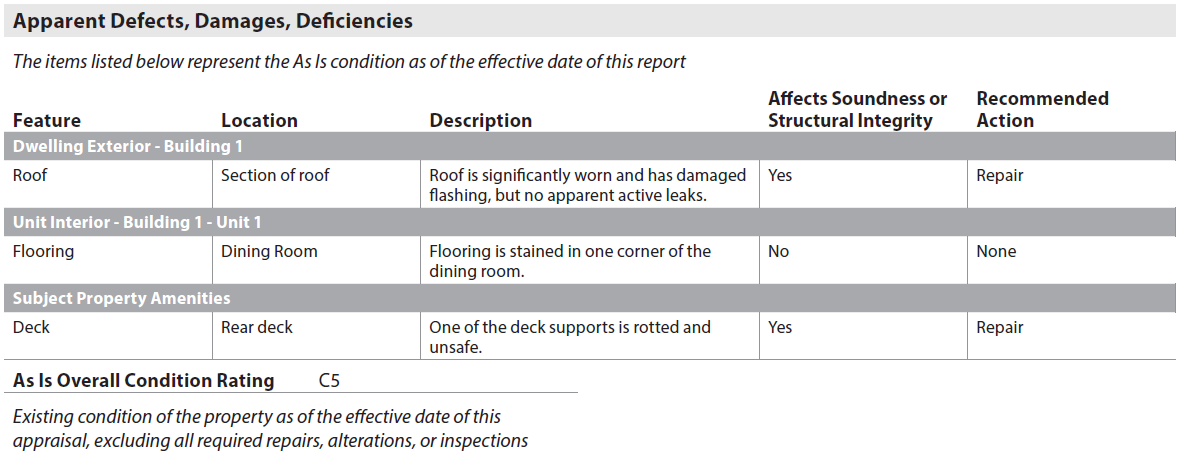
When CostToRepairType (UID: 3900.0001 FID: Not on report) = "None" (Figure 26 - 6)
- Do not display the column Estimated Cost to Repair and Total Cost amount or the label Total Estimated Cost of Items Recommended for Repair.
When one or more of the following indicators are "true":
- SiteDefectsExistIndicator (UID: 1500.0178, FID: 4.099)
- DwellingExteriorDefectsExistIndicator (UID: 3900.0097, FID: 8.055)
- UnitInteriorDefectsExistIndicator (UID: 3900.0107, FID: 10.055)
- OutbuildingDefectsExistIndicator (UID: 0300.0111, FID: 12.019)
- VehicleStorageDefectsExistIndicator (UID: 3200.0021, FID: 13.004)
- SubjectPropertyAmenitiesDefectsExistIndicator (UID: 0200.0053, FID: 14.005)
The Apparent Defects, Damages, Deficiencies table displays and display static text in italics (FID: 26.020), "The items listed below represent the As Is condition as of the effective date of this report" displays above the table.
Reconciliation: Apparent Defects, Damages, Deficiencies Table
| Feature | Location | Description | Affects Soundness or Structural Integrity | Recommended Action | Estimated Cost to Repair |
|---|---|---|---|---|---|
| The details (Feature, Location, Description, Affects Soundness or Structural Integrity, Recommended Action) for Apparent Defects, Damages, Deficiencies in Reconciliation are redisplayed from the related report section. Display sections within the table in the following order (as applicable). - Site - Dwelling Exterior (all defects for each dwelling) - Unit Interior (repeat Unit Interior for each living unit, with defects, in Dwelling) - Outbuilding (all defects for each Outbuilding) - Unit Interior (repeat Unit Interior for each ADU, with defects, in Outbuilding) - Vehicle Storage - Subject Property Amenities Display a separate row for each apparent defect, damage, or deficiency. If the same Feature has multiple, display each on a separate row. |
The Estimated Cost to Repair column displays when CostToRepairType = "Itemized" - An amount must be provided for each item with DefectItemRecommendedActionType = "Repair". - Sum all amounts and display at bottom of the column with label Total Cost - − Do not display column on report if Cost to Repair Method <> "Itemized" |
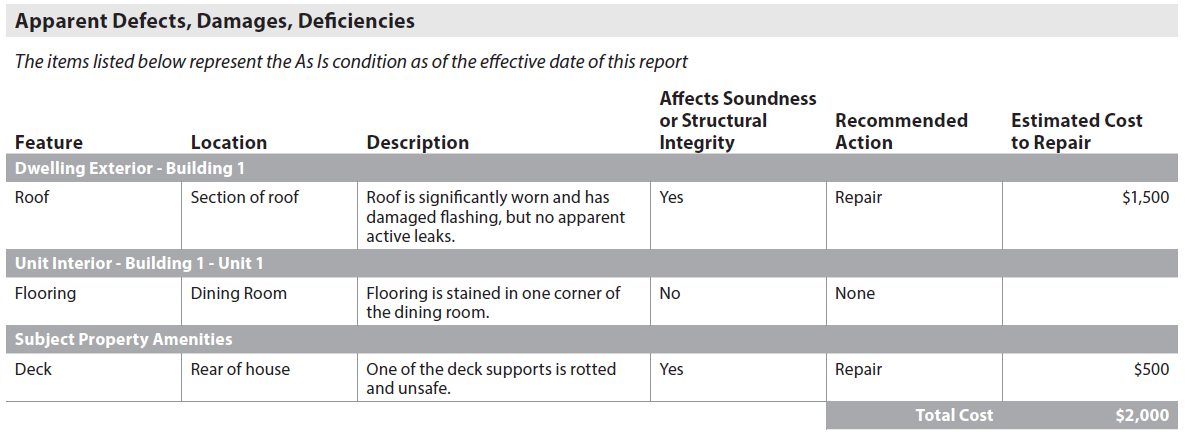
Figure 26 - 5
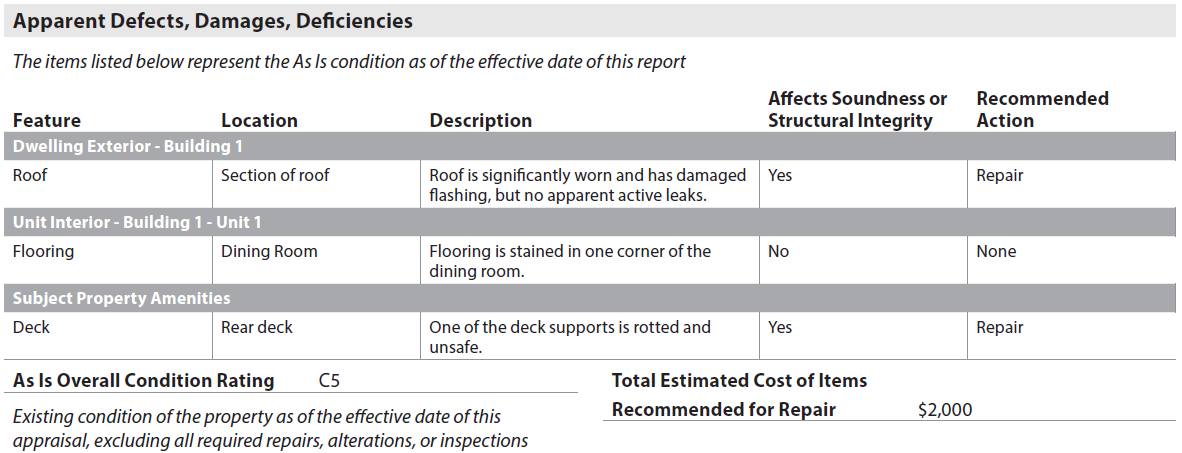
Figure 26 - 6
When all the following indicators are "false", then "None" displays below the subsection header (gray bar), and the Apparent Defects, Damages, Deficiencies table does not display. (Figure 26 - 7):
- SiteDefectsExistIndicator (UID: 1500.0178, FID: 4.099)
- DwellingExteriorDefectsExistIndicator (UID: 3900.0097, FID: 8.055)
- UnitInteriorDefectsExistIndicator (UID: 3900.0107, FID: 10.055)
- OutbuildingDefectsExistIndicator (UID: 0300.0111, FID: 12.019)
- VehicleStorageDefectsExistIndicator (UID: 3200.0021, FID: 13.004)
- SubjectPropertyAmenitiesDefectsExistIndicator (UID: 0200.0053, FID: 14.005)
When "None" displays below the subsection header (gray bar), the Apparent Defects, Damages, Deficiencies table does not display. (Figure 26 - 7)
Figure 26 - 7

As Is Overall Condition Rating#
When NewConstructionIndicator = "false" AND (PropertyValuationConditionalConclusionType = "SubjectToCompletionPerPlans" OR "SubjectToRepair")
- Display As Is Overall Condition Rating - PropertyAsIsConditionRatingCode (UID: 1300.0034, FID: 26.071) and display static text in italics "Existing condition of the property as of the effective date of this appraisal, excluding all required repairs, alterations, or inspections" in italics below label As Is Overall Condition Rating.
Reconciliation Exhibits#
The Reconciliation Exhibits subsection displays only when images are provided. All text must display above the image in bold font.
- Any images provided must be delivered using ImageCategoryType (UID: 1400.0638, FID: 26.035.1) = "ReconciliationExhibit".
- An image caption should be included using ImageCaptionCommentDescription (UID: 1400.0640, FID: 26.035.2).
