Implementation Guide
Key Concepts
Appendix B-1, page 37
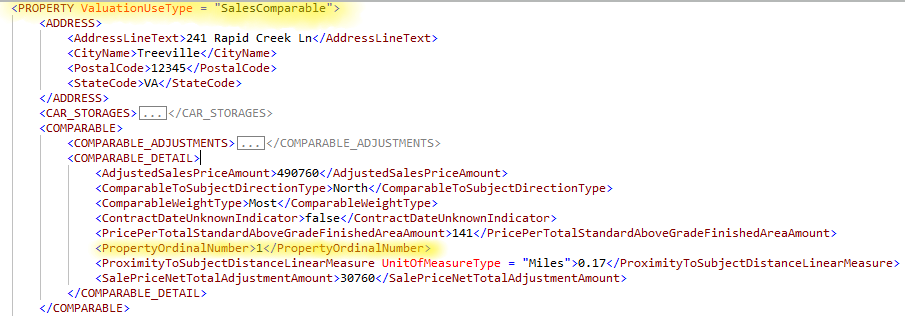
The data associated with the subject property and each comparable property used in the valuation process must be provided in an individual occurrence of the PROPERTY container. ValuationUseType is an attribute defined on the PROPERTY container. This attribute must be populated for each occurrence of the PROPERTY container to indicate whether the referenced property is the subject property or a comparable. The data associated with each comparable property used in the Sales Comparison Approach ("SalesComparable", "PropertyAnalyzedNotUsed"), Cost Approach ("LandComparable"), Income Approach ("GrossRentMultiplierComparable"), and Rental Information ("RentalComparable") must be provided in an individual occurrence of the PROPERTY container with ValuationUseType populated as specified below. Every instance of the PROPERTY container except when ValuationUseType = "SubjectProperty" must have PropertyOrdinalNumber populated in the COMPARABLE_DETAIL container.
Subject Property#
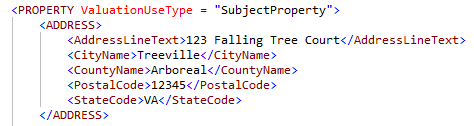
ValuationUseType must be populated as "SubjectProperty" for the instance of the PROPERTY container that captures data about the subject property.
The following example illustrates instance of the PROPERTY container representing the subject property.
Sales Comparable#
The data associated with each comparable property used in the Sales Comparison Approach must be provided in an instance of the PROPERTY container with ValuationUseType populated as "SalesComparable". The following example illustrates an instance of the PROPERTY container representing a Sales Comparable.
Land Comparable#
The data associated with each comparable property used in the Cost Approach must be provided in an instance of the PROPERTY container with ValuationUseType populated as "LandComparable".
Rental Comparable#
The data associated with each comparable property used in the Comparable Rental Analysis must be provided in an instance of the PROPERTY container with ValuationUseType populated as "RentalComparable".
Property Analyzed Not Used#
The ValuationUseType attribute must be populated as "PropertyAnalyzedNotUsed" on an instance of the PROPERTY container that has data about the property that was considered by the appraiser for inclusion in the Sales Comparison Approach, but not used.
Gross Rent Multiplier Comparable#
ValuationUseType must be populated as "GrossRentMultiplierComparable" for each comparable property used to determine the gross rent multiplier for the Income Approach.
The data associated with the subject property and each comparable property used in the valuation process must be provided in an individual occurrence of the PROPERTY container. ValuationUseType attribute must be populated for each occurrence of the PROPERTY container to indicate if the referenced property is the subject property or a comparable. Please refer to the ValuationUseType Attribute section for more details on this attribute.
IMPROVEMENTS/IMPROVEMENT Element in MISMO#
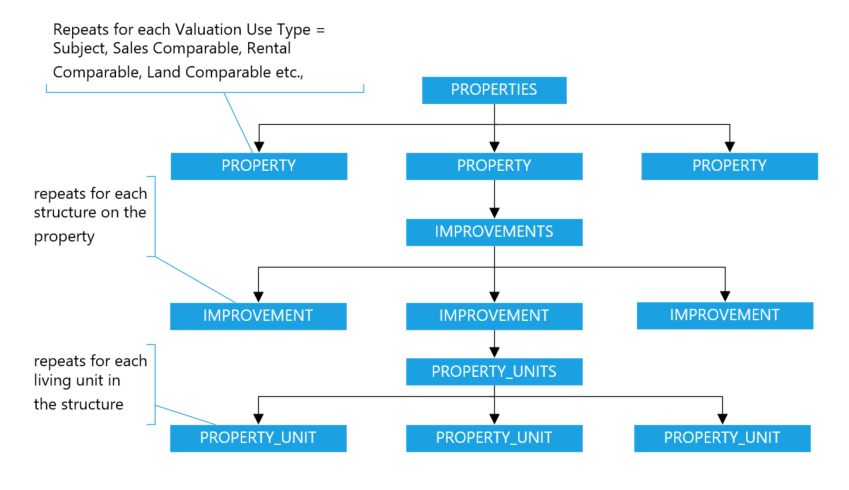
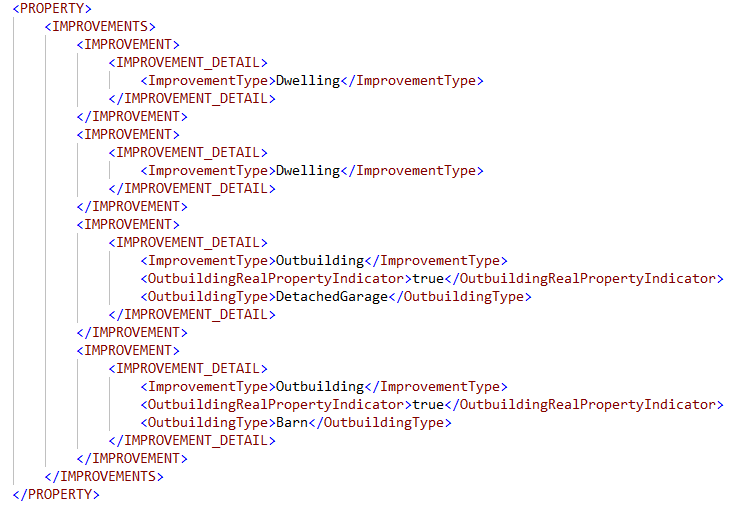
- The data associated with each structure on the property must be provided in an individual occurrence of the IMPROVEMENT container.
- For each instance of the IMPROVEMENT container, IMPROVEMENT/IMPROVEMENT_DETAIL/ImprovementType must be provided to classify the structure on the property as either a dwelling or an outbuilding.
- For each outbuilding on the property, IMPROVEMENT/IMPROVEMENT_DETAIL/OutbuildingType must be provided to identify the type of the outbuilding on the property.
E.g., a 2- to 4-unit property with 2 dwellings and 2 outbuildings must have 4 occurrences of the IMPROVEMENT container, two instances classified as IMPROVEMENT/IMPROVEMENT_DETAIL/ImprovementType = "Dwelling", and the other two classified as IMPROVEMENT/IMPROVEMENT_DETAIL/ImprovementType = "Outbuilding".
PROPERTY_UNITS/PROPERTY_UNIT Element in MISMO
- The data associated with each living unit in a dwelling must be provided in an individual occurrence of the PROPERTY_UNIT container in the same instance of the IMPROVEMENT container that represents this dwelling.
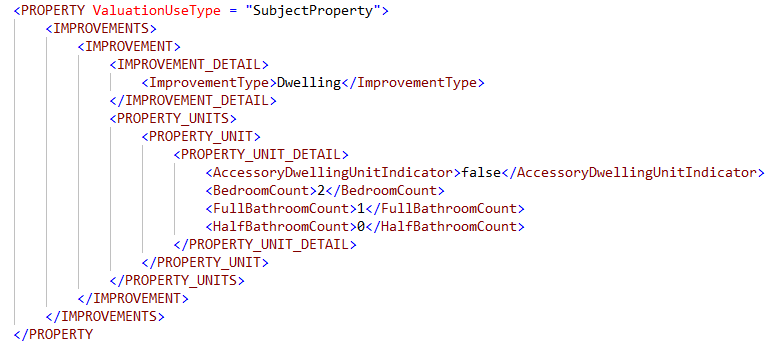
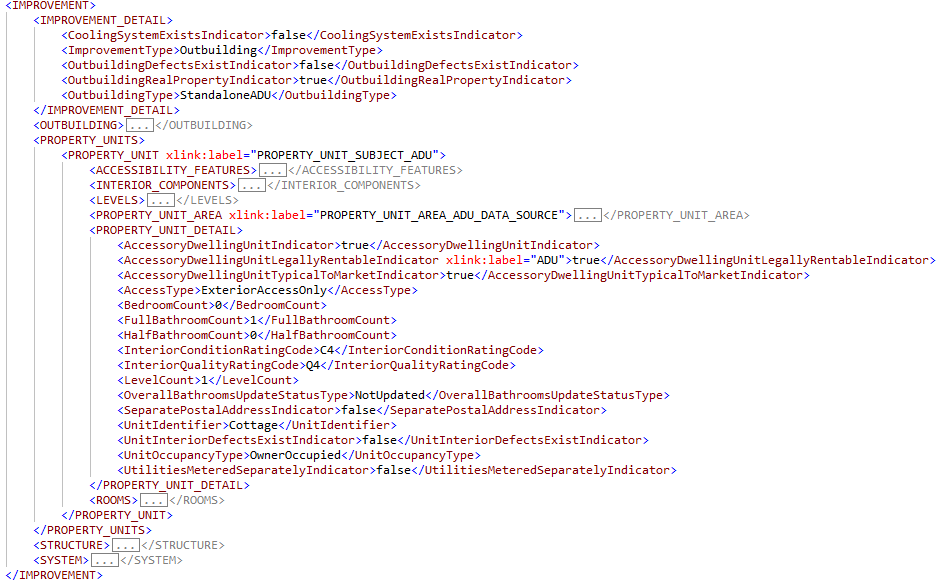
- The data associated with each Accessory Dwelling Unit (ADU) in an outbuilding must be provided in an individual occurrence of the PROPERTY_UNIT container in the same instance of the IMPROVEMENT container that represents this outbuilding.
- When a single-family home has an ADU in the basement, the data associated with this ADU must be provided in a separate occurrence of the PROPERTY_UNIT container in the same instance of the IMPROVEMENT container that represents the dwelling in which the ADU is located. PROPERTY_UNIT/PROPERTY_UNIT_DETAIL/AccessoryDwellingUnitIndicator must be provided as "true" to indicate the unit is an ADU. In such a scenario, details about rest of the dwelling must be provided in another instance of the PROPERTY_UNIT container as shown in the below snippet. In the below XML, the second instance of the PROPERTY_UNIT container represents the ADU and the first instance of the PROPERTY_UNIT represents rest of the dwelling.
- Clients, Lenders, AMCs, and other parties as identified by the appraiser
- Appraiser and Supervisory Appraiser
- Person(s) providing significant real property appraisal assistance
- Entity providing a property data report
The below snippet shows how the IMPROVEMENT and PROPERTY_UNIT containers repeat for a 2- to 4-unit property that has 2 living units in the dwelling and has an ADU in the outbuilding.
The Assignment Information section of the valuation report provides information about people and/or companies ("contacts") that are pertinent to the appraisal, including:
PARTY Element#
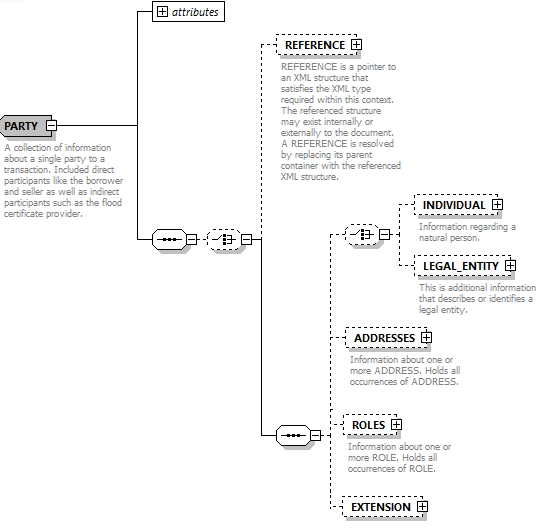
The PARTY container will be leveraged to capture information about various parties associated with the appraisal. Information about each party involved in the appraisal must be provided in a separate instance of a PARTY container. Party information such as the address, contact information, license details, and the role(s) played by the given party must be provided as indicated in the URAR Delivery Specification document.
INDIVIDUAL/LEGAL_ENTITY Element#
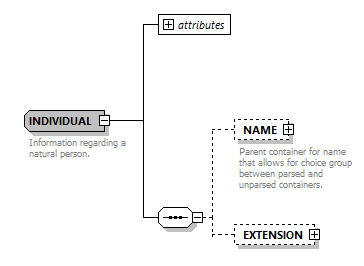
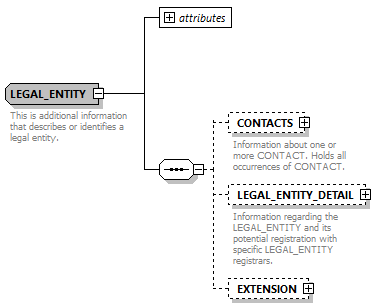
The INDIVIDUAL and LEGAL_ENTITY containers are part of the XML schema choice group in the PARTY container. XML schema choice group contains a list of mutually exclusive elements, i.e., it allows only one of the elements contained in the choice group to be present in an instance of the parent container. As INDIVIDUAL and LEGAL_ENTITY containers are part of the choice group, only one of these containers must be included, but not both, in an instance of the PARTY container. The INDIVIDUAL container must be used when the party being referenced is an individual and the LEGAL_ENTITY container must be used when the party being referenced is a legal entity. Refer to the URAR Delivery Specification document for mapping details.
- If the party being referenced is an individual, the FirstName and LastName of this party must be provided in the INDIVIDUAL container. For example, first name and last name of the appraiser are provided in the INDIVIDUAL/NAME container.
- If the party being referenced is a legal entity, the legal entity name must be provided in the LEGAL_ENTITY container. For example, company name of the lender or AMC are provided in the LEGAL_ENTITY/LEGAL_ENTITY_DETAIL/FullName.
ROLE Element#
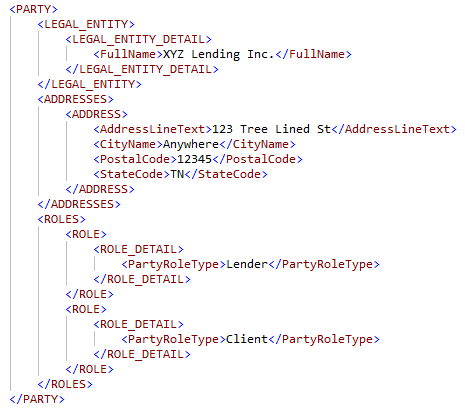
When a PARTY plays multiple roles, e.g., lender is also the client, then both these roles must be identified in the same instance of the PARTY container with multiple occurrences of the ROLE container. The specific role played by the party is captured in ROLE/ROLE_DETAIL/PartyRoleType.
- When lender is also the client, the instance of the PARTY container representing lender must have two instances of the ROLE container. One instance must identify ROLE/ROLE_DETAIL/PartyRoleType as "Lender", another instance must identify ROLE/ROLE_DETAIL/PartyRoleType as "Client". Similarly, when AMC is the Client, or Attorney is the Client, the PARTY container must include two instances of ROLE container. The snippet provided below depicts PARTY container where "Lender" is also the "Client".
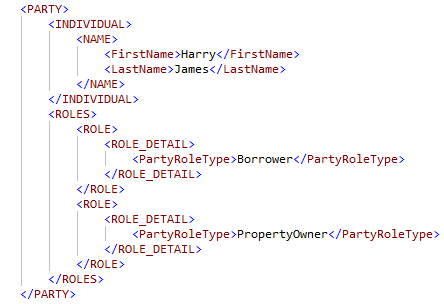
- When the borrower and property owner are the same party, deliver one instance of the PARTY container with two instances of the ROLE container as shown below.
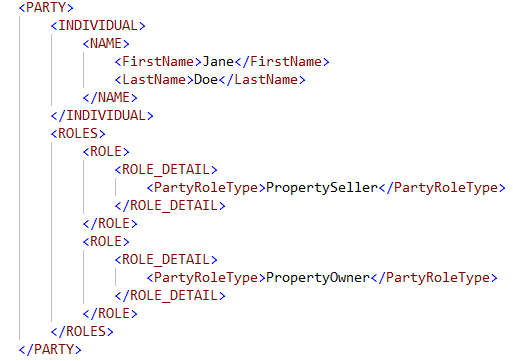
- When the seller and property owner are the same party, deliver one instance of the PARTY container with two instances of the ROLE container as shown below.
ROLE container also has a choice group, and the containers that are part of this choice group are APPRAISER, PROPERTY_DATA_COLLECTOR, and SERVICE_PROVIDER. One of these containers must be included in an instance of the ROLE container. These containers will be leveraged to provide additional data specific to each PartyRoleType as specified below.
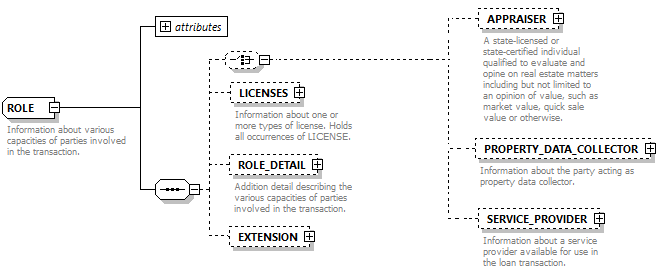
- When PartyRoleType = "Appraiser" or "AppraiserSupervisor", details such as the appraiser company name and designations are provided in the APPRAISER container.
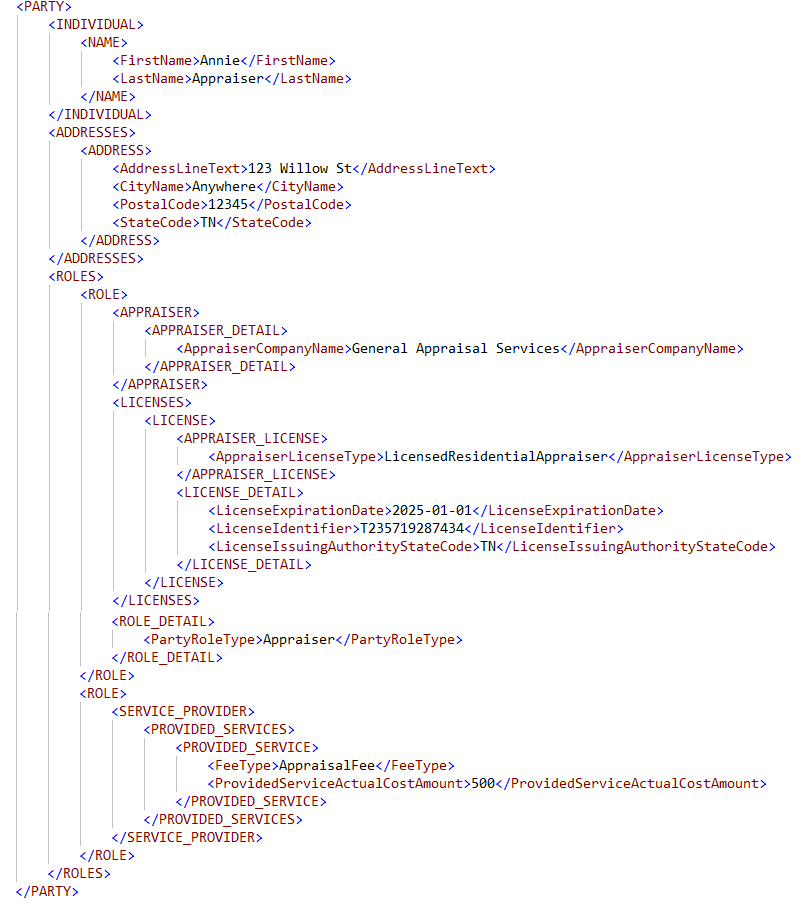
- The appraiser fee when provided must be included in the instance of the PARTY container where PartyRoleType = "Appraiser". In the instance of this PARTY container, two ROLE containers must be included. One of the instances must identify ROLE/ROLE_DETAIL/PartyRoleType = "Appraiser", the other instance of ROLE container must include PROVIDED_SERVICE container with FeeType = "AppraisalFee".
- The snippet below illustrates the use of ROLE/APPRAISER container to identify the appraiser's company name and the use of ROLE/PROVIDED_SERVICE container to provide the appraiser fee.
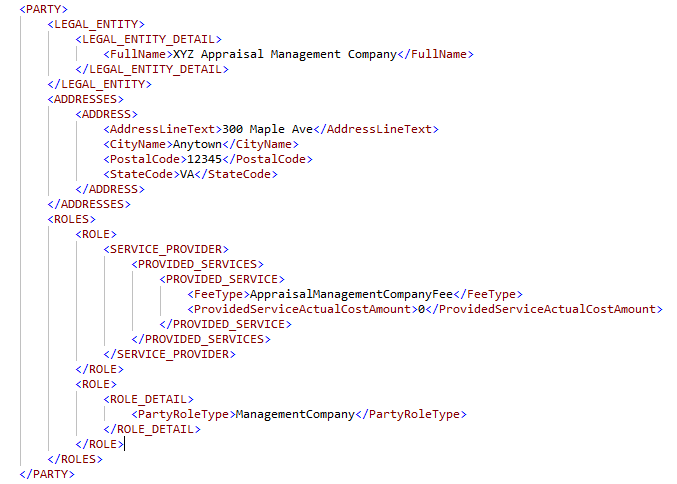
- The AMC fee when provided must be included in the instance of the PARTY container that represents the Appraisal Management Company. In this instance of the PARTY container, two ROLE containers must be included. One instance must identify PartyRoleType = "ManagementCompany", another instance of the ROLE container includes PROVIDED_SERVICE container with FeeType = "AppraisalManagementCompanyFee" as shown below.
- When PartyRoleType = "PropertyDataCollector", additional information about the person acting as the property data collector must be provided in the PROPERTY_DATA_COLLECTOR container as specified in the URAR Delivery Specification document.
In each section of the appraisal report, images are included per the conditionality stated in the URAR Delivery Specifications document. For details on how to package the images associated with a given appraisal in the submission file to UCDP, refer to the Appraisal File Structure section. The images associated with an appraisal must not be embedded in the XML file, only the metadata about these images must be included in the XML file as specified below. Any reference made to an "image" in the following subsections is referring to the following metadata elements of the IMAGE container.
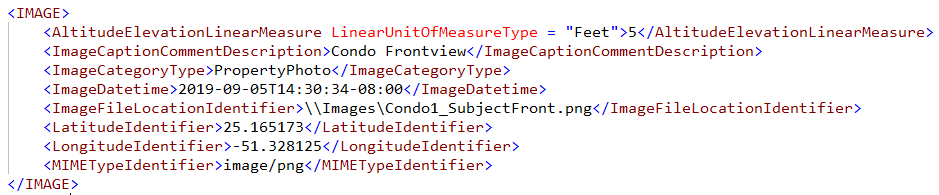
Comparable Property Image Data#
Image data associated with each comparable property (ValuationUseType = "SalesComparable", "RentalComparable", "GrossRentMultiplierComparable") must be included in the instance of the PROPERTY container representing the referenced property. For example, image data associated with sales comparable #1 must be included in the instance of the PROPERTY container with ValuationUseType = "SalesComparable" and PropertyOrdinalNumber = "1".
Subject Property Image Data#
Image data associated with the subject property must be included in the instance of the PROPERTY container with ValuationUseType = "SubjectProperty". Image data associated with subject property is provided in the XML either by containment or ImageCategoryType. When image data is provided by containment, ImageCategoryType is not required as the parent container gives context to the image.
Containment#
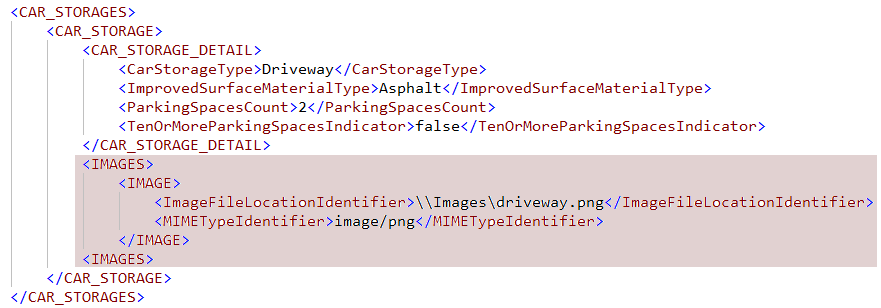
- Image data associated with a given vehicle storage must be included in the IMAGE container located in the instance of the CAR_STORAGE container that represents the referenced vehicle storage. For example, image data associated with a driveway must be provided in the IMAGE container in the instance of the CAR_STORAGE where CarStorageType = "Driveway".
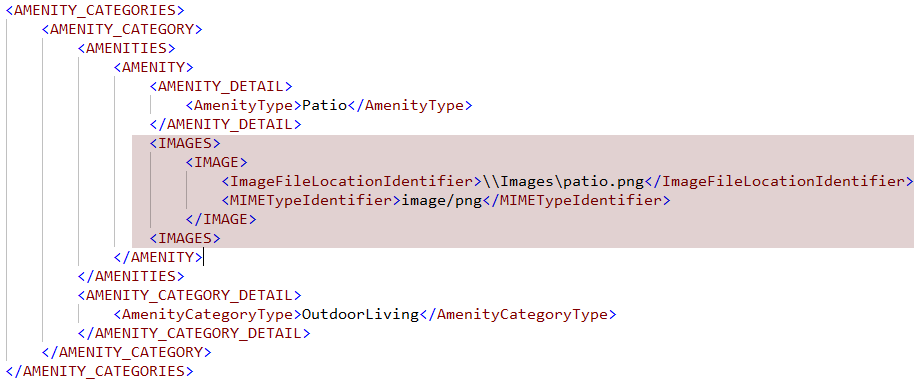
- Image data associated with a given amenity must be included in the IMAGE container located in the instance of the AMENITY container that represents the referenced amenity. For example, image data associated with a patio must be provided in the IMAGE container located in the instance of the AMENITY container where AmenityType = "Patio".
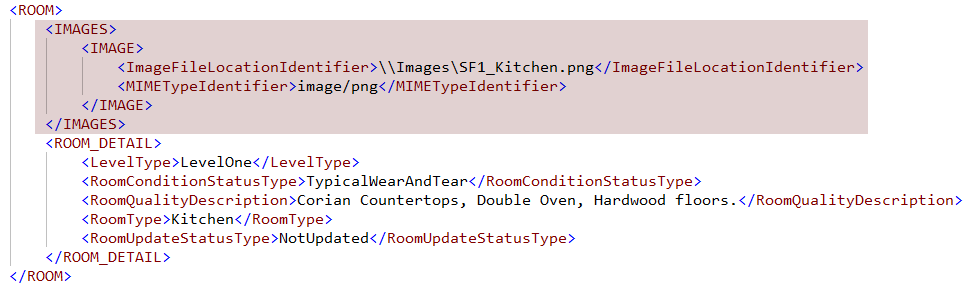
- Image data associated with a room in the living unit must be included in the IMAGE container located in the instance of the ROOM (based on the RoomType) container. For example, image data associated with the kitchen is included in the instance of the ROOM container where RoomType = "Kitchen".
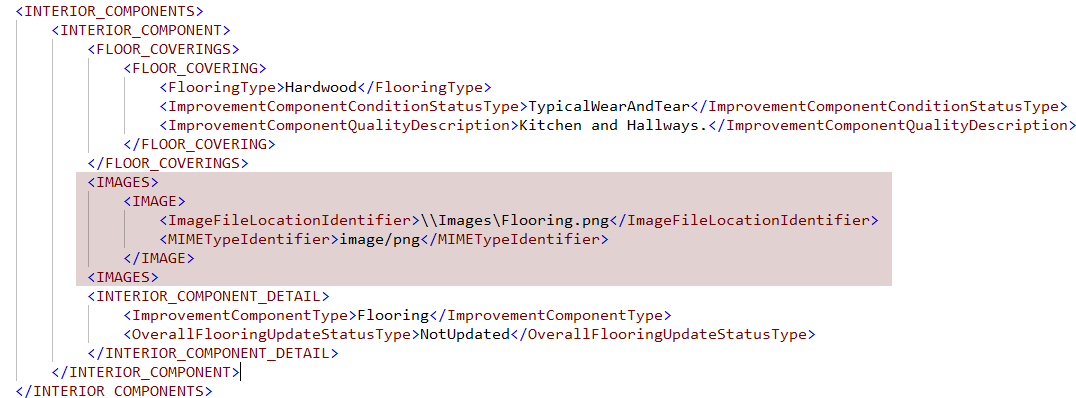
- Image data associated with each interior feature (flooring, walls, and ceiling, etc.) of a living unit must be included in the IMAGE container located in the instance of the INTERIOR_COMPONENT container that represents the referenced interior feature.
- Image data associated with each defect, damage, or deficiency must be included in the IMAGE container located in the instance of the DEFECT container that represents the defect.
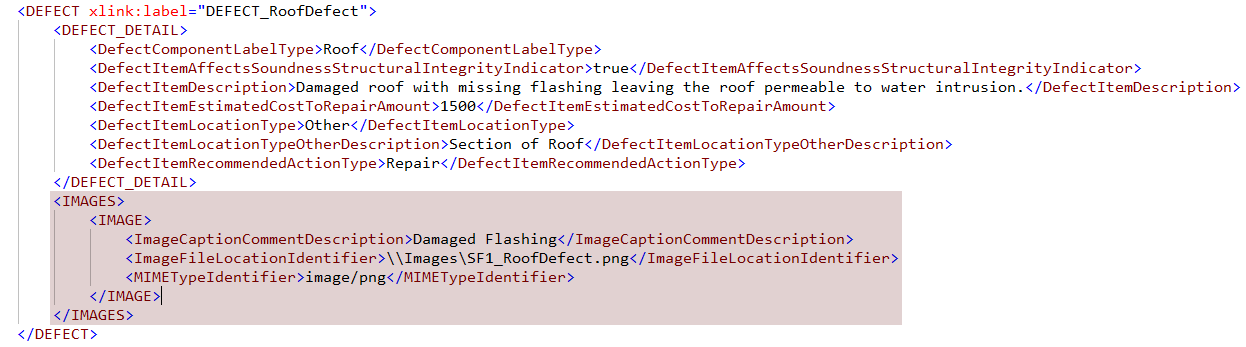
Image Category Type#
When images use ImageCategoryType, the appropriate enumeration must be provided. The valid value either is a descriptor of the image or reference the report subsection as specified in the associated section of this document.
- ImageCategoryType is a descriptor of the image. For example,
- When an image of the legal description is included in the appraisal, ImageCategoryType = "LegalDescription".
- When an image of a site influence is included in the appraisal, ImageCategoryType = "SiteInfluence".
- ImageCategoryType references a report subsection. For example,
- An image provided as an exhibit in the Site section uses ImageCategoryType = "SiteExhibit".
- An image provided as an exhibit in the Dwelling Exterior section uses ImageCategoryType = "DwellingExteriorExhibit".
Additional considerations…
- Each instance of the IMAGE container that is included in the XML file must have ImageFileLocationIdentifier populated with the path to this image in the .zip file. For example,
\Images\SF1_HERSScore.png a. \ denotes the root folder of the zip file. All image paths and the PDF Object URL are relative to the root. - Regardless of how many times an image is displayed on the report, include the image only once in the Images folder of the .zip file. Image location can be 'pointed to' from multiple places in the XML.
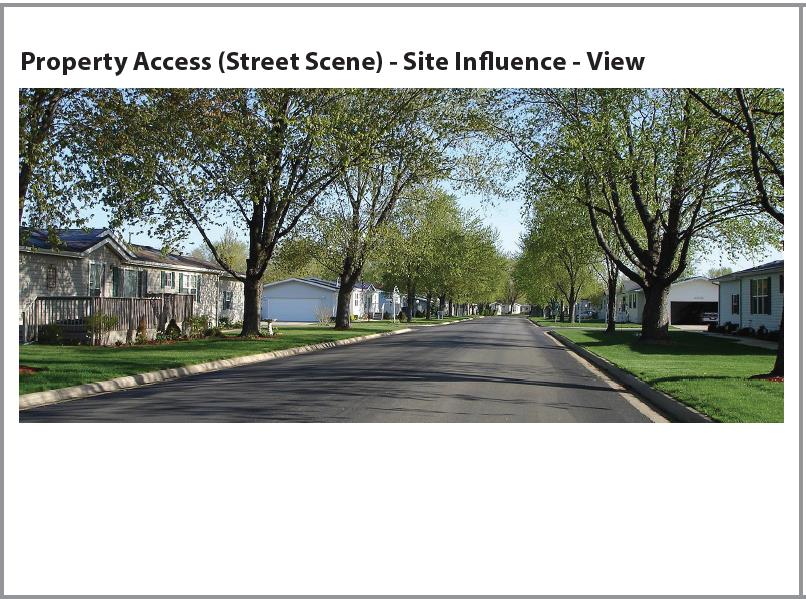
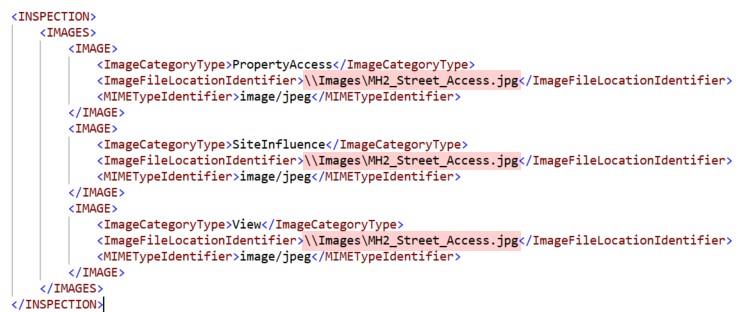
- Scenario 1: The image shown in the following snippet is used to represent property access, it also is used to represent a site influence and a view associated with the subject property. In the XML, three instances of the IMAGE container must be included as shown in the XML snippet with appropriate ImageCategoryType in each instance and ImageFileLocationIdentifier pointing to the same image in all instances. On the report, each ImageCategoryType should display above the image in bold font separated by " - " as shown below.
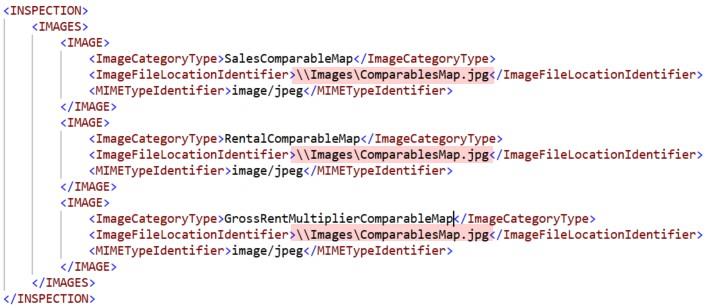
- Scenario 2: When sales comparables, rental comparables, and gross rent multiplier comparables are all captured in the same map, then the map must be included only once in the Images folder of the .zip file. In the XML, three instances of the IMAGE container must be included, each populated with appropriate ImageCategoryType and ImageFileLocationIdentifier pointing to the same image in all instances as shown below.
Scenario 3: When a given image of the subject property is used in the Summary section and as the thumbnail in the Sales Comparison Approach, this image must be included only once in the Images folder of the .zip file. As the ImageCategoryType for this image is "PropertyPhoto" in both these locations and ImageFileLocationIdentifier is also pointing to the same image, only one instance of the IMAGE container must be included in the XML.
Scenario 4: When a given image is used in two different sections, then this image must be displayed in both section's exhibits subsection with appropriate ImageCategoryType. For example, when DetachedGarage.png is used to represent detached garage as an outbuilding and as a vehicle storage, then this image should be displayed in both Outbuilding and Vehicle Storage sections. One copy of this image is included in the Images folder of the .zip file. In the XML file, include two instances of the IMAGE container both pointing to the same image in the ImageFileLocationIdentifier.
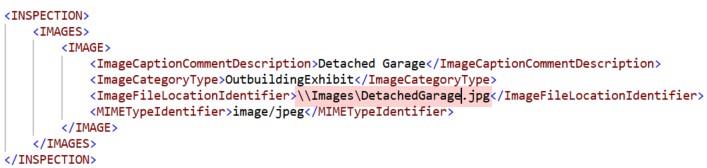
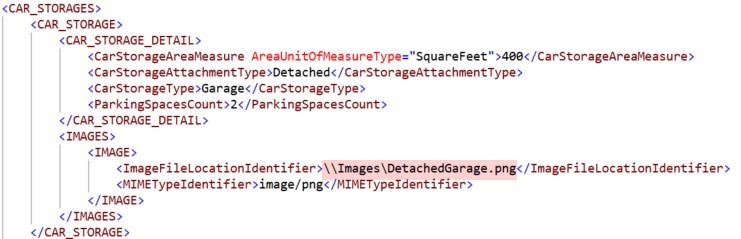
- Descriptive Text for Images - When an image has multiple pieces of information to display on the URAR each piece of data should be separated with a "-". Whether an image is referenced in multiple sections, either through containment or multiple ImageCategoryType(s) each piece of descriptive text displayed in the report should be separated using a "-" hyphen. If
The display order when an image has multiple pieces of descriptive text should be "ImageCategoryType - ImageCaptionCommentDescription - ImageCategoryType - ImageCaptionCommentDescription - ... - ImageCategoryType - ImageCaptionCommentDescription". The ImageCategoryType and the related ImageCaptionCommentDescription should be listed sequentially, followed by the next ImageCategoryType and ImageCaptionCommentDescription.
i.e. "View - Residential - Site Influence - Busy Roadway - Property Access (Street Scene) - West"
Defects, damages, and deficiencies observed on the property will be reported in the following sections. Each defect, damage, or deficiency that has been identified must be captured in an instance of the DEFECT container. The DEFECT container is located under the PROPERTY container. There is no context in the data for the location (building or unit) where the defect is identified. An arcrole must be used to link the DEFECT container to the appropriate instance of the container (location) to provide the context.
- Site
- Dwelling Exterior
- Unit Interior
- Outbuilding
- Vehicle Storage
- Amenities
Additional considerations:
- Each defect is included once in the XML and displays in the section where identified
- Defects may redisplay in the Reconciliation and/or Summary sections
- Image data associated with each defect must be included in the IMAGE container located in the instance of the DEFECT container that is representing the defect. One to many images can be provided for a defect by repeating the IMAGE container in the same instance of the DEFECT container.
Site#
- Each defect associated with the site must use DefectComponentLabelType = "Other" and DefectItemLocationType = "Other".
- Each of these DEFECT containers must be linked with an arcrole to the SITE container.
Dwelling Exterior#
Defects pertaining to the dwelling exterior, mechanical systems, or noncontinuous finished area are linked to the structure where the defect is identified.
A DefectComponentLabelType is used for reporting defects associated with the dwelling. Each of these DEFECT containers must be linked with an arcrole to the instance of the IMPROVEMENT container (ImprovementType = "Dwelling") where the defect is identified.
- Exterior Walls and Trim
- Foundation
- Mechanical System
- Roof
- Windows
- Other (Describe)
DefectComponentLabelType = "Other" and DefectComponentLabelTypeOtherDescription must be used to report defects that are pertaining to other components of the dwelling and these DEFECT containers must also be linked with an arcrole to the appropriate instance of the IMPROVEMENT container.
Unit Interior#
Each defect identified in the living unit (including an ADU) must be linked to the instance of the PROPERTY_UNIT container where the defect is identified. For example,
- Defects associated with the living unit in a dwelling must be linked to the PROPERTY_UNIT container in the instance of the IMPROVEMENT where ImprovementType= "Dwelling".
- Defects associated with an ADU in the outbuilding must be linked to the PROPERTY_UNIT container in the instance of the IMPROVEMENT where ImprovementType= "Outbuilding" and the applicable OutbuildingType.
A DefectComponentLabelType is used for reporting defects associated with the living unit (including an ADU).
- Flooring
- Walls and Ceiling
- Other (Describe)
DefectComponentLabelType = "Other" and DefectComponentLabelTypeOtherDescription are used to report defects that are pertaining to other components/features of the living unit (including an ADU). The DEFECT containers are linked to the appropriate instance of the PROPERTY_UNIT container.
For example, a 2- to 4-unit property has two dwellings with 1 living unit in each building.
- A defect has been identified with "Walls and Ceiling" in the living unit located in Building 1. The DEFECT container that represents this defect with "Walls and Ceiling" must be linked to the instance of the PROPERTY_UNIT in Building 1.
- Another defect has been identified in the Kitchen located in Building 2. The DEFECT container that represents this defect is linked to the instance of the PROPERTY_UNIT in Building 2.
Outbuilding#
A DefectComponentLabelType is used for reporting defects with an outbuilding. Each of these DEFECT containers are linked to the instance of the IMPROVEMENT container (ImprovementType = "Outbuilding" and applicable OutbuildingType) where the defect is identified.
- Exterior Walls and Trim
- Foundation
- Mechanical System
- Roof
- Windows
- Flooring
- Walls and Ceiling
- Other (Describe)
DefectComponentLabelType = "Other" and DefectComponentLabelTypeOtherDescription are used to report defects that are pertaining to other components of the outbuilding. The DEFECT containers are linked to the appropriate instance of the IMPROVEMENT container (ImprovementType = "Outbuilding" and the applicable OutbuildingType).
Vehicle Storage#
- Defects identified with vehicle storage do not require DefectComponentLabelType as the DEFECT container is linked to the specific instance of the CAR_STORAGE container. The CarStorageType provides the context.
- Defects identified with vehicle storage must be linked to the given vehicle storage where the defect is identified. For example, the instance of the DEFECT container that represents defect with a driveway must be linked to the instance of the CAR_STORAGE container with CarStorageType = "Driveway".
- When multiple defects are identified with an instance of vehicle storage, each of these DEFECT containers must be linked to the same instance of the CAR_STORAGE container.
Subject Property Amenities#
- Defects identified with subject property amenities do not require DefectComponentLabelType as the DEFECT container is linked to the specific instance of the AMENITY container. The AmenityType provides the context.
- Defects identified with subject property amenities are linked to the given amenity where the defect is identified. For example, the instance of the DEFECT container that represents defect with a deck must be linked to the instance of the AMENITY container with AmenityType = "Deck".
- When multiple defects are identified with a given amenity, each of these DEFECT containers are linked to the same instance of the AMENITY container.
The DATA_SOURCE containers are leveraged to identify the source of data for an item referenced in the appraisal. As the DATA_SOURCES container is located outside the PROPERTIES container, each instance of the DATA_SOURCE container must be linked to the data point or the container that it is providing the source of the information. When multiple items have the same data source, include only one instance of the DATA_SOURCE container in the XML and link this instance to the multiple items as indicated below.
In the following example, in the Sales Comparison Approach, Assessor Record is indicated as the data source for sales comp 1, 2, and 3. One instance of the DATA_SOURCE container with DataSourceType = "AssessorRecord" is included in the XML and the same DATA_SOURCE container is used in the RELATIONSHIP containers to indicate that it is a data source for sales comp 1, 2, and 3.
DATA_SOURCE container with DataSourceType= "AssessorRecord" has xlink:label as shown below.

This DATA_SOURCE container is referenced in three RELATIONSHIP containers in the xlink:from attribute, which indicates that the same data source is used for sales comp 1, 2 and 3.

IMPROVEMENT_COST_AND_DEPRECIATED_VALUE Element#
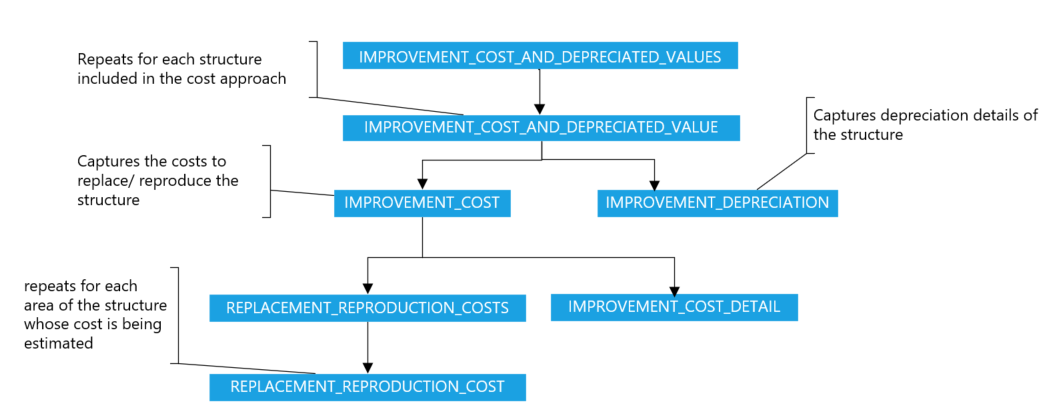
Depreciated Cost of each structure included in the cost approach must be provided in a separate instance of the IMPROVEMENT_COST_AND_DEPRECIATED_VALUE container. For example, when a dwelling and 2 outbuildings are included in the cost approach, three instances of the IMPROVEMENT_COST_AND_DEPRECIATED_VALUE container must be delivered in the XML.
- Each IMPROVEMENT_COST_AND_DEPRECIATED_VALUE container must be linked to the subject instance of the IMPROVEMENT container to which the replacement/reproduction costs apply. For example,
- The instance of the IMPROVEMENT_COST_AND_DEPRECIATED_VALUE container that is capturing Depreciated Cost of the Barn must be linked to the subject instance of the IMPROVEMENT container where ImprovementType = "Outbuilding" and OutbuildingType = "Barn".
- The instance of the IMPROVEMENT_COST_AND_DEPRECIATED_VALUE container that is capturing Depreciated Cost of the dwelling must be linked to the subject instance of the IMPROVEMENT container where ImprovementType = "Dwelling". When there is more than one dwelling, the arcrole must be made to the appropriate instance of the IMPROVEMENT container (based on the ImprovementType = "Dwelling" and StructureIdentifier).
- In each instance of the IMPROVEMENT_COST_AND_DEPRECIATED_VALUE container,
- Information about the costs to replace/reproduce the structure must be delivered in the IMPROVEMENT_COST container.
- Information about depreciation of the structure must be delivered in the IMPROVEMENT_DEPRECIATION container.
IMPROVEMENT_COST Element#
In each instance of the IMPROVEMENT_COST_AND_DEPRECIATED_VALUE container, information about the costs to replace/reproduce the structure must be delivered in the IMPROVEMENT_COST container.
- Within the IMPROVEMENT_COST container, the REPLACEMENT_REPRODUCTION_COST container must repeat for each area of the structure where costs to reproduce/replace are being estimated.
- For example, when replacement/reproduction cost is provided for "Above Grade Finished Area" and "Built-in Garage", two instances of the REPLACEMENT_REPRODUCTION_COST containers must be provided.
IMPROVEMENT_DEPRECIATION Element#
In each instance of the IMPROVEMENT_COST_AND_DEPRECIATED_VALUE container, information about the depreciation related to the structure must be included in the IMPROVEMENT_DEPRECIATION container.
This section describes how to package the UAD XML file, appraisal report, and the associated images. The same requirement applies for Appraisal Update and Completion Report as well.
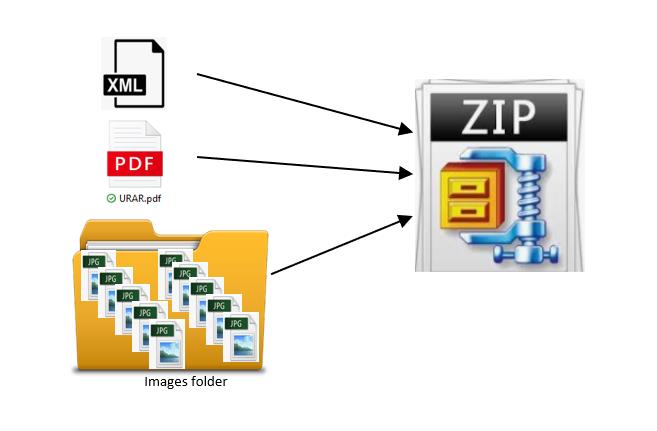
Create one .zip file for each appraisal (not to exceed 60 mb). The .zip file must include:
- One UAD 3.6 XML file
- One Appraisal Report PDF (including the embedded images)
- Images folder includes images associated with this appraisal (e.g., .jpeg, .png)
Creation of .zip File#
- Create a directory for the Report
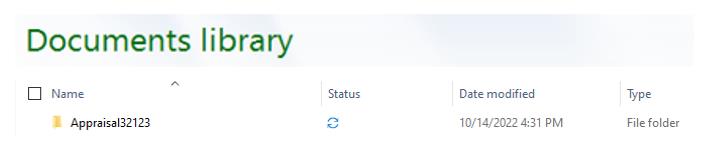
- Place the Appraisal Report and UAD XML file in this directory and create subdirectory (folder) called Images for the images.
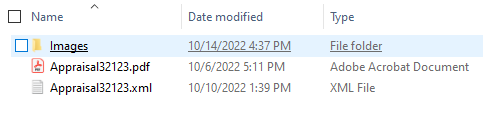
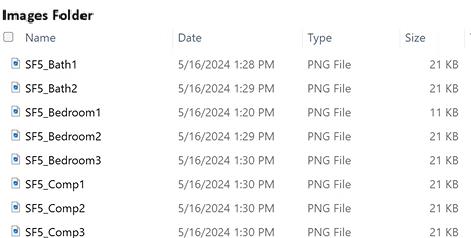
- Place the images in the Images subdirectory
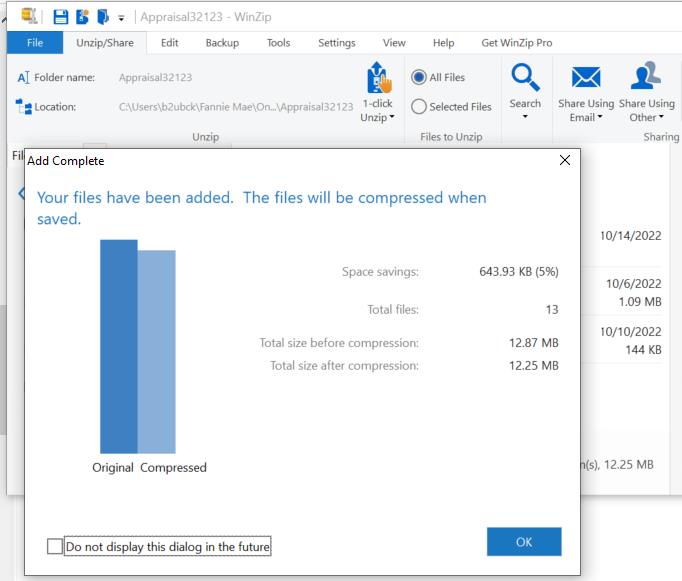
- ZIP the contents of the top-level Appraisal directory (folder)
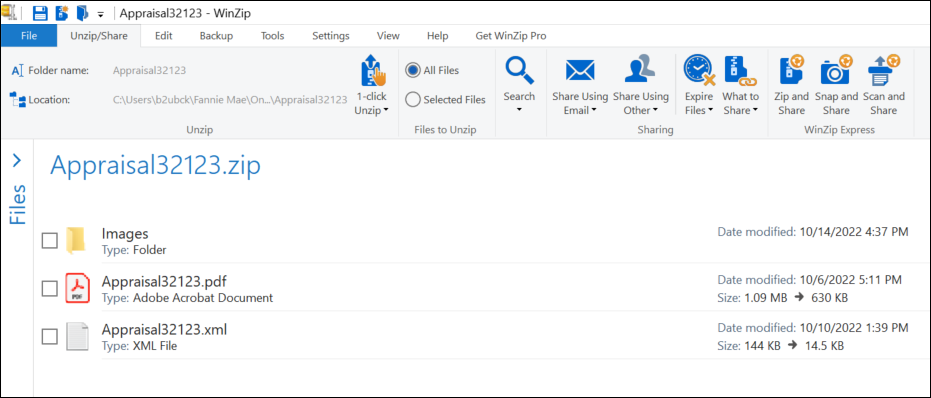
UAD 3.6 XML file#
- A well-formed XML file in accordance with the MISMO v3.6 Reference Model.
- The XML must be formatted using UTF-8 encoding.
- The images associated with an appraisal must not be embedded in the XML. Only the metadata about images must be provided in the XML that includes relative path to these images in the .zip file. The metadata about each image is included in an instance of the IMAGE container in the UAD 3.6 XML file as specified in the Images section.
- The appraisal report (pdf) must not be embedded in the XML. It must be included in the .zip file as specified above.
Appraisal Report - PDF requirements#
- The PDF report included in the .zip file must match the content of the corresponding XML file.
- The appraisal report must be a first-generation/native PDF. For the purposes of the UAD, a first-generation PDF is a PDF file of the appraisal report that is produced and included in the .zip file by the appraiser's software vendor before the appraisal is transmitted by the appraiser.
- The PDF report included in the .zip file must not be password protected for opening/viewing/printing/page extracting.
- The PDF report in the zip file is not encrypted.
- PDF is not restricted from reading (e.g., no Digital Rights Management (DRM) protections).
Images Folder in the .zip File#
- The name of the images folder must be "Images" (case sensitive).
- Each image included in the Images folder of the .zip file must have a unique file name.
- Please refer to the data point "MIMETypeIdentifier" in the URAR Delivery Specification document for the allowable extensions for the images.
- Each image provided in the Images folder must be referenced at least once in the XML file.